
Integrated AI workspace
Move between AI chat, mind maps, whiteboards, and smart documents in a single workspace so research, planning, and writing stay connected.

TinaMind is an AI workspace with mind maps, whiteboards, chat, documents and browser extensions for research, planning and content creation.
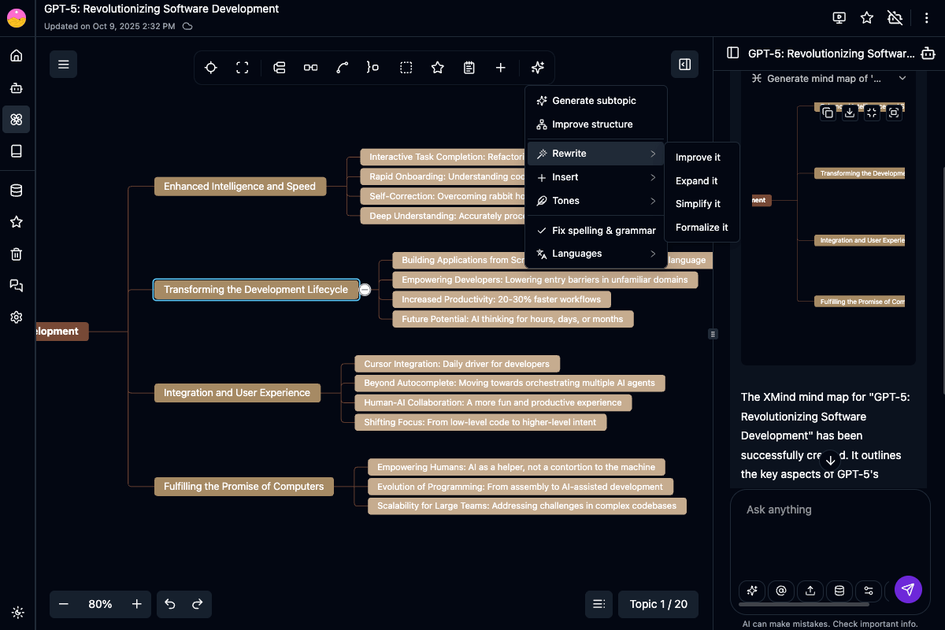
TinaMind is an AI workspace that combines mind mapping, whiteboards, chat, and smart documents in one platform. The site also promotes browser extension tools for webpage analysis, document processing, writing, translation, and YouTube summarization.
The product is aimed at people who want to move from reading and research into planning and writing without switching between separate apps. Its workspace modules and extensions are described as ways to capture knowledge, visualize ideas, and produce output from the same environment.
Move between AI chat, mind maps, whiteboards, and smart documents in a single workspace so research, planning, and writing stay connected.
Turn ideas into XMind-compatible mind maps for brainstorming, planning, and presenting structured thinking.
Use an infinite canvas and real-time collaboration for sketches, diagrams, wireframes, and brainstorming sessions.
Draft, revise, and polish text with AI assistance inside smart documents and the browser extension's writing tools.
Use the browser extension to search the web, summarize pages, process documents, translate text, and answer questions from content.
Generate summaries, extract key points, translate subtitles, and analyze YouTube videos through the TubeLens extension.
Capture research notes, connect them into a knowledge base, and switch between chat and documents while keeping context in one place.
Turn loose ideas into structured mind maps, then move into whiteboards for diagrams, flowcharts, or planning boards.
Draft articles, emails, or reports with AI help, then refine wording inside the document editor or browser writing tools.
Summarize web pages or uploaded documents, answer questions from their contents, and extract key points without manually scanning long text.
Summarize YouTube videos, translate subtitles, and extract key information for learning or content review.
TinaMind is presented as an AI workspace and browser extension assistant. The site shows core modules for chat, documents, whiteboards, and mind maps, plus browser and YouTube extensions.
The pricing page lists Starter, Professional, and Premium plans with annual pricing, and the site also promotes a free start on the homepage. The exact free limits are not clearly stated in the collected text.
The dashboard page says the browser extension supports internet search, chat, document question answering, writing, YouTube summarization, translation, and prompt management. The pricing page also mentions webpage analysis and TubeLens YouTube analysis.
The pricing page says the workspace includes Documents, Whiteboards, Mind Maps, and ChatBot modules. The collected text does not clearly describe separate team administration or collaboration permissions beyond real-time collaboration on some modules.
The site shows support for GPT-5, Claude 5, and Gemini 3.0 on the product pages, with some plan details naming specific model tiers such as GPT5 mini, Gemini 3.1 Flash, and Claude Haiku or Sonnet variants. The exact model access depends on plan and feature area.