
AI Model Swap
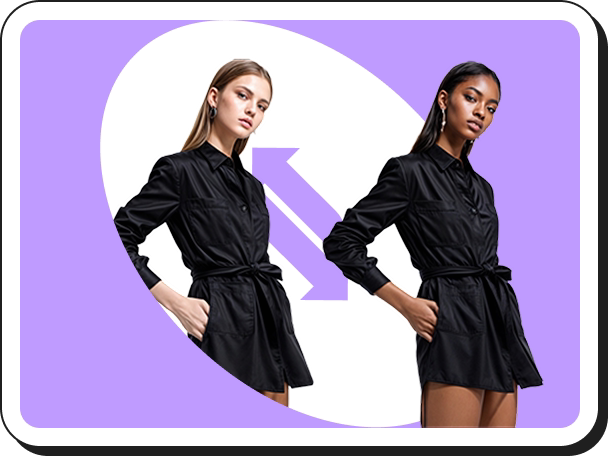
Create studio-style fashion visuals by swapping a mannequin or human model with an AI-generated model while keeping the outfit, pose, lighting, and background intact.

PicCopilot is an AI content platform for e-commerce that turns product photos into model shots, videos, reels, and social posts. It offers a free plan plus paid tiers for sellers who need faster product visuals, templates, and localization tools.
PicCopilot is an AI content platform for e-commerce sellers that turns product photos into marketing assets such as model shots, videos, reels, and social posts. The site positions it as a way to create publish-ready content for storefronts and campaigns without relying on ad spend or traditional design work.
Across the product site, PicCopilot focuses on workflow speed and content variation. Users can upload product images, pick templates or model options, and generate visuals for different channels, markets, and product categories, including fashion, accessories, and general merchandise.
Create studio-style fashion visuals by swapping a mannequin or human model with an AI-generated model while keeping the outfit, pose, lighting, and background intact.
Turn uploaded product photos into higher-click-through marketing images using templates that are described as based on proven, top-performing formats.
Generate virtual try-on images for clothing and accessories such as shoes, bags, jewelry, and eyewear to show products on models without a photoshoot.
Make product and campaign assets for social and marketplace channels, including reels, product pages, banners, and storefront visuals sized for platforms like Instagram, TikTok, Amazon, Shopify, Etsy, and Pinterest.
Adjust images for publishing and localization with tools such as background removal, AI backgrounds, shadows, image translation, style clone, image enhancer, and image upscaler.
Use batch and member-only workflows on paid plans, with the pricing page highlighting faster handling of multiple images and access to newer tools.
A solo seller can turn product photos into platform-ready images and social posts, reducing the time spent on weekly design work while keeping a consistent publishing flow.
A fashion brand can swap models or use virtual try-on to show apparel on different model types and localize visuals for different regions or campaigns.
A marketplace seller can generate high-click-through main images and listing visuals using AI templates without building layouts from scratch.
A team publishing across social and storefront channels can create reels, product pages, and ad-ready assets from the same upload, then export them for platforms such as Instagram, TikTok, Shopify, Amazon, Etsy, and Pinterest.
A cross-border business can translate text inside images and adjust styling elements like backgrounds and shadows to adapt the same creative for different languages and markets.
The Free Plan includes basic AI features such as background removal and image enhancement, plus a limited trial of member-only functions. The Pro Plan adds advanced options like custom uploads, batch processing, a larger library of AI marketing templates, and access to the latest tools.
Yes. First-time Pro Plan subscribers get a 7-day free trial with full access to Pro features. The pricing page also says users can request a refund during the trial through the Subscription Center, subject to the refund policy.
The pricing page lists UnionPay, Visa, Mastercard, American Express, JCB, and Alipay, along with other secure payment methods. Monthly and yearly billing are both supported.
Yes. The pricing page says upgrades between subscription plans are supported immediately. Downgrades are not real-time; the change takes effect after the current subscription period ends.
Yes. For companies and teams with large-scale requirements, PicCopilot says it provides a business API/SDK solution and directs users to its API/SDK page for details.