
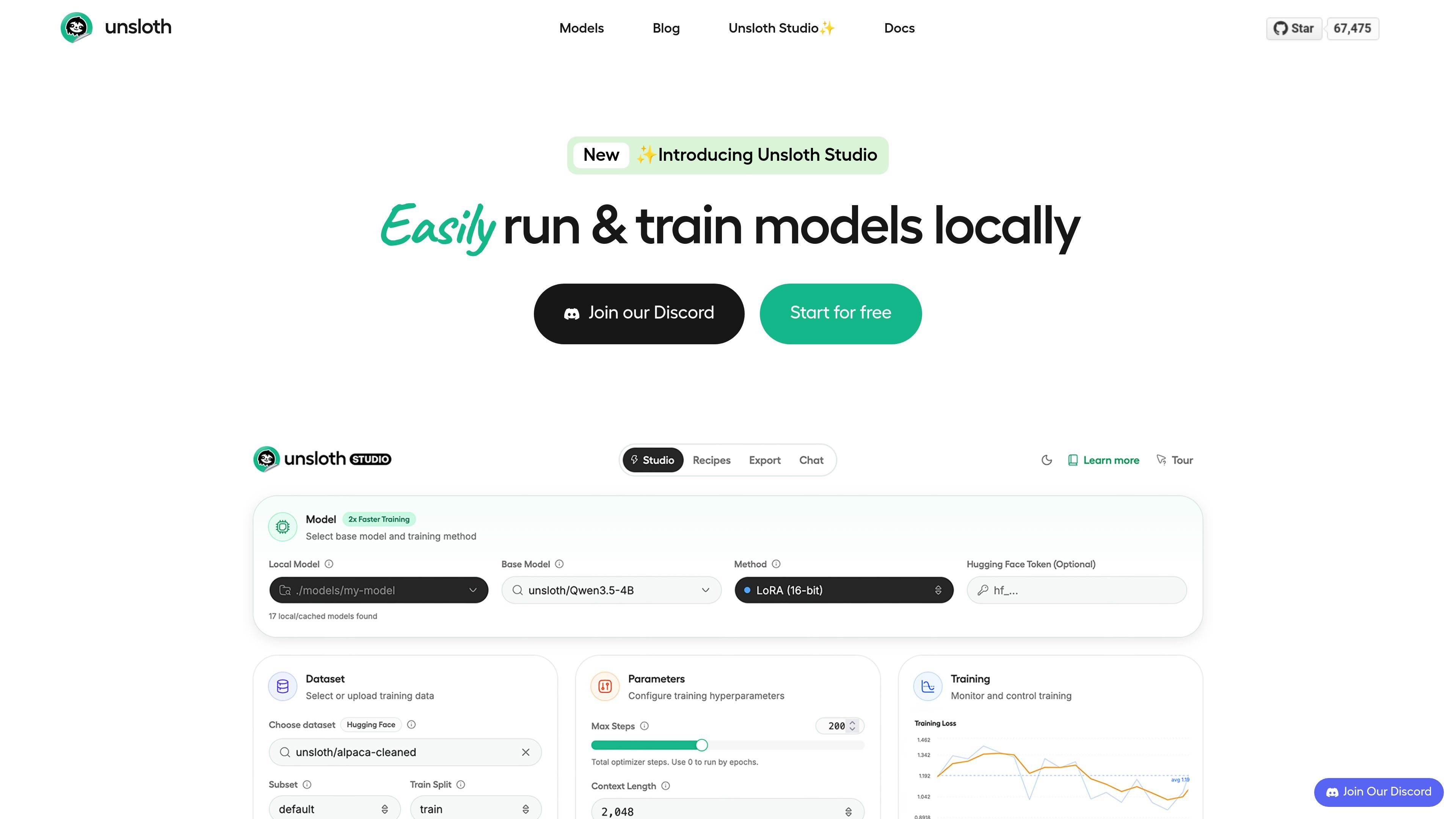
Local model running
Run GGUF and safetensors models locally, compare two models side by side, and use uploaded images, documents, audio, or code files in the workflow.

An open-source local UI and framework for training, running, and exporting open models on your hardware
Unsloth is an open-source framework and local web UI for training, running, and exporting open models from one unified interface. The product is centered on keeping model workflows on your own hardware, with documentation that covers local inference, fine-tuning, data preparation, and export.
The Studio release adds a no-code local workflow for running GGUF and safetensors models, preparing datasets from files such as PDFs and CSVs, and training models with built-in observability. The site positions Unsloth as a way to work with 500+ models across text, vision, audio, and embeddings without leaving a local environment.
Run GGUF and safetensors models locally, compare two models side by side, and use uploaded images, documents, audio, or code files in the workflow.
Auto-create datasets from PDFs, CSVs, JSON, DOCX, TXT, and YAML sources, then clean and refine them in the Data Recipes workflow.
Train and fine-tune 500+ models with LoRA, 4-bit, 16-bit, FP8, and pre-training options, with live observability for loss, gradient norms, and GPU usage.
Use self-healing tool calling, web search, Bash, and Python execution, including sandboxed code runs for testing and verification.
Export models to GGUF or safetensors for use with llama.cpp, vLLM, Ollama, LM Studio, and similar runtimes.
Connect to Unsloth through an API endpoint or use it with external tools such as Claude Code and Codex, as described in the Studio docs.
Prepare a local fine-tuning workflow by importing source files, converting them into datasets, and starting training with presets or custom settings.
Run a model offline on your own machine, compare outputs from two models, and test tool calling or web search in a controlled environment.
Turn unstructured files into training-ready datasets with Data Recipes, then refine the dataset in a visual node workflow before training.
Export a trained or base model to GGUF or safetensors so it can be used in runtimes such as llama.cpp, vLLM, Ollama, or LM Studio.
Use the API endpoint or connect external tools to a local model when you want local inference inside developer workflows.
Unsloth Studio is a local web UI for training, running, and exporting open models. The docs describe it as an open-source, no-code interface that works offline on your own machine.
The docs say Unsloth Studio works on Windows, Linux, WSL, and macOS. It also supports NVIDIA GPUs for training, while CPU-only setups are limited to chat inference and Data Recipes.
Unsloth supports running and training models locally, exporting models to safetensors or GGUF, and using an API endpoint. The docs also mention support for text, vision, audio/TTS, and embedding models.
Yes. The pricing page includes a Free plan, a Pro plan, and an Enterprise plan. The free version is open source, while paid plans add higher-performance and enterprise capabilities.
The Studio docs say Unsloth does not collect usage telemetry. It only collects minimal hardware information needed for compatibility, and Studio runs 100% offline and locally.
Traffic data is for reference only.

ludwig.ai
Open-source declarative deep learning framework for training, fine-tuning, and deploying models from one YAML config.

tensorflow.org
Open-source machine learning platform for building, training, and deploying models across desktop, mobile, web, cloud, and edge.

agents.craft.do
Craft Agents is an open-source desktop app for working with AI agents, models, APIs, MCP servers, local files, and a built-in browser.
phospho.ai
phospho offers open-source robotics tools, hardware kits, PRO subscriptions, and custom solutions for robot control, data collection, and AI model training.
voideditor.com
Open source AI IDE based on VS Code with autocomplete, chat, agents, and local or hosted models.

kilocode.ai
Open source AI coding agent for VS Code, JetBrains, CLI, and cloud workflows, with model routing, BYOK, local models, and KiloClaw.