
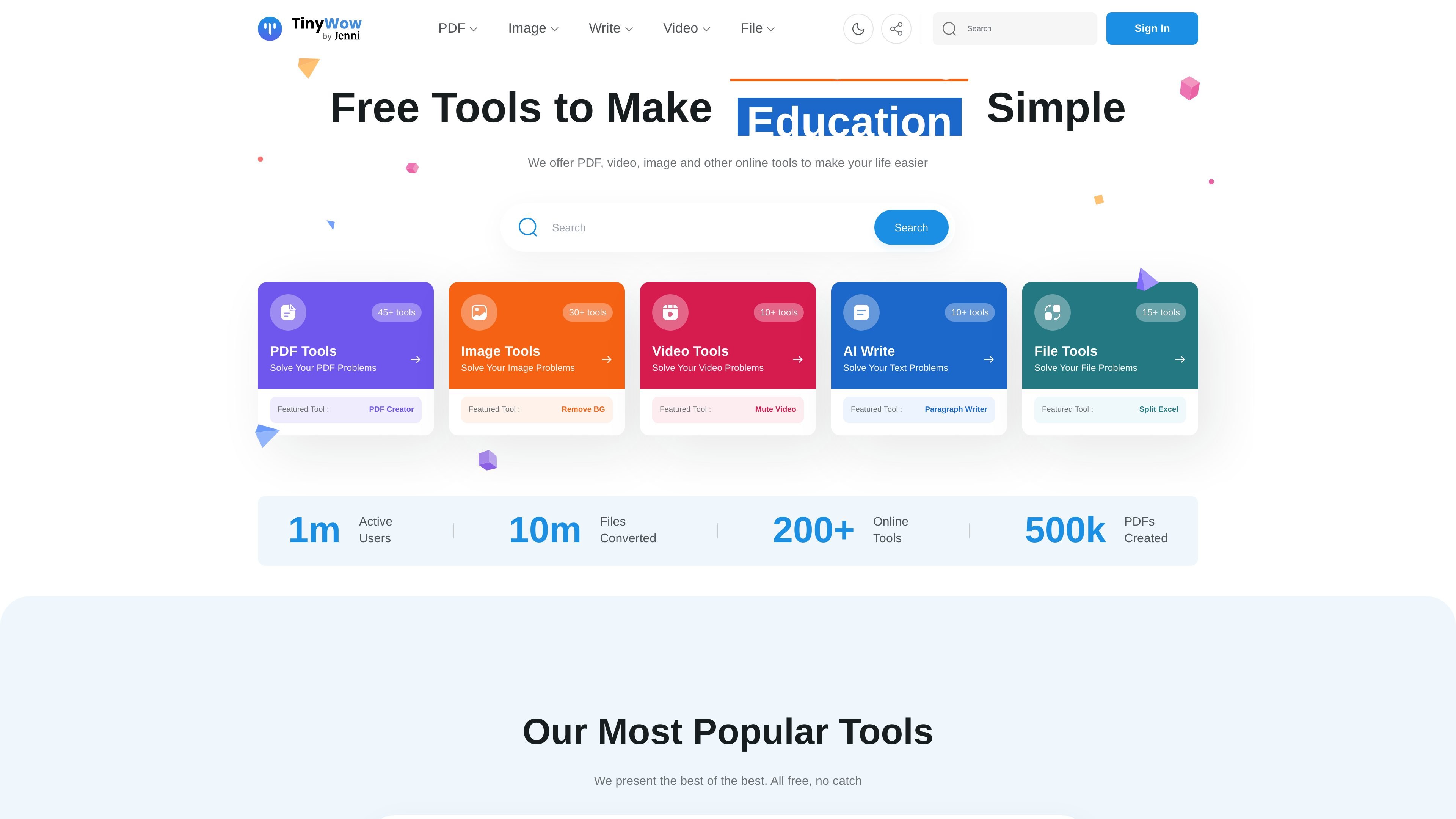
Grouped tool library
TinyWow organizes its tools into PDF, image, video, AI writing, converter, and other utility categories, making it easier to find a specific workflow without searching through unrelated features.

TinyWow offers free browser-based tools for PDFs, images, video, file conversion, and AI writing, helping with common tasks without software.
TinyWow is a browser-based collection of free online tools for working with PDFs, images, video, files, and AI writing tasks. The site is organized around quick, self-serve utilities such as PDF editing, PDF conversion, background removal, transcription, and text generation.
Its core purpose is to let users complete common file and content tasks without installing desktop software. The product pages emphasize simple upload-and-download workflows, no-sign-up access for featured tools, and a premium option for users who want ad-free, unlimited, faster processing.
TinyWow organizes its tools into PDF, image, video, AI writing, converter, and other utility categories, making it easier to find a specific workflow without searching through unrelated features.
The PDF editor supports text changes, highlighting, underlining, strike-through, sticky notes, annotations, shapes, signatures, images, and date or time insertion directly in the browser.
The PDF to Word tool converts a PDF into a Word document and also mentions OCR-based text extraction from PDFs.
The background remover lets users upload an image, remove the background, refine the result with an eraser, choose a new background color or image, and download the processed file.
The homepage lists many additional utilities, including PDF merging, compression, splitting, image upscaling, watermark removal, transcription, and file conversion tools.
The site shows free tool access alongside a premium option that removes ads, allows unlimited usage, and speeds up processing.
Use the PDF editor to fix typos, add comments, place signatures, insert shapes, or fill in forms without switching to desktop software.
Use the conversion tools when you need a PDF turned into a Word document for further editing or text extraction.
Use the background remover when preparing product photos, profile images, or other visuals that need a transparent or replacement background.
Use the homepage’s broader tool set when you need quick one-off tasks such as merging, splitting, compressing, or converting files.
Use the AI writing utilities when you need help drafting, rewriting, summarizing, or generating text from a prompt or source passage.
Yes. The homepage says TinyWow offers free online tools and the PDF editor page says you can edit PDFs in the browser with no software installation required. The PDF-to-Word page also shows a simple upload, process, and download flow.
The source does not show a single unified account requirement for all tools. The homepage emphasizes no sign-up for featured tools, while some pages display a free trial prompt for broader access to premium tools.
The product pages show browser-based workflows for PDF editing, PDF to Word conversion, and image background removal. That suggests it is designed for individual, self-serve tasks rather than team collaboration features.
The source explicitly shows output formats such as Word documents from PDF conversion and downloadable edited PDFs or processed images. It also mentions additional file conversions like PDF to JPG and JPG to PDF on the homepage.
The homepage lists premium access with ad-free use, unlimited usage, and faster processing for $9 a month. However, the pricing page itself was unavailable and returned a page-not-found response, so plan details should be confirmed on-site.
Traffic data is for reference only.
| Apr | 2411576 |
|---|---|
| May | 2426818 |
| Jun | 2074665 |
Traffic analytics are not available yet.
Traffic analytics are not available yet.

hugo.ai
Hugo is an AI-powered support agent that resolves tickets and automates support work 24/7 using your data and connected systems.
usechalked.com
Chalked is a Mac reply assistant that reads the conversation you are in and prepares context-grounded responses for Gmail, LinkedIn, and, on macOS 26, Messages. It uses calendar and working context when relevant, while leaving review, editing, and sending to you.
keysake.ai
Keysake is a Mac input method for Chinese speakers learning English. It shows relevant English expressions alongside Chinese text as you type and lets you save language from your own messages and notes for later review.

aichat1234.com
迅捷AI写作 is an online AI writing tool for papers, novels, office work, and content creation, with templates, online documents, and multi-format export.

getconch.ai
Browser-based writing and study assistant for academic work

vetta-x.com
Vetta X is an AI growth workspace for X that drafts replies and posts in your voice, tracks creators, and enables one-tap publishing after your approval—so you can stay active without spending all day in the app.