
Side-panel tab management
Use the browser side panel to manage tabs in a persistent workspace instead of switching to a separate tab or window.

Side Copilot Chrome extension for AI chat, tab management, and browser automation in the side panel. Research, organize, and work without leaving your flow.
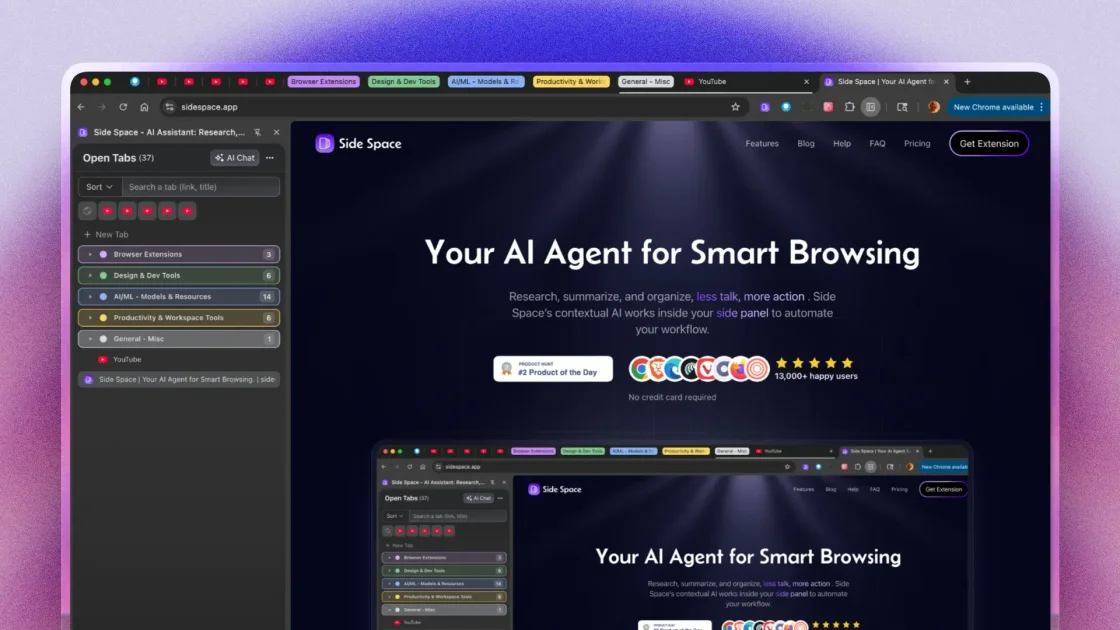
Side Copilot is a Chrome browser extension that turns the browser’s side panel into a workspace for tab management, AI chat, and browser automation. It is positioned for people who want to research, organize, and act on web content without moving out of their browsing flow.
The product’s pricing and use-case pages show a split between a free tier for basic tab organization and current-page chat, and paid tiers that unlock more spaces, Agent Mode, cross-page automation, multi-tab chat, and additional content tools such as mind maps and media or document chat.
Use the browser side panel to manage tabs in a persistent workspace instead of switching to a separate tab or window.
Organize browsing sessions into spaces with cloud sync, with the free plan allowing up to 5 spaces and paid plans allowing unlimited spaces.
Chat with the current page or current tab to ask questions and get context-aware help while browsing.
Use Agent Mode for browser automation tasks such as tab, group, window, history, session, and bookmark actions, with cross-page automation in Pro+.
Apply customized shortcut templates and use authenticated tools for history, session, and bookmark workflows.
Access specialized tools in higher tiers, including multiple-tab chat, mind map generation, Reddit post search, YouTube transcript chat, and document/image file chat.
Keep related research in organized spaces, chat with the current page, and use the side panel to stay focused while comparing sources or collecting notes.
Group tabs, restore accidentally closed sessions, and use browser tools to manage tabs, windows, history, sessions, and bookmarks from natural-language prompts.
Turn long YouTube videos, articles, PDFs, and other files into shorter summaries or structured notes for study and review.
Convert prompts, URLs, and long text into a zoomable mind map for visual planning or idea organization.
Use the agent to automate repetitive browser tasks and apply customized shortcut templates for repeated workflows.
Side Copilot is a Chrome browser extension that uses the side panel for tab management, AI chat, and browser automation. Its FAQ explains that it fills the unused side panel area to keep browsing tasks accessible without switching away from the current page.
The source shows a free plan and paid plans. Free includes up to 5 spaces, cloud sync for those spaces, chat with the current tab, and basic support. Paid plans add more spaces and automation features.
The pricing page says each new purchase is granted a 100% money-back guarantee within 7 days of the purchase date.
The pricing page lists BYOK, which stands for Bring Your Own Key, as a way to access AI models from providers.
The source identifies Side Copilot as a Chrome browser extension and does not provide confirmed support for other browsers or mobile apps in the captured pages.