
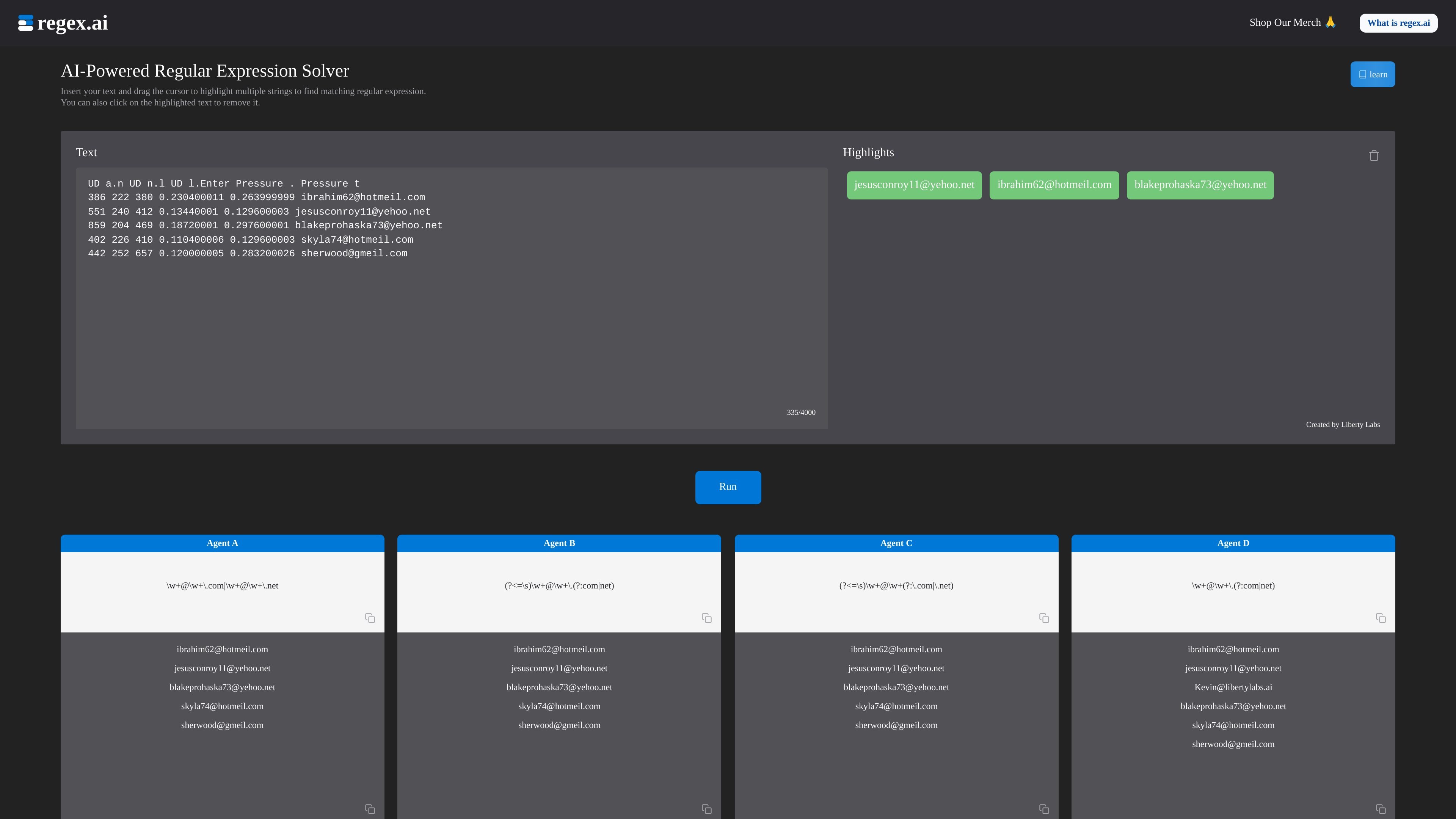
Highlight-based regex generation
Paste a text sample, highlight strings that should match, and let the tool infer a pattern from those selections.

Browser-based AI regex generator and solver from text samples
Regex.ai is a browser-based AI regular expression solver that turns highlighted text selections into regex patterns. The homepage shows a workflow where you paste a block of text, select matching strings, and let the tool generate candidate expressions from those highlights.
The site positions the product as a way to simplify regex creation and make data extraction faster to set up. Its documentation also includes a basic introduction to regular expression syntax, which suggests the product is aimed at users who need both pattern generation and a reference for understanding the results.
Paste a text sample, highlight strings that should match, and let the tool infer a pattern from those selections.
Remove unwanted highlights before running the solver so the pattern is guided by the exact matches you want.
View multiple candidate agents with different pattern strategies, such as broad matching, adjacent-character matching, and character-count focused matching.
See examples of matched text alongside the generated regex, which makes it easier to compare how each pattern behaves on the sample input.
Read introductory documentation on metacharacters and special sequences, including anchors, quantifiers, character classes, and shorthand escapes.
Use the tool in a browser without any setup shown in the source pages.
Useful when you have a sample of text and want the tool to infer a regex from the exact strings that should match, rather than constructing the pattern manually.
Helpful for cleaning up a candidate match set by removing highlights that should not be included in the final expression.
Suited to users who want to compare multiple generated patterns and choose the one that best matches their data shape.
Helpful for learning or reviewing regex syntax because the site pairs generated output with documentation on metacharacters and special sequences.
Relevant for quick data-extraction tasks where a browser tool can help identify a pattern for emails or similar structured text in a pasted sample.
Regex.ai is a web-based tool that generates regular expressions from highlighted text selections. The homepage shows an interactive workflow where you paste text, highlight matching strings, and refine the highlights to produce regex output.
The source describes a simple four-step workflow: remove the placeholder text, enter your own text, drag to highlight the data you want to find, and click unwanted highlights to remove them before running the text strings.
The source does not describe account setup, supported languages, or export options. It does show the generated patterns and matching examples in the interface, but not broader integration or delivery features.
The documented examples focus on regular expression basics such as metacharacters, special sequences, and pattern building. That suggests the tool is intended for users who want help creating regex patterns from text rather than a full text-processing platform.
The pricing page at /pricing returns an error page, so the site does not currently expose pricing details in the collected source material.
Traffic data is for reference only.

aws.amazon.com
Amazon Q Developer is an AI-powered coding assistant for software developers. It provides code suggestions, chat, testing, security scanning, refactoring, and agentic help across supported IDEs, the command line, AWS tools, and selected collaboration workflows.

www.modelarch.io
modelARch is an AI-assisted domain modeling and application generation platform for teams that need to turn business rules, roles, and workflows into an inspectable full-stack product. It generates Python/FastAPI and React/TypeScript code from the same explicit model.

vulk.dev
VULK is a multimodal AI app builder for generating full-stack web apps, 3D/WebGL experiences, mobile projects, stores, images, and video from prompts and other inputs. It is designed for creators and developers who want editable source code, backend services, previews, and deployment targets in one workflow.

camelai.com
AI software engineer for building, deploying, and running apps

cognition.ai
Cognition builds autonomous software engineering agents led by Devin for planning, coding, testing, and shipping in cloud and IDE workflows.

solarch.dev
Backend architecture tool for designing, validating, and generating code from node-edge graphs.