
AI image generation
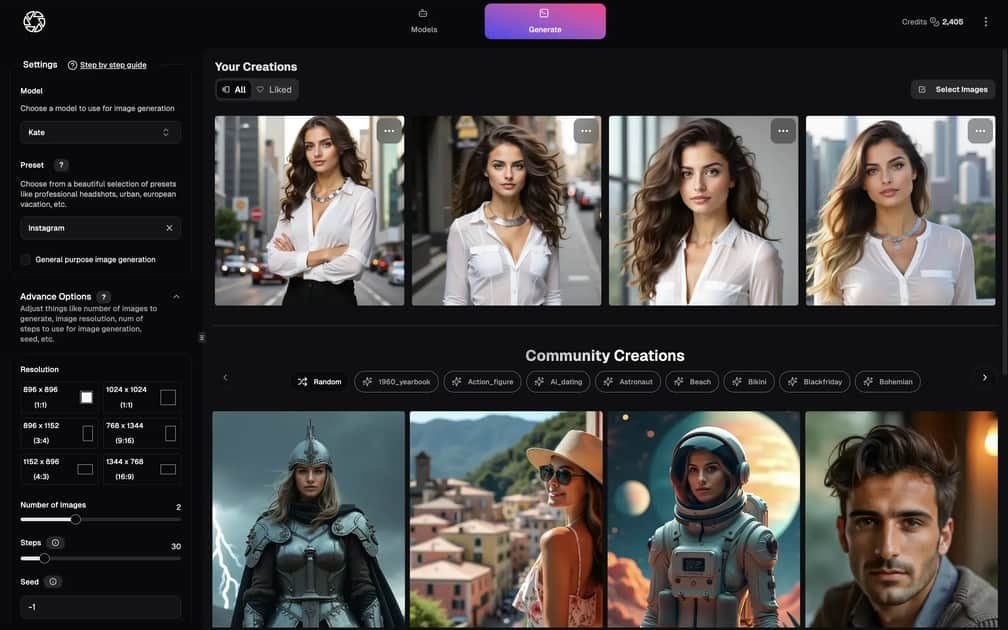
Generate personalized AI photos, headshots, product visuals, and social content from prompts, selfies, presets, and reference images.

Web-based AI suite for creating, editing, and animating images and videos
PhotoGPT is an AI creative suite for generating, editing, upscaling, and animating visuals in one workspace. The product combines AI image generation, AI video generation, AI photo editing, image upscaling, and a Flow-based storyboard for connected workflows.
The site positions the product around personalized photos, professional headshots, product visuals, social content, and brand assets. It also supports personal model training, reference-guided creation, and image editing features such as background changes, retouching, and lighting adjustments.
Generate personalized AI photos, headshots, product visuals, and social content from prompts, selfies, presets, and reference images.
Turn prompts and visual ideas into cinematic AI videos, with examples for story scenes, anime-style videos, character animation, and storyboard workflows.
Edit uploaded photos or generated images by removing objects, replacing backgrounds, retouching portraits, improving lighting, and creating product photo upgrades.
Upscale images to recover detail, sharpen edges, and prepare visuals for web, social, print, ecommerce, or brand use.
Plan connected visual workflows in a single storyboard that links prompts, reference inputs, image generation, editing, and video output.
Train personal AI models from uploaded images to support repeatable portraits and character-based workflows.
Create headshots, LinkedIn profile images, and resume photos with a studio-style look using prompts, selfies, or trained personal models.
Produce ecommerce imagery, virtual try-on visuals, and branded product scenes while preserving the product identity in the final result.
Build short-form scenes, character motion, and storyboarded AI clips for social posts, ads, or concept videos.
Edit existing photos to remove objects, swap backgrounds, retouch portraits, or improve lighting without leaving the same workspace.
Plan multi-step creative work with a connected storyboard when an image needs to lead into an edit or video output.
PhotoGPT appears to generate personalized images from prompts, reference images, and selfie-trained models. The source also shows an AI image and video workspace, plus separate model-training and editing areas.
Yes. The site presents AI video generation alongside image generation, photo editing, upscaling, and Flow workflows. The pricing page lists video models including Veo 3.1, Seedance 2.0, Kling 3.0, and Kling 3.0 4K.
The site describes AI image generation as creating new visuals from prompts, selfies, presets, and reference images, while AI photo editing is for modifying existing photos. Editing examples include object removal, background changes, retouching, lighting changes, and product photo upgrades.
The product is positioned for professional headshots and LinkedIn photos, so it supports that use case. The source does not specify team-management features or collaboration limits.
Yes. The home and use-cases pages explicitly mention product visuals, product photography, virtual try-on, branded content, and campaign assets.
Traffic data is for reference only.

upsampler.com
Upsampler is an online AI platform for generating, editing, and upscaling images and videos in one workspace. Pay per credit, with full API access and a commercial use license on every plan.

deeparteffects.com
Deep Art AI offers web, desktop, and mobile tools to generate, transform, and enhance images with AI, plus local desktop apps and API/SDK integration.

abrush.ai
ABrush is an AI image generation plugin for Adobe Photoshop that lets artists generate, edit, and upscale images without leaving their creative workspace. It combines multiple AI models with Photoshop-based control for iterative image work.

lupaupscaler.com
Lupa Ai is an AI creative platform for generating, editing, enhancing, and upscaling images and video, with shared workspaces and asset organization for collaborative visual production.

letz.ai
LetzAI combines image and video generation, editing, upscaling, and community features in one web app for creative professionals.

remaker.ai
Remaker AI is an image editing and generation platform for creating, enhancing, and recreating visuals with prompts and preset effects, plus background removal, upscaling, object removal, and AI video tools.