Nim Video icon

Nim Video

Nim Video is a web-based AI video and image creation platform for turning prompts, images, and source footage into editable visuals. It offers a free tier and paid subscriptions with added credits, higher output options, and commercial-use features.

Nim Video

Overview

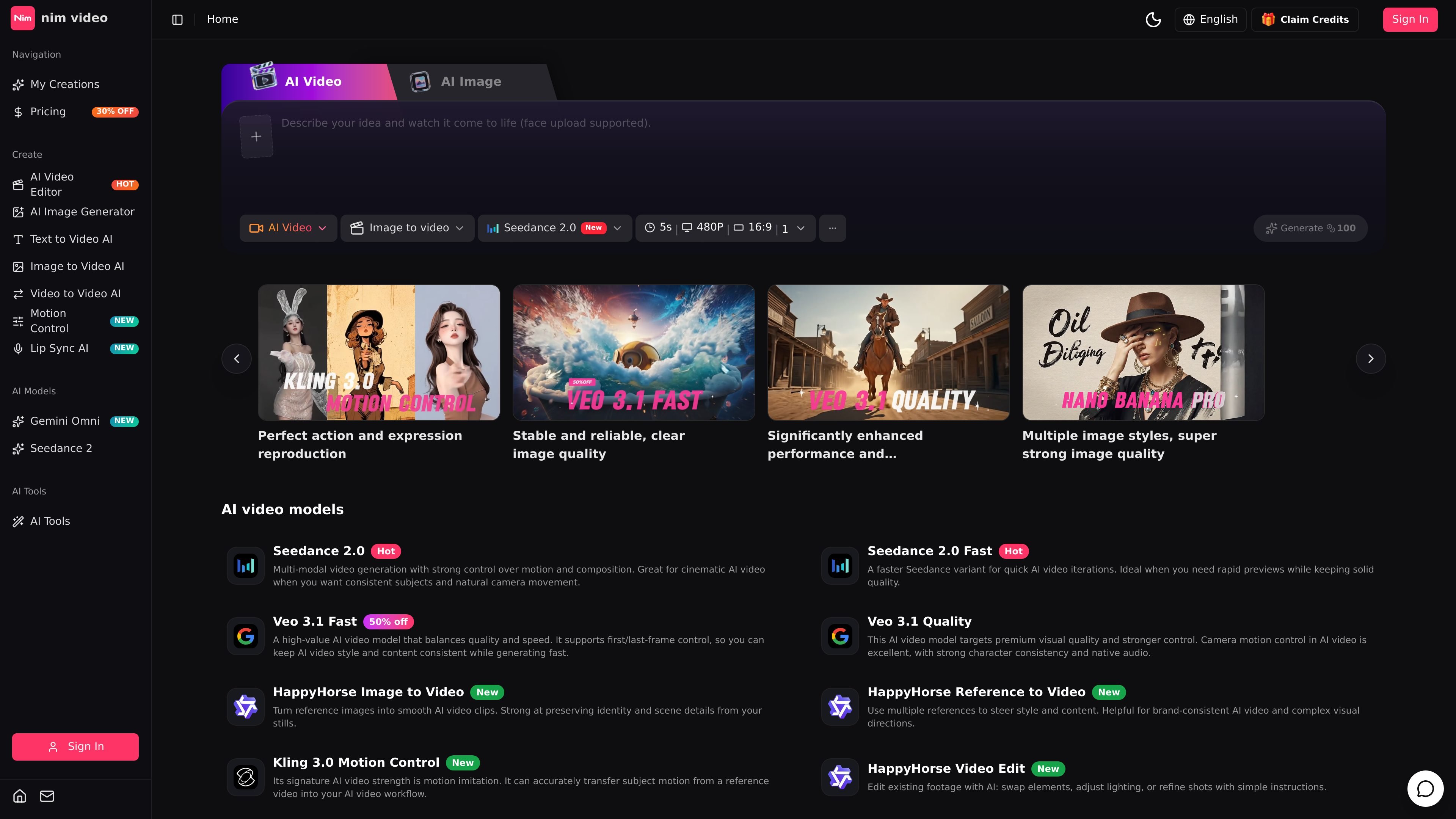
Nim Video is an AI video and image creation platform that combines prompt-based generation, reference-driven workflows, and prompt editing in one studio workspace. The site presents it as a place to move from idea to output across text-to-video, image-to-video, video editing, and image generation without switching products.

Its video side includes multiple model options and workflows such as text-to-video, image-to-video, video-to-video, reference-to-video, video extend, motion control, and lip sync on supported plans. The image side includes text-to-image and image-to-image generation with models such as GPT Image 2, Nano Banana, Nano Banana Pro, and FLUX. Pricing is subscription-based, with a free tier for trying the product and paid plans that add more credits, higher output tiers, and commercial options.

Core capabilities

Multiple video generation workflows

Generate AI videos from text prompts, still images, reference images, or existing video footage. The site highlights several video models and workflows, including text-to-video, image-to-video, video-to-video, reference-to-video, and video editing.

Prompt-based video editing

Edit uploaded clips with prompt instructions instead of rebuilding the scene manually. The video editor page shows options to change the environment, replace people, change age or weather, remove distractions, and adjust the look of footage.

AI image generation and editing

Create still images from text prompts or reference images using AI image models such as GPT Image 2, Nano Banana, Nano Banana Pro, and FLUX. The image generator page also supports image-to-image workflows and output prompts for different compositions and aspect ratios.

Output and control options

Use models and controls that vary by workflow, including aspect ratio, duration, resolution, audio generation, and quality mode on supported plans. The pricing page also shows motion control and lip sync features at different tiers.

Unified studio workspace

Work from a single dark studio-style workspace that brings video and image creation together. The home page emphasizes moving from prompt to reference, generation, editing, and reuse without leaving the product.

Plan-based output limits

Save and download outputs, with higher plans adding private generation, no-watermark video downloads, and higher-resolution upgrades. The pricing page separates these capabilities by plan rather than making them universally available.

Common use cases

  • Text-to-video creation

    Turn prompts into short AI video clips when you need a fast starting point for concept tests, social posts, or visual experiments.

  • Image-to-video workflows

    Upload a still image or reference set and generate motion while trying to preserve the original subject, style, or scene details.

  • Prompt-based video revisions

    Edit an existing clip with instructions such as changing the environment, swapping people, adjusting appearance, or removing objects.

  • AI image production

    Create campaign visuals, social graphics, posters, or product images from text prompts or source images using the image generator.

  • Production-oriented output preparation

    Move from draft assets to exportable outputs with plan-based controls like higher resolutions, no-watermark downloads, and private generation.

Pros and Cons

Pros

  • Combines AI video and AI image creation in one workspace.
  • Supports several distinct workflows, including text-to-video, image-to-video, video editing, and image generation.
  • Offers prompt-based editing for existing footage, which is useful when users already have source video.
  • Includes a free tier and paid subscriptions, making it possible to test the product before upgrading.
  • Higher plans add practical production controls such as no-watermark downloads, private generation, priority queues, and commercial use rights.

Cons

  • Several capabilities are gated by plan, including higher-resolution output, private generation, lip sync, and commercial rights.
  • The source pages do not provide a single, complete integration list or ecosystem overview.
  • Some workflows and model options are presented across multiple pages, so users may need to compare pages to understand which features are included on each plan.

FAQ

What is Nim Video?

Nim Video is a browser-based AI video and image creation workspace. The site presents it as a studio for generating videos and images from prompts, reference media, and editing instructions.

What can I do with Nim Video?

The site shows text-to-video, image-to-video, video-to-video, video extend, AI image generation, and prompt-based video editing workflows. It also highlights motion control, lip sync, and reference-driven generation on higher plans.

Is Nim Video free or paid?

The pricing page includes a free plan with one-time credits, plus Basic, Pro, and Business subscription plans. Paid plans add more credits, faster queues, higher-resolution output options, private generation, and commercial rights on the Business plan.

Can I use my own images or videos as input?

Nim Video can be used in the same workspace for AI video and AI image tasks, and the home page frames it as a single studio for moving from prompt to reference, generation, editing, and reuse. The site also supports uploading reference images or source video for certain workflows.

Is Nim Video suitable for team or commercial use?

The source pages show support for team-oriented and commercial workflows on higher tiers, including priority queues, dedicated support, and commercial rights. The pages do not spell out collaboration features such as shared workspaces or multi-seat management.

Quick Facts

Category
AI video and image creation platform
Platform
Web-based
Primary workflows
Text-to-video, image-to-video, video editing, image generation
Pricing shape
Free tier plus paid subscription plans
Source domain
nimvideo.com
Notable controls
Motion control, lip sync, aspect ratio, duration, resolution
Nim Video - AI Tool, Features, Use Cases & Alternatives | Findings24