
Public workflow discovery and reuse
Browse public workflows, fork them, and run them as a starting point instead of building from scratch. The site also says workflows can be saved and revisited in history.

Low-code AI orchestration for multilingual workflows across web and messaging
Gooey.AI is a low-code AI orchestration platform for building, deploying, and measuring AI workflows. It is positioned for teams that want to combine frontier and open-source models with prompts, documents, functions, and external systems without starting from a blank engineering stack.
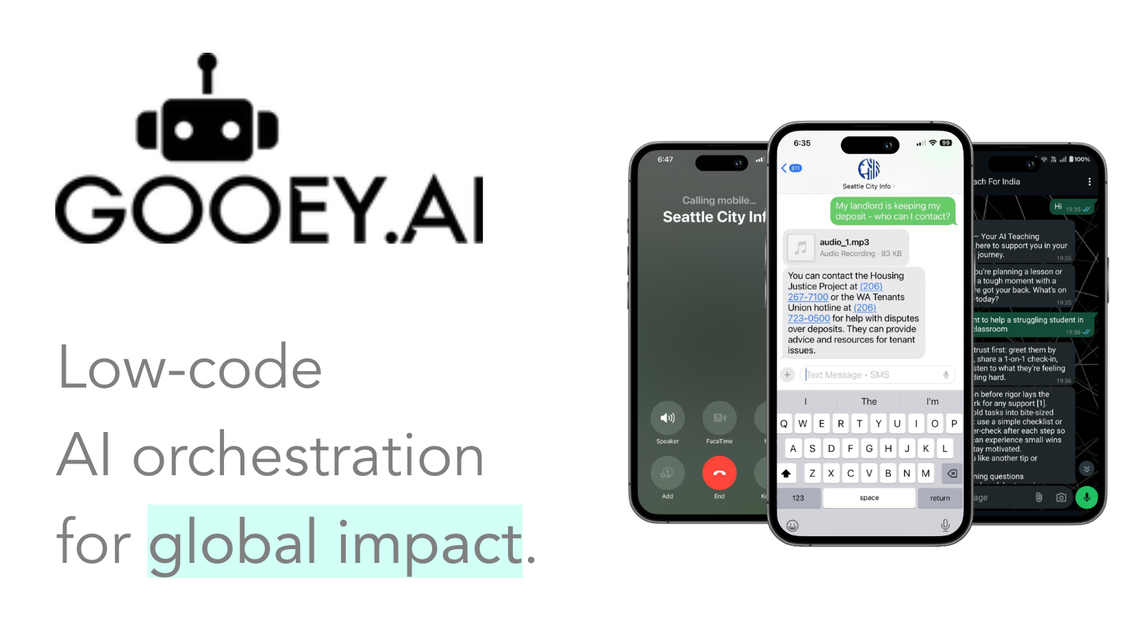
The product can be used to create text, image, audio, video, and agent-style outputs, then deploy them to web and messaging channels such as WhatsApp, SMS/voice, Slack, and Facebook. The site emphasizes collaboration, multilingual delivery, and measurable workflows for sectors such as agriculture, health, education, culture, and public services.
Browse public workflows, fork them, and run them as a starting point instead of building from scratch. The site also says workflows can be saved and revisited in history.
Build human-readable workflows from prompts, team documents, agentic functions, and connected systems. The platform positions these workflows as low-code and transparent rather than hidden behind a single prompt box.
Deploy AI assistants to channels where users already work, including the web, WhatsApp, SMS/voice, Slack, and Facebook. The home page presents this as a core delivery option for frontline and public-facing use cases.
Work with a broad model mix from major providers such as Google, OpenAI, Meta, DeepSeek, and Mistral under one billing account. The pricing page also references base and premium model access across plans.
Support multilingual workflows, including speech recognition and translation in 1000+ languages, text-to-speech, and lip-sync output. The site also highlights multilingual agents for advisory and support use cases.
Use workflows for testing and measurement, including analytics, evaluation, workflow history, and impact or usage dashboards on higher-tier plans. The product is positioned around measurable outcomes rather than one-off generations.
Design multilingual advisory assistants for agriculture, health, education, or public service teams that need to reach people in their own language and context. The site highlights deployments that work through WhatsApp, IVR, and mobile tools.
Build and test low-code workflows for internal teams that need to prototype AI outputs quickly. Users can tweak settings, save runs, revisit history, and iterate without rebuilding the whole workflow.
Create custom AI tools for apps or services by calling workflows through the API. The FAQ says workflows can be integrated into another app, which fits citizen developers and product teams that need embedded AI.
Run workflow experiments that compare models, prompt changes, or input variations, then review analytics and evaluation data. The pricing page frames the platform around measurable outcomes and workflow evaluation.
Deploy assistants for teams that need voice, speech, or multilingual interaction, including translation and text-to-speech. This fits organizations serving users who prefer audio channels or non-English communication.
Gooey.AI is a low-code AI orchestration platform for building and running AI workflows. The FAQ describes it as a place to explore generative AI tools, create text, image, audio, or video outputs, and stitch custom API pipelines into other products without code.
The FAQ says workflows start from the Explore page. Users select a workflow, add the required inputs such as text, image, audio, or video, then submit the run and save or download the output. Many workflows also expose a Settings section for tuning variables before submission.
Yes. The FAQ says every workflow can be called as an API in your own app. It instructs users to open the workflow, log in, and use the Run as API and Create Key flow to get started.
The pricing page says Gooey.AI offers a free tier with 500 free credits after signup using a verified Google, Apple, GitHub, or mobile phone number. It also offers paid Pro, Team, and Enterprise plans with different billing models.
The pricing page says Team plans provide a shared workspace with per-seat pricing, while Enterprise is custom and includes pooled usage, SSO, zero data retention, and broader support and integration options.
Traffic data is for reference only.

relevanceai.com
Enterprise platform to build and govern AI agents across workflows

github.com
GitHub Copilot is GitHub’s AI coding assistant and agent platform, helping developers write code, run background tasks, and manage agent-driven work across their workflow.

kiro.dev
Kiro is an AI coding and agentic engineering platform for developers and teams, turning prompts into specs and validating work across IDE, CLI, and web workflows.

www.gumloop.com
Gumloop is a no-code AI automation framework for building and hosting business workflows and agents, helping teams automate tasks and connect data.

activepieces.com
AI-first automation platform for workflows and AI agents across business apps.

openhands.dev
OpenHands is an open-source, model-agnostic platform for cloud coding agents that automates engineering workflows across local, cloud, and enterprise deployments via web, CLI, terminal UI, and SDK interfaces.