
AI response drafting
Generates first-draft responses from approved sources such as prior responses, content libraries, and documentation, then lets teams refine the output instead of starting from scratch.

AutoRFP.ai AI RFP software for drafting, reviewing and managing responses to RFPs, RFIs, DDQs, tenders and security questionnaires.
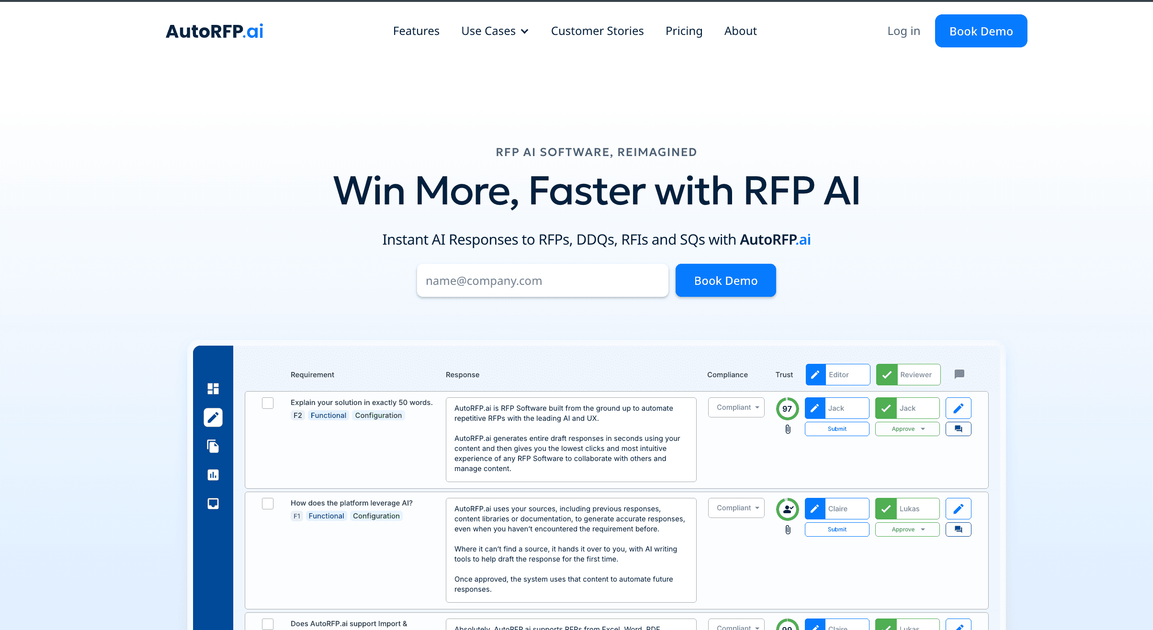
AutoRFP.ai is an AI RFP software platform for drafting and managing responses to RFPs, RFIs, DDQs, tenders, and security questionnaires. The product is positioned around generating accurate first drafts from your existing content, then letting teams review and approve those answers in one workspace.
The site emphasizes a workflow built for response teams: import past responses or documents, generate draft answers, assign editors and reviewers, and export the finished project back into the customer document or a branded template. Pricing information shows paid plans with unlimited users, support, onboarding, and a 30-day money-back guarantee.
The homepage also highlights related capabilities such as translation, localization, and integrations with existing systems. Overall, the product appears aimed at teams that want to standardize response work without maintaining a manual content library from scratch.
Generates first-draft responses from approved sources such as prior responses, content libraries, and documentation, then lets teams refine the output instead of starting from scratch.
Handles RFPs, RFIs, DDQs, tenders, and security questionnaires, including complex Excel workbooks, long Word documents, and web portal inputs.
Supports editors and reviewers working in the same project, with live collaboration and unlimited users on all plans shown on the pricing page.
Exports completed responses back into the customer document or a branded RFP template after the project is finished.
Supports translation and localization, with the homepage stating responses can be produced in 44+ languages and localized for UK and US English.
Connects with existing systems and content sources, and the pricing page lists 18+ integrations alongside SSO with Google and Microsoft.
Sales and proposal teams can import previous responses and company documentation, then generate a first draft quickly instead of rebuilding answers for each new request.
Presales and subject-matter reviewers can assign editors and reviewers in the same project, review the generated answer, and approve it before export.
Teams handling security assessments can reuse approved answers and export completed work back into the customer’s template or document.
Organizations working across regions can translate or localize responses so the final submission matches the required language or English variant.
Operations teams can connect the product to existing systems and keep response work in one place instead of tracking content across multiple tools.
AutoRFP.ai is designed to support RFPs, RFIs, DDQs, tenders, and security questionnaires. The site also says it can work with imported content from previous responses, content libraries, and documentation, then help generate and refine drafts.
The pricing page states that setup includes white-glove onboarding and that imported responses can be loaded into an account within 48 hours. The product also includes training and support as part of the plans shown.
The response engine generates first drafts from your sources, then lets users refine them with one click. The site also shows editor and reviewer collaboration, with unlimited users included on all plans.
The site says AutoRFP.ai can import RFPs from Excel, Word, PDF, and web portals, including SAP Ariba, and export completed work back into the customer document or a branded template.
AutoRFP.ai is positioned for teams that want to draft, review, and manage responses in one system. The site highlights use across sales, presales, and proposal workflows rather than a free-form writing assistant.