AgentQL logo

AgentQL

Claim

AgentQL is a developer-focused web data extraction and automation tool that uses natural-language queries to return structured results from web pages. It supports debugging in the browser, code-based automation through Python and JavaScript SDKs, and browserless extraction through a REST API.

AgentQL preview

What AgentQL does

AgentQL is a developer-focused web data extraction and automation tool built around a natural-language query language. It helps users describe the web elements or data they want, then returns structured output that matches the query shape.

The product combines a browser debugger, Python and JavaScript SDKs, a REST API, and integrations with agentic and no-code tools so teams can test queries, automate page interactions, and move data into broader workflows. The site also positions it for pages that are public, private, or behind authentication, and for parsing difficult sources such as PDFs.


Core capabilities

Query-shaped extraction

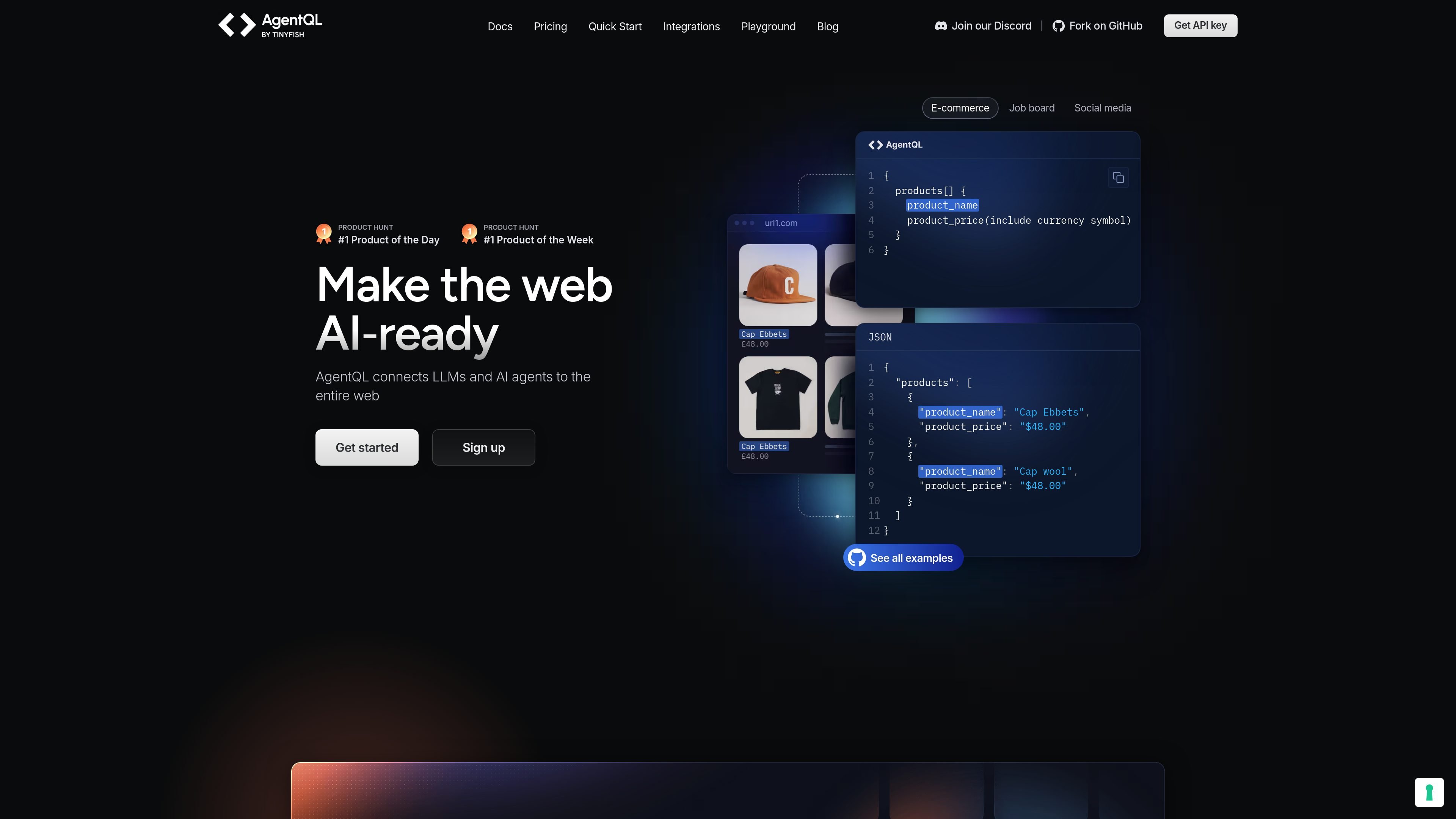
AgentQL uses a query language to describe the elements and data you want, then returns structured results in the shape you define. The site shows examples with arrays, nested objects, and fields such as product names and prices.

Python and JavaScript SDKs

The product connects to web pages through Python and JavaScript SDKs built on Playwright, letting you automate interactions and extract data in code.

Browser debugging extension

A Chrome-based debugger lets you test queries against live pages, inspect matched elements, and refine queries before putting them into production.

Browserless REST access

The REST API can retrieve public-facing data from any URL without a browser, which supports browserless extraction workflows.

Web automation across pages

The documentation and pricing pages indicate that AgentQL works with public or private pages, including pages behind authentication, and that it can be used for repeated workflows across similar layouts.

Integration ecosystem

AgentQL integrations include tools such as Zapier, LangChain, Langflow, Dify, AgentStack, and MCP for connecting extraction to no-code and agent workflows.

Practical ways to use AgentQL

  • Website data extraction

    Use the query language to pull structured fields from product listings, search results, or other repeating page layouts, then reuse the same query across similar pages.

  • Query development and validation

    Run queries in the Chrome debugger while building, then move the working query into a Python or JavaScript script for repeatable automation.

  • Browserless data retrieval

    Use the REST API when you need public-facing data from a URL and do not want to spin up a browser session.

  • Workflow integration

    Connect AgentQL to no-code or agent frameworks such as Zapier, Dify, LangChain, Langflow, MCP, or AgentStack when extracted web data needs to flow into other tools.

  • Interactive web and PDF workflows

    Apply AgentQL to pages that require interaction or to PDF content when you need structured information from harder-to-parse sources.

Pros and Cons

Pros

  • Natural-language queries reduce reliance on brittle XPath or CSS selectors.
  • The same query can be reused across similar pages and page layouts.
  • A live browser debugger helps validate queries before production use.
  • Python and JavaScript SDKs support code-based automation with Playwright.
  • REST and integrations widen the number of ways teams can use extracted data.

Cons

  • The source materials do not provide detailed limits for specific sites, document types, or failure modes.
  • Pricing and usage capacity vary by plan, so teams need to review the plan details before committing to a workflow.

FAQ

How does AgentQL work?

AgentQL is a query-language-based tool for web data extraction and automation. Its quick start guide shows that you can use the Chrome debugger to test queries in real time, then run the same queries through the Python or JavaScript SDKs.

What platforms and tools does AgentQL support?

The documentation says AgentQL provides Python and JavaScript SDKs, a REST API, and a browser debugging extension. The SDKs use Playwright for interacting with web pages, while the REST API is available for extracting public-facing data from URLs without a browser.

Is there a free tier or trial?

Yes. The pricing page includes a free trial with no credit card required, and the Starter plan is listed at $0/month with included API calls, remote browser time, and developer tools.

Who is AgentQL for?

AgentQL is positioned for developers, teams, founders, and businesses that need structured web data or automation. The integrations page specifically notes no-code options such as Zapier and Dify, while more technical workflows can use tools such as LangChain, Langflow, MCP, and AgentStack.

What kinds of data can AgentQL retrieve?

The site describes support for extracting data from web pages, interacting with page elements, browserless REST access to public URLs, and parsing difficult information like tables from PDFs. It does not claim support for every document type or every site behavior, so suitability depends on the source and workflow.

Quick Facts

Category
Developer Tool / Data Extraction
Primary users
Developers, founders, teams, and businesses
Core workflow
Write a query, test it in the debugger, then run it through SDKs or the REST API
Platforms
Web pages, browser automation, and PDFs
Integrations
Zapier, LangChain, Langflow, Dify, MCP, AgentStack
Source domain
agentql.com