
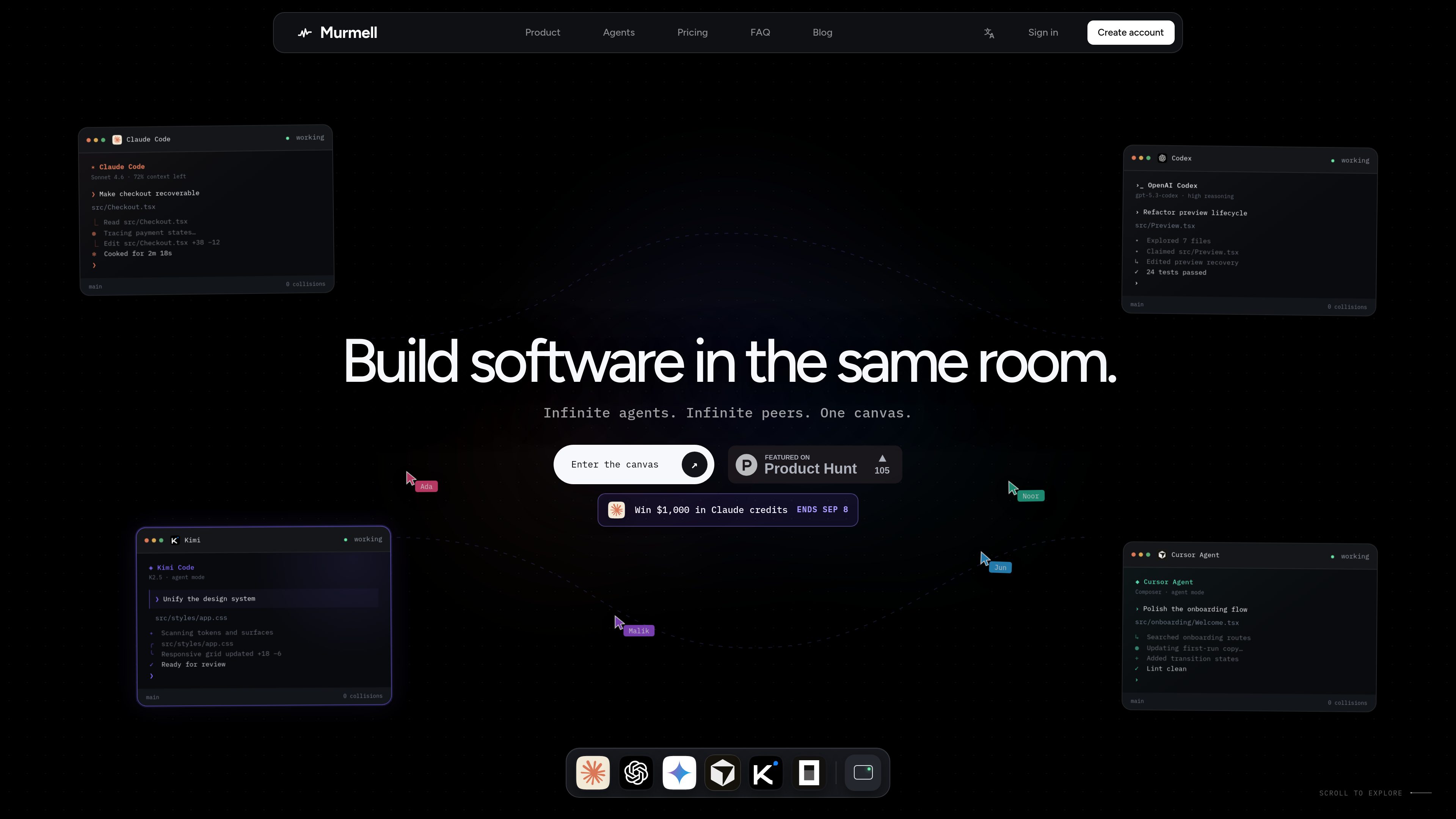
Multi-agent browser canvas
Open multiple coding agents in the same project and manage them from one shared canvas rather than separate local sessions.

Murmell은 공유 클라우드 샌드박스에서 AI 코딩 에이전트를 실행하는 브라우저 기반 캔버스입니다. 로컬 설정이나 파일 충돌 없이 하나의 프로젝트에서 Claude Code, Codex, Kimi, OpenCode를 조율할 수 있습니다.
Murmell is a browser-based canvas for running several AI coding agents on one shared project directory in the cloud. It is built around a live workspace where agents can work in parallel and other people on the link can watch the session as it happens.
The product’s core purpose is to make multi-agent coding safer and easier to coordinate. Murmell uses file reservations, shared terminals, and persistent cloud sandboxes so teams can avoid overlapping edits, keep a session in sync, and work without setting up the agents locally.
Open multiple coding agents in the same project and manage them from one shared canvas rather than separate local sessions.
Agents reserve file paths before editing, which helps prevent simultaneous writes to the same file.
Projects run on cloud machines managed by Murmell, so the workspace is not tied to one developer’s laptop.
Everyone with access to the canvas can see the same terminals, cursors, and live previews while work is underway.
The site names Claude Code, OpenAI Codex, Kimi, and OpenCode as supported agents, with more mentioned on the homepage.
Murmell publishes numbered guides for common tasks such as using Claude Code without local installation, splitting work across several agents, and sharing a session live.
Use Murmell when you want different agents to work on separate parts of the same repository at the same time, with reservations reducing the chance of file collisions.
The guides describe opening a real Claude Code terminal from the browser, which is useful when you want to use the agent without installing it locally.
Share a canvas link so another person can observe the same terminals, cursors, and previews without refreshing or replaying the session.
Use the persistent cloud sandbox when you want the workspace to live on Murmell’s machines rather than on a developer laptop.
The examples on the homepage show tasks like checkout recovery, preview refactoring, and design-system updates handled by separate agents in the same room.
The site explicitly names Claude Code, OpenAI Codex, Kimi, and OpenCode, and the homepage also says “and more.”
According to the site, agents run on dedicated cloud machines managed by Murmell, while the local machine is only used for the browser.
Murmell uses a reservation system: an agent claims the file paths it is about to edit before writing, so other agents wait until those paths are released.
Yes. The site says a canvas can be shared as a link and watched live, with no need to replay or refresh the session to stay in sync.
The site indicates Starter is free forever and mentions paid Pro and Builder plans, but the dedicated pricing page fetched for this review returned a 404, so the public pricing information is limited in the collected pages.
트래픽 데이터는 참고용으로만 확인하세요.

www.tryport22.com
port22는 터미널에서 실행 중인 코딩 에이전트 세션을 모니터링하고 제어하는 iOS 앱 및 macOS 에이전트입니다. 실시간 기록을 iPhone으로 스트리밍하고 입력이 필요할 때 알림을 보내며 Claude Code, Codex, OpenCode를 지원합니다.
tablo-cat.netlify.app
tablo는 화면 한쪽 구석에서 Claude Code와 OpenAI Codex 세션을 모니터링하는 데스크톱 고양이 위젯입니다. 실시간 컨텍스트 사용량, 권한 요청, 알림, 세션별 활동 미리보기를 확인하세요.

skillsmp.com
SkillsMP는 공개 GitHub 저장소에서 오픈 소스 에이전트 스킬을 찾는 무료 마켓플레이스입니다. 검색, 탐색, REST API와 MCP를 지원하며 Claude Code, Codex CLI, ChatGPT에서 사용할 수 있습니다.
blackflare.dev
BlackFlare는 Claude Code와 Codex를 위한 macOS 메뉴 막대 앱으로, 활성 세션이 절전 상태가 되지 않도록 하고 완료 또는 입력 필요 알림과 사용량을 표시합니다. Telegram이나 Slack으로 알림을 전달하고 설정 파일을 직접 편집하지 않고 기본값을 변경할 수도 있습니다.

evlat.kalaomer.com
Evlat is a quiet macOS status strip for monitoring Claude Code, Codex, and Antigravity sessions, plus long-running commands. It highlights sessions that need your response and shows activity from local or SSH-connected machines.