SongMuse icon

SongMuse

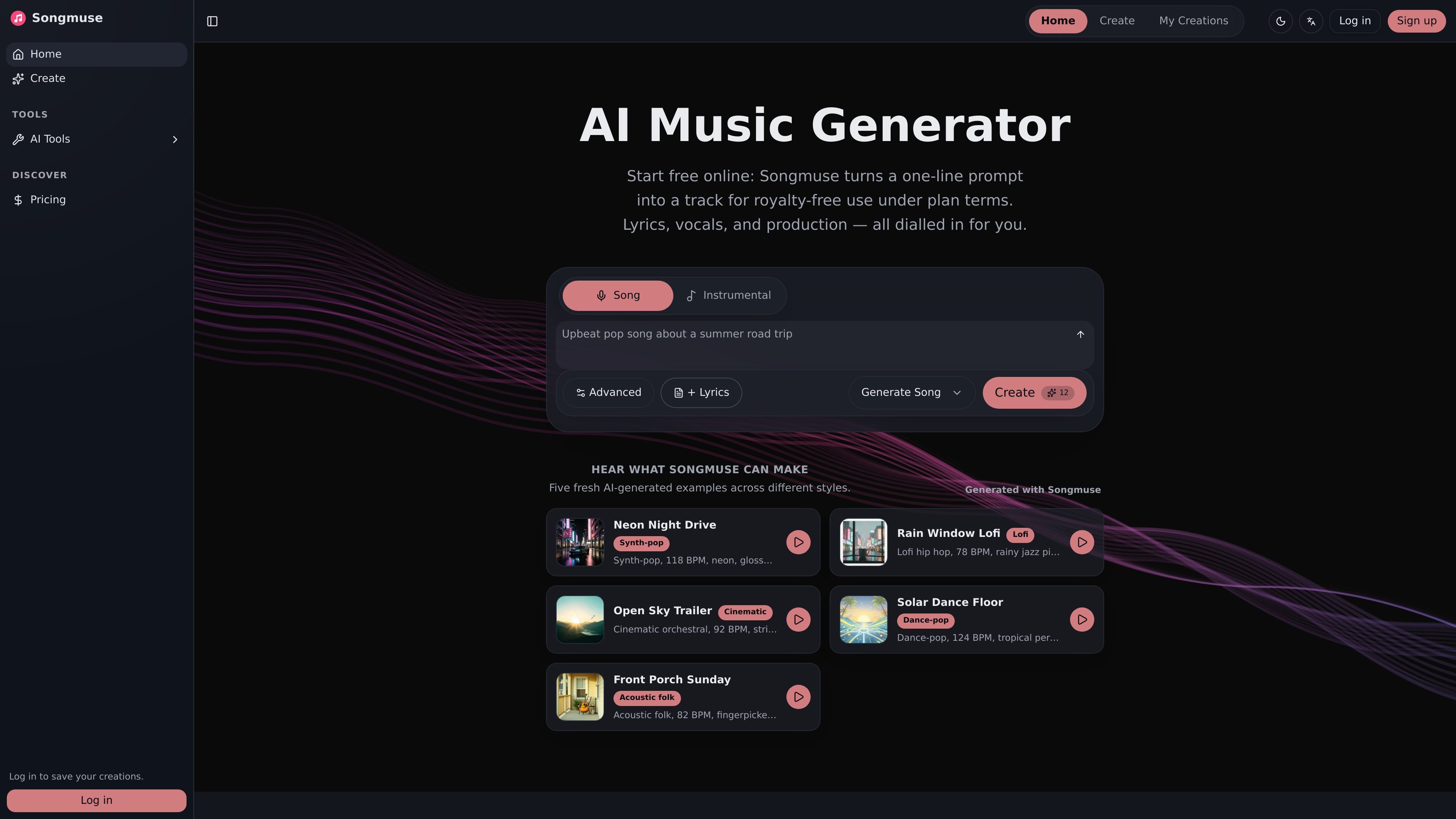
SongMuse is a browser-based AI music generator that turns short prompts into songs or instrumental tracks for royalty-free use under plan terms. It supports lyrics, vocals, production controls, and MP3 downloads for creators working on social content, demos, podcasts, games, and personal projects.

SongMuse

What SongMuse does

SongMuse is an AI music generator for creating songs and music from short text prompts. The site positions it as a fast, browser-based tool that turns a plain idea into a track in under a minute, with lyrics, vocals, arrangement, and production all generated from the same workflow.

It is aimed at creators who need royalty-free audio under plan terms, including people making social clips, podcast beds, demo songs, jingles, indie game music, or personal gifts. The site emphasizes a simple prompt-first flow, then optional advanced controls for users who want more influence over the result.

Core features

Natural-language prompting

Describe a mood, era, tempo, genre, scene, or reference style in natural language. SongMuse turns the brief into a music prompt without requiring a technical workflow.

Custom lyrics and vocals

Paste your own lyrics or let the system draft them. The site also supports section tags and vocal direction for more controlled songwriting.

Instrumental or full-song output

Switch between instrumental mode and full-song generation. The homepage says full songs can include lead vocals, ad-libs, and a hook, while instrumental mode suits backing tracks and production stems.

Detailed creative controls

Use advanced settings to tune style adherence, audio weight, weirdness, vocal gender, title, and negative tags. These controls are presented as optional for more producer-like adjustment.

Two takes per generation

Generate two variations per request and review them in the built-in player. The site frames this as a quick way to compare takes before choosing one to keep or refine.

Library and MP3 export

Download tracks as MP3 files and manage them in a creator library. The site says there are no watermarks or DRM and that users can rename, favorite, delete, and revisit past tracks.

Common ways to use SongMuse

  • Social video soundtracks

    Create background music for short-form content such as YouTube videos, TikToks, Reels, and Shorts, then export an MP3 for editing into the final cut.

  • Podcast audio beds

    Generate intros, stingers, and ad beds that match a show’s tone, with the option to work in instrumental mode when vocals are not needed.

  • Songwriting demos

    Draft a melody, lyric idea, or full demo so songwriters can hear a concept performed back before they record or arrange it themselves.

  • Jingles and brand music

    Produce jingle or brand-song ideas quickly, using style controls and reference direction to shape the mood before choosing a final version.

  • Game and interactive audio

    Create music for indie games, cutscenes, or interactive experiences where royalty-aware use and easy reuse matter.

Pros and Cons

Pros

  • Creates music from short natural-language prompts, which keeps the workflow simple.
  • Supports lyrics, vocals, instrumental tracks, and more controlled song generation.
  • Provides advanced creative controls such as style adherence, audio weight, weirdness, and negative tags.
  • Generates two variations per request and includes built-in playback for quick comparison.
  • Offers a personal library with rename, favorite, delete, and download actions, plus MP3 export without watermarks or DRM.

Cons

  • Commercial use is described as subject to plan terms rather than a blanket unrestricted license.
  • Pricing pages indicate different credit allowances and some features are limited by plan, so heavier use may require a higher tier.
  • The site does not document integrations or external export destinations beyond MP3 download in the provided copy.

FAQ

Can I use SongMuse output commercially?

SongMuse presents itself as a free online AI music generator, with commercial use governed by plan terms. The site says you can start free online and then use the output under the applicable license terms.

How does SongMuse work?

The site describes a simple flow: write a prompt, adjust details such as vocals or style settings if needed, then generate and listen. It says SongMuse creates two variations per request in under a minute.

How long does generation take?

SongMuse is designed to generate music in about a minute or less, according to the homepage and create page copy.

Do I need technical skills to use it?

The site positions SongMuse as easy to use with natural-language prompts and does not describe any technical setup requirements.

Quick Facts

Category
AI music generator
Platform
Web browser
Primary outputs
Songs and instrumental tracks
Source domain
songmuse.art
Pricing shape
Free to start; paid plans and credit packages are listed
Notable workflow
Prompt, adjust controls, generate two takes, then download or save

SongMuse 대안

MakeSong icon

MakeSong

MakeSong is a web-based AI song generator that turns text prompts or lyrics into music and offers related audio and video tools. It targets creators who want quick song drafts, lyric-to-music generation, and exportable tracks for sharing or commercial use.

FreeMusic AI icon

FreeMusic AI

FreeMusic AI is a web-based AI music generator that creates royalty-free songs from prompts, lyrics, and text-to-music inputs. It also includes vocal removal, stem splitting, mastering, and music video tools for creators who need original audio for content, games, podcasts, and branded projects.

Suno icon

Suno

Suno is an AI music generator for creating original songs in the browser from prompts, lyrics, or uploaded audio. Free and paid plans add different creation, editing, and commercial-use capabilities.

Udio icon

Udio

Udio is a web-based AI music generator that creates songs from text prompts and supports sharing, discovery, and paid editing tools. It offers a free plan plus Standard and Pro tiers for users who need higher generation limits and more advanced workflows.

Magnific icon

Magnific

Magnific is an AI creative platform for generating images, video, and audio, with stock content, editing tools, and shared workflow features. Its plans range from individual use to team and enterprise subscriptions with commercial licensing, API access, and admin controls.

DeepAI icon

DeepAI

DeepAI is a browser-based AI platform for image creation, photo editing, chat, video, music, and image APIs. It offers free exploration, a paid Pro plan, and developer endpoints for common image workflows.