
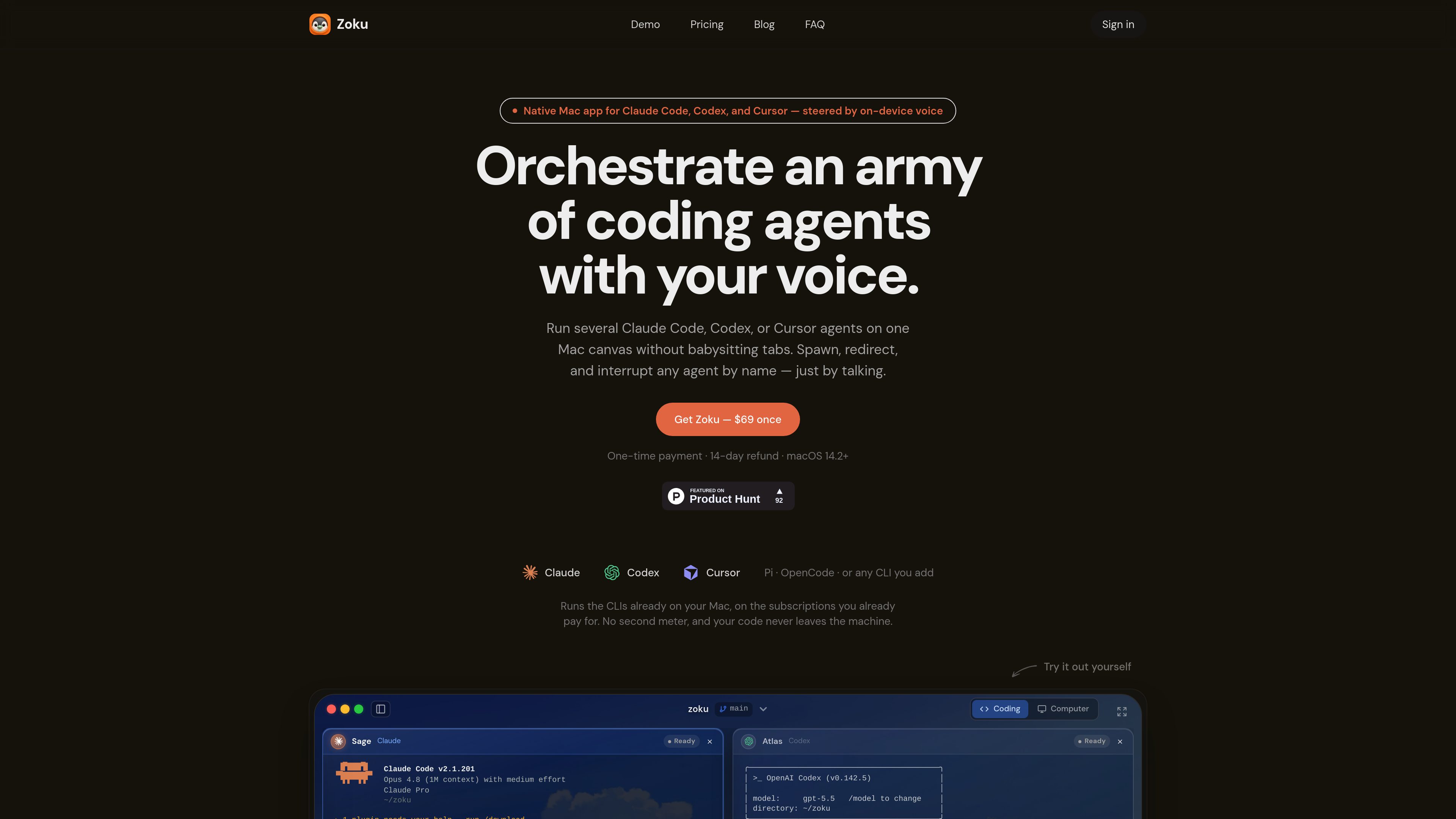
Named multi-agent canvas
Run multiple Claude Code, Codex, Cursor, Pi, OpenCode, or terminal sessions together and identify them by name rather than by tab position.

Zoku is a native macOS app for running and coordinating multiple coding-agent CLIs on one canvas. It lets developers spawn, redirect, monitor, and interrupt named agents by voice while using the subscriptions and command-line tools already installed on their Mac.
Zoku is a native macOS app for working with parallel coding agents from a single canvas. It launches Claude Code, Codex, Cursor, Pi, OpenCode, and other command-line tools already installed on a Mac, giving each running agent a name and a dedicated canvas tile. Developers can address an agent by name to redirect it, request a task, or stop it instead of searching through terminal tabs.
The app combines a visual workspace with hands-free command input. Holding ⌥⌘ from any app activates voice control, and Zoku transcribes commands on-device with Parakeet. Its core canvas, worktrees, and command voice are included in a one-time Mac license; the optional talking companion is a separate in-app Cloud add-on.
Run multiple Claude Code, Codex, Cursor, Pi, OpenCode, or terminal sessions together and identify them by name rather than by tab position.
Spawn, redirect, focus, and interrupt agents by speaking commands. On-device command transcription does not require a Cloud plan or per-command charge.
Create a worktree by specifying a branch name, so parallel agents can work in separate directory contexts rather than overwriting the same workspace.
The canvas distinguishes agents that are working, done, or need attention, with notifications such as a chime, spoken name, or notch marker.
Claude, Codex, Cursor, Pi, and OpenCode are configured to work with Zoku, while other command-line tools can be added with a launch command, spoken spawn phrase, and interruption key.
A workspace can point to the user’s own machine over SSH, allowing agents to continue through local sleep, app quitting, and disconnection. On the local Mac, closing the window does not stop agents, but sleep does.
A developer can open several agents in separate worktrees to investigate implementation ideas or work on independent branches, then monitor them from one canvas.
Developers can start agents on their own Mac and close the Zoku window while the processes continue, returning to the canvas when they want to review progress.
While working in another app, a developer can hold **⌥⌘** and tell a named agent to run tests, summarize a diff, change direction, or stop, avoiding manual tab switching.
One coding agent can enlist another agent, such as a Codex session reviewing a plan, with Zoku coordinating the sessions and displaying their results on the canvas.
Developers who need processes to survive local sleep, quitting, or disconnects can point a workspace at their own machine over SSH.
Zoku runs Claude Code, Codex, Cursor, Pi, OpenCode, and a plain terminal as live sessions on one canvas. Other CLIs can be added with their launch command and voice configuration.
For the canvas, Zoku launches the CLIs already installed on the Mac and uses the subscriptions the user already pays for. Live coding voice can use optional Cloud service or the user’s own OpenAI key; Local and Model voice options remain on-device.
The early-access price is $69 paid once, with a 14-day money-back period. The license includes unlimited agents, unlimited workspaces, worktrees, SSH support, on-device command voice, and future updates. There is no free tier. The public price is stated as $99 after early access.
Zoku requires macOS 14.2 or later. On-device voice requires Apple Silicon, and the first launch requests Microphone and Accessibility permissions.
No. The canvas, menu bar, notch status, and on-device speech features are native to macOS, and the FAQ says no Windows or Linux version is planned.
トラフィックデータは参考情報としてご利用ください。

usefiretower.com
Firetower is an open-source, self-hosted control plane for running coding agents on servers you own. It lets developers start agent sessions from repositories, monitor them from desktop or mobile clients, review changes, and ship branches without keeping the initiating device online.
flocker.md
Flocker is an AI agent management platform for creating agent profiles, coordinating multi-agent work, and monitoring activity from a shared dashboard. It is designed for people running multiple agents across tools such as Claude Code, Codex, OpenClaw, OpenCode, and MCP-compatible workflows.
harproject.dev
HAR HQ is a team governance and observability layer for organizations running coding agents with HAR. It standardizes verification, tracks AI-related work and spend, and helps engineering teams review and improve agent workflows.

deepaksinghcs14.github.io
deadeye is a plugin for coding agents that selects a suitable model and effort level for each task, while trimming verbose command output before it enters context. It is built for Claude Code and also supports Codex CLI, Gemini CLI, Cursor, and Windsurf on an experimental basis.

getbb.app
bb is a local-first, open-source IDE for running coding agents in parallel, organizing their work in threads, and extending the workspace with plugins. It is designed for developers and teams that want to coordinate provider-based agents and customize their software workflow.

bitrise.io
Bitrise Remote Dev Environments provides on-demand cloud VMs for developers and AI agents, using the same machines, toolchains, and caches as Bitrise CI or Build Hub. Teams can connect with familiar development clients, persist session state, and run agent workflows from template to pull request.