
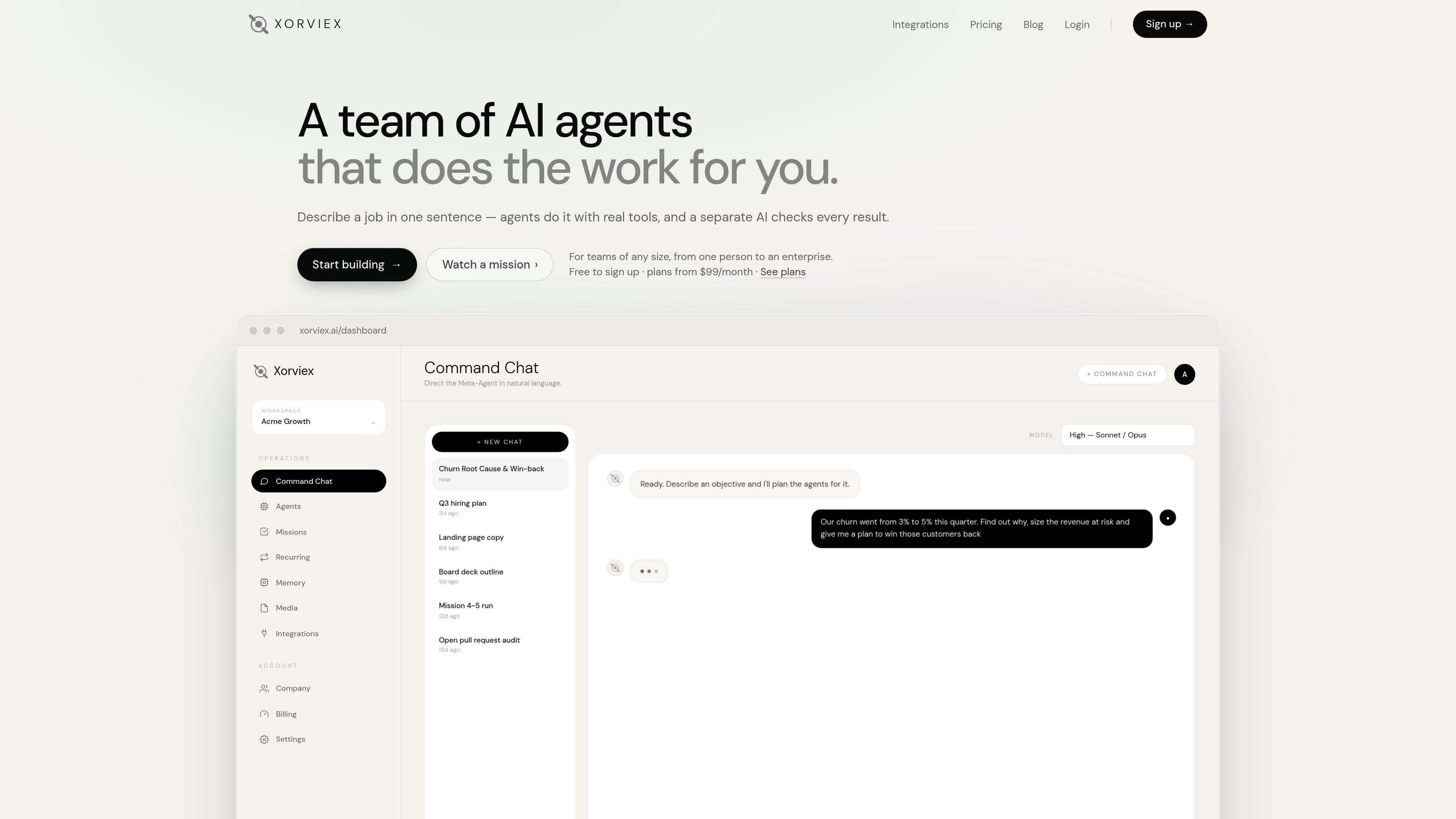
Natural-language mission planning
Describe an objective in Command Chat and Xorviex plans the agents and steps needed to pursue it. Missions display their scope, assigned agents, status, and activity.

Xorviex is a workspace for delegating research, analysis, writing, and connected-app tasks to coordinated AI agents. You describe an objective in natural language; the agents plan the work, use available tools, and a separate Supervisor AI audits the result.
Xorviex is an AI-agent workspace that turns a one-sentence objective into a planned mission. It assigns work to multiple agents, uses real tools and connected applications for research or execution, and sends results through a separate Supervisor AI for review.
The workspace combines natural-language Command Chat with missions, recurring schedules, workspace memory, integrations, and activity logs. Depending on the objective, a mission can produce research, analysis, written material, files, scheduled posts, or updates in a connected service. Users can select a mission scope from 1 to 5; larger scopes use more Operation Units.
Xorviex is designed for multi-step work rather than simple question answering. Examples shown on the product site include competitor pricing reports delivered to Slack, churn analysis with a win-back plan, lead research, hiring-plan work, landing-page copy, board-deck outlines, and pull-request audits.
Describe an objective in Command Chat and Xorviex plans the agents and steps needed to pursue it. Missions display their scope, assigned agents, status, and activity.
A single mission can divide work among specialized roles such as research, analysis, and reporting. The workspace shows queued and running agents along with their outputs.
A separate Supervisor AI checks agent results before delivery. The mission view exposes the audit state, while the pricing plans distinguish Standard and Priority Supervisor AI access.
Agents can work with connected services rather than stopping at a written answer. Supported actions include posting, scheduling, uploading files, searching, recording metrics, and creating reports, depending on the app connection.
Users can schedule repeat work, such as a weekly competitor pricing report, and maintain workspace memories for ongoing context. The workspace also includes mission logs and usage tracking.
Xorviex fingerprints agent failures into deduplicated incidents. Depending on the plan, it can alert users, retry environmental failures, or automatically remediate by rerunning work under a corrected plan and having the result audited again.
Create a scheduled mission that researches competitor pricing, tracks price changes, compares products, records metrics, generates a PDF report, and uploads it to a Slack channel.
Give Xorviex a change in churn rate and ask it to investigate causes, estimate revenue at risk, and produce a customer win-back plan.
Launch a research mission to find a defined set of prospects, such as fintech SaaS leads, and return the requested findings for follow-up work.
Use missions for deliverables such as landing-page copy, investor updates, board-deck outlines, or social content, with connected tools available when the workflow requires publishing or file handling.
Delegate process-heavy work such as open pull-request audits or recurring operational monitoring, allowing the agents to gather evidence, analyze it, and present an actionable result.
Describe an objective in Command Chat using natural language. Xorviex plans a mission, assigns agents, and shows the resulting steps, tools, status, and audit state.
Yes. The integrations page lists 18 apps, including Slack, Gmail, Google Calendar, Google Drive, Google Docs, Google Sheets, GitHub, Notion, Jira, Asana, Salesforce, LinkedIn, X, Instagram, Facebook, TikTok, YouTube, and Ayrshare. Available actions depend on the connected app and workspace permissions.
The site states that credentials are encrypted at rest, scoped to one workspace, and never shown to the model. Agents receive only the actions that the workspace has connected.
The Self-Healing Engine fingerprints failures into deduplicated incidents. Starter alerts the user and automatically retries environmental failures; Active mode can apply remediation by rerunning the agent under a corrected plan and sending the output through the Supervisor again.
Usage is measured in Operation Units based on the work performed by agents and the Supervisor. Before a mission starts, users select a scope from 1 to 5, and each mission reports what it used. Monthly-plan usage resets each billing month.

construct.computer
Construct Computer is an AI employee workspace for solo founders and small teams. It combines a persistent cloud computer, browser and terminal tools, memory, workflows, schedules, email, and connected apps so agents can complete work while users are away.

solid.tech
Solid provides AI agents with computers, accounts, and budgets to carry out business tasks across approved tools. Users describe the desired outcome and rules; agents handle setup, execution, verification, and reporting, with approvals where needed.

ozbrain.com
OzBrain is a hosted shared knowledge base that AI agents and authorized teammates can read and write. It gives connected agents a structured source of truth for projects, decisions, research, rules, and other working knowledge.

www.cognee.ai
Cognee is an open-source memory platform for AI agents and applications. It connects data across sources, builds connected memory using vector, graph, and relational storage, and makes that context available through SDK, cloud, or self-hosted deployments.

www.crowny.lol
A MacBook notch workspace for AI agents, meetings, music, focus tools, and everyday tasks.

steel.dev
Steel is open-source browser infrastructure for AI agents and web automation. It provides cloud browser sessions through an API, with support for common browser automation tools and workflows such as scraping, research, RPA, and agent-driven web tasks.