
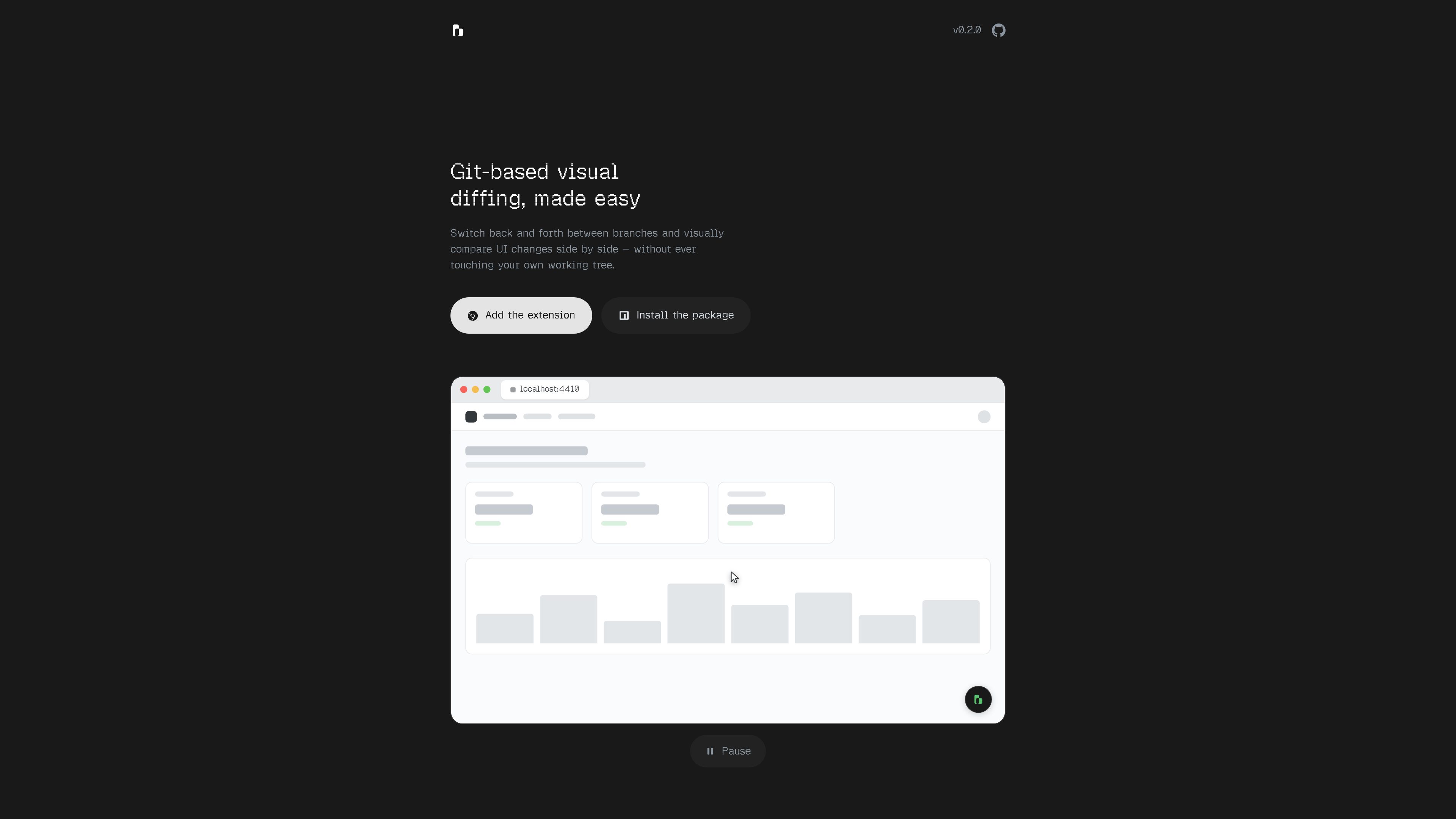
In-page branch switching
Choose a Git branch from the widget embedded in the running app. sidebranch builds the selected branch in an isolated worktree and starts its own development server.

sidebranch is a local developer tool for reviewing Git branch changes inside a running web app. It creates isolated worktrees and dev servers so UI changes can be compared side by side without changing the main working tree.
sidebranch is a Git-based visual diffing tool for reviewing web application changes from inside a running app. Its in-page widget lets a reviewer select a branch, launch it in an isolated worktree and dev server, and compare it with another branch without altering the reviewer’s own working tree.
The comparison view keeps both panes live and offers side-by-side, blend, and onion diff modes. Changes can therefore be reviewed in the UI itself rather than inferred only from source files. The tool is described as framework agnostic for applications that answer HTTP on a port, with Next, Vite, Django, and Rails listed as examples.
sidebranch is installed locally with the Chrome or Edge extension and the sidebranch package. A .sidebranch.json file supplies the app start command and optional setup details, while a loopback-only daemon manages the review servers and worktrees.
Choose a Git branch from the widget embedded in the running app. sidebranch builds the selected branch in an isolated worktree and starts its own development server.
View two running branch versions side by side, or use blend and onion diff modes to make UI changes more apparent.
Review branch versions without switching or modifying the reviewer’s own working tree. Pane worktrees can be removed with the cleanup command after review.
Define the command used to start the app in `.sidebranch.json`; an optional install command runs only when lockfiles change, and selected files such as `.env` can be copied into panes.
The site lists Next, Vite, Django, and Rails as examples of supported stacks, provided the application responds over HTTP on a port.
Use `doctor` to check the environment, configuration, and daemon status; `stop` to halt the daemon and pane servers; and `start --port` to choose a different local port.
Run the application, select a feature or fix branch from the in-page widget, and inspect its rendered changes alongside the current version.
Use blend or onion diff modes to locate layout, navigation, or other interface changes that may be difficult to assess from a code diff alone.
Use isolated pane worktrees when the reviewer has uncommitted changes or needs to keep the primary checkout on its current branch.
Describe the project’s start command, lockfile-sensitive install step, and required environment files in `.sidebranch.json` so each pane can be prepared consistently.
It compares running versions of Git branches in a web application. The selected branch is built in an isolated worktree and served in its own development pane.
The product is designed to compare branches without touching the reviewer’s own working tree. Separate pane worktrees are created for the branch versions and can be removed with `npx sidebranch clean`.
Install the sidebranch extension from the Chrome Web Store for Chrome or Edge, then run `npx sidebranch init` in the repository to create a starter `.sidebranch.json`. Start the local service with `npx sidebranch start`.
The configuration identifies the command that starts the app. It can also specify an install command, which runs when lockfiles change, and files to copy into pane worktrees, such as `.env` or `.env.local`.
The daemon is local and loopback-only. It listens on `http://127.0.0.1:49400` by default, and another port can be selected with `npx sidebranch start --port` and matched in the extension options.
トラフィックデータは参考情報としてご利用ください。
ceritmustafa.github.io
ScreenMark is a macOS menu bar app for live screen annotation, zoom, whiteboard overlays, freeze frames, and recording. It is designed for presenters, teachers, workshop facilitators, and anyone who needs to explain on-screen content without leaving their workflow.

apra-labs.github.io
apra-fleet runs a fleet of AI agents across multiple machines and provider CLIs. It provides a common execution model for combining Claude, Codex, Copilot, Antigravity, and local models.

button.focusbear.io
Focus Button is a physical timer that starts a distraction-blocking session through the Focus Bear app. It is designed for students, knowledge workers, and anyone who benefits from a tactile way to begin focused work.

local-music-organizer-site.pages.dev
A macOS toolkit for organizing local Music.app libraries, investigating audio and metadata problems, comparing recording versions, and working with standalone audio files. It is designed for offline collections and keeps changes under explicit user control.

www.mondaymerch.com
Design Studio is Monday Merch’s browser-based tool for placing a brand, artwork, or text on customizable merchandise. Users can start from a template or a blank design, preview multiple product sides, and move toward ordering without design software.

www.solouno.io
SoloUno is a self-help app for people working to reduce or manage body-focused repetitive behaviors (BFRBs) such as nail biting, skin picking, and hair pulling. It combines habit tracking, trigger awareness, habit-free challenges, urge sessions, and daily reflection.