

Multimodal note generation
Convert photos, screenshots, slides, PDFs, and audio into organized text notes. The site also mentions video-to-text notes in its meta description and product messaging.
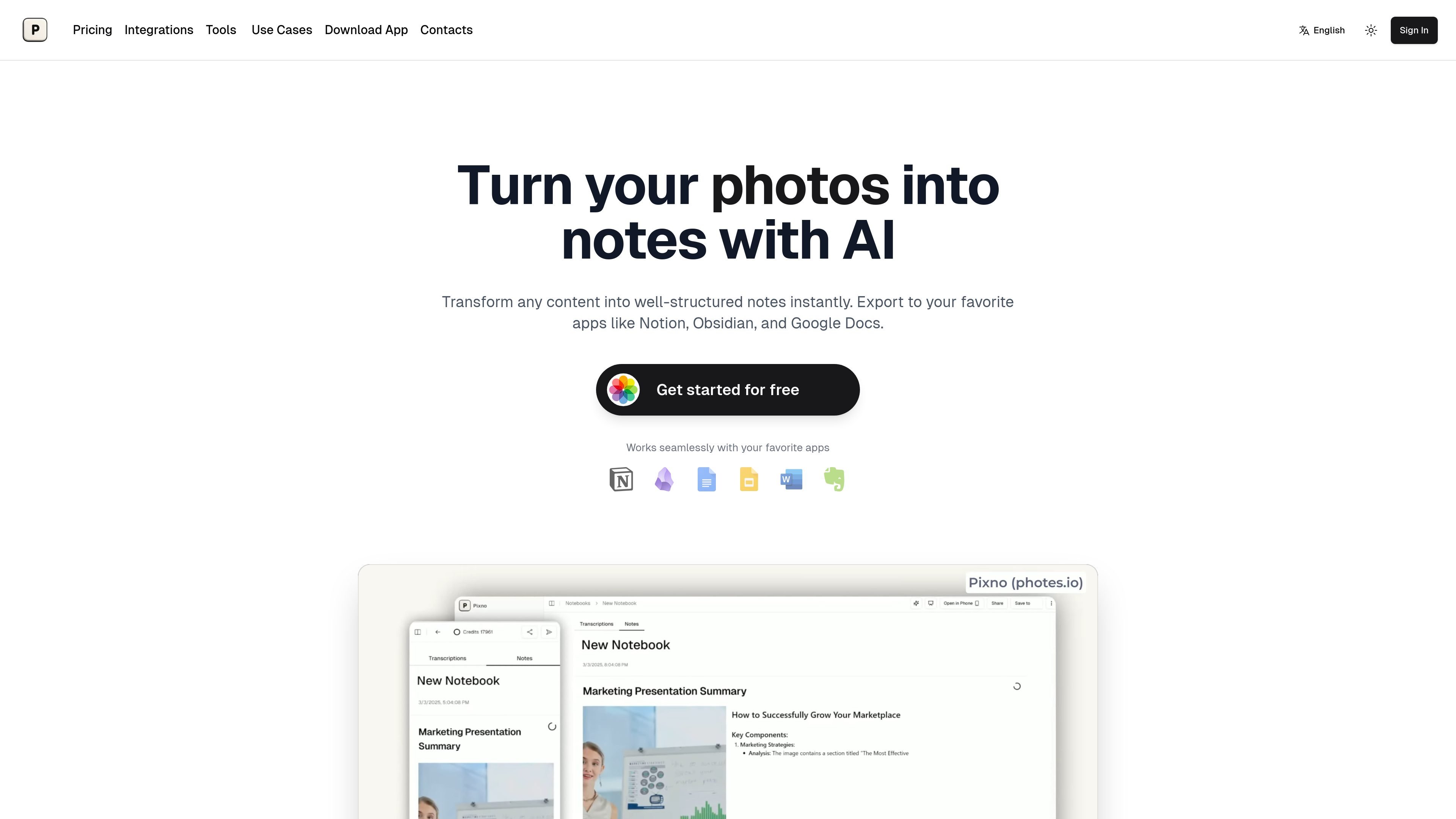
Pixno, branded on the site as Photes.io and Pixno, is an AI note-taking product that converts photos, PDFs, audio recordings, and other captured content into structured text notes. The homepage positions it as a way to turn raw input into organized notes quickly, while the pricing page confirms separate plans for individual use and higher-volume workflows.
The product is aimed at people who want to extract usable notes from class materials, slide decks, readings, recordings, and images without manual transcription. The site describes outputs such as summaries, translations, AI-powered Q&A, and export to apps like Notion, Google Docs, Microsoft Word, and Obsidian-compatible workflows.
Pixno also extends beyond simple OCR-style extraction. Its image-to-text page says it can understand charts, infographics, handwriting, and tables, and the homepage says it can add external readings and web references to generated notes. Together, these pages present Pixno as a note generation tool for study, research, and general knowledge capture.
Convert photos, screenshots, slides, PDFs, and audio into organized text notes. The site also mentions video-to-text notes in its meta description and product messaging.
Use AI to turn raw captures into structured notes, summaries, translations, and question-and-answer outputs. The site specifically references GPT-4 Vision and GPT-4o for image understanding, and mentions access to other reasoning models on paid plans.
Export notes to Notion, Google Docs, Microsoft Word, and other note-taking apps. The product positions this as a way to move notes into existing workflows rather than keeping them in one app.
Add external readings and web search references to strengthen generated notes. The homepage describes this as a way to expand content and improve credibility with referenced material.
Work across phone, tablet, and desktop with real-time synchronization. The site also mentions simple QR code scanning for cross-device note-taking on the image-to-text page.
Share notes with others and collaborate in real time. The homepage also says users can browse notes in a feed-like interface and customize the experience to their workflow.
Students can capture lecture slides, textbook pages, and recorded lectures, then turn them into study notes or ask questions about the material later.
Researchers and readers can summarize PDFs and pull out the main points from long documents without reading every page manually.
People who record meetings, talks, or interviews can upload audio and receive organized text notes instead of a raw transcript alone.
Users who photograph whiteboards, charts, infographics, or handwritten material can extract the visible information into a more readable note format.
Teams or solo users who already keep notes in other apps can export content into tools such as Notion or Google Docs and keep working in their preferred stack.
Pixno turns photos, PDFs, audio recordings, and videos into text notes with AI. It also supports note enhancement, summaries, and AI-powered Q&A for some workflows.
The pricing page shows a free Hobby plan with 50 credits per month and paid Basic, Pro, and Ultra plans billed annually, plus a monthly toggle and single-purchase packs.
The site says notes can be exported to Notion, Google Docs, Microsoft Word, and other note-taking apps. The homepage and pricing page also mention export support in general.
The site indicates that notes can sync across devices, and one page mentions real-time sync across devices with QR code scanning. This suggests a cross-device workflow, though the exact setup may vary by tool.
The site includes FAQ prompts about privacy and Obsidian export, but the rendered text does not provide full answers. Those capabilities appear to be supported, but the exact settings and steps are not detailed in the source text.
トラフィックデータは参考情報としてご利用ください。

summarize.ing
YouTube動画を短い要約、マインドマップ、Q&A形式の要点に整理

snipd.com
洞察の保存やエピソードとの対話、音声ハイライト整理ができるAIポッドキャストアプリ

www.dictantor.app
Dictantor is an on-device voice notebook for recording, transcribing, searching, summarizing, and sharing voice notes. It is designed for capturing ideas and reviewing recordings across iPhone, Apple Watch, and Mac.
audionotes.app
音声、音声・動画、テキスト、画像、YouTubeリンクを構造化ノートに変換するAIノートアプリ。iOS、Android、Web、Macに対応。

genei.io
記事、PDF、ウェブページ向けのAIリサーチ・要約ツール

studyfox.pro
StudyFoxは宿題やクイズを解き、ノート、フラッシュカード、マインドマップ、要約を作成するAI学習アシスタントです。