
Child-centered book generation
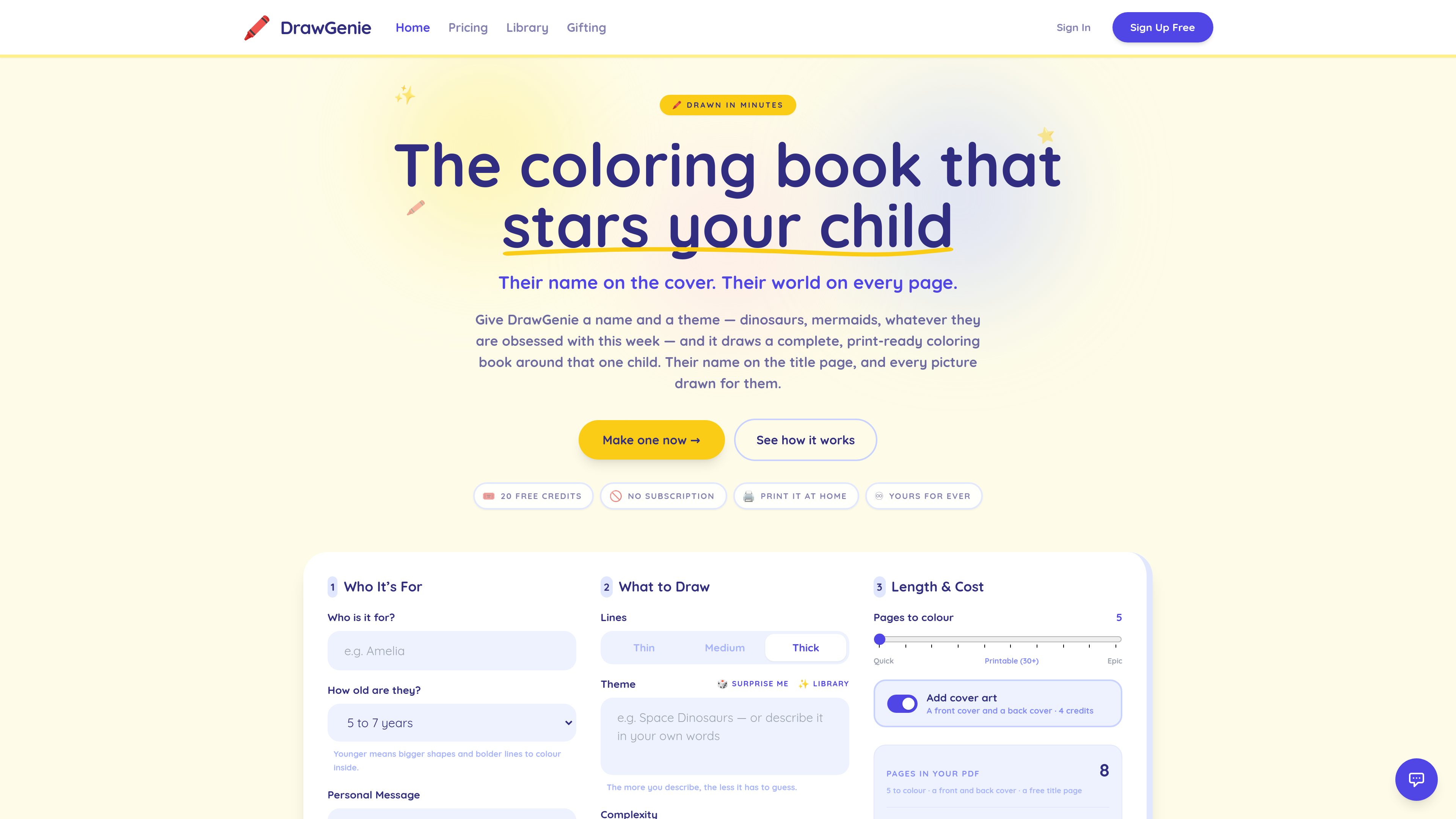
Enter a child’s first name and age, then create a book whose title or cover includes their name and whose illustrations are generated for the selected child profile.

DrawGenie creates personalized, print-ready AI coloring books from a child’s first name, age, and a theme. It is designed for parents, grandparents, teachers, illustrators, and educators who want custom pages they can download and print at home.
DrawGenie is an AI coloring-book generator for making custom, print-ready books around one child. Users enter a first name and age, describe a theme, and select visual preferences such as line weight and drawing style. The resulting pages are personalized to the child and can be downloaded as a PDF for home printing.
The service is intended for personal, family, classroom, and creative use. It generates pages one at a time, allows individual pages to be redrawn, and uses credits instead of a recurring subscription. New accounts receive 20 page credits, and physical printed books are not yet open for orders.
Enter a child’s first name and age, then create a book whose title or cover includes their name and whose illustrations are generated for the selected child profile.
Describe any subject in your own words, such as dinosaurs or mermaids, rather than choosing only from a fixed list. A theme library and Surprise Me option are also available.
Choose an age range from 2–4 years through 11 and over. Younger settings use larger shapes and bolder lines; additional controls cover line weight and styles such as cartoonish, whimsical, detailed, abstract, and hand-drawn sketch.
Review pages as they appear and redraw a page you do not want, including a cover, without regenerating the whole book. Each redraw uses 2 credits.
Download completed books as PDFs and print them at home. Downloads are unlimited, and the files can be reopened from My Books on signed-in devices.
The service provides 20 starter credits and sells additional page-credit packs. Credits do not expire, and there is no recurring subscription.
Parents and grandparents can create a coloring book around a child’s name and current interests, then download the PDF for a home-printed activity or gift.
Teachers can make themed line-art pages for classroom activities and handouts. Standard plans cover classroom use, while volume discounts are available for orders over 20 projects.
Families can combine unusual themes or describe a specific idea in their own words when a standard coloring-book subject does not fit the project.
Illustrators and educators can use the generator for custom line art that they intend to print and distribute for personal, family, or classroom purposes.
Creators who need to sell what they make can use the Creator Licence, which includes commercial rights for pages created under the licence and print-ready PDFs at 32 or more pages, plus PNGs page by page.
You provide a first name and age, describe a theme, choose available line and style settings, and submit the project. Pages are then generated individually and assembled into a downloadable PDF.
A new account receives 20 page credits, which are enough to draw 10 pages because each drawn page costs 2 credits. PDF downloads are unlimited, and no payment card or subscription is required to use the starter credits.
A front and back cover together use 4 credits in addition to the page credits. For example, a 10-page book with covers costs 24 credits.
Yes. You can redraw an individual page or cover rather than regenerating the complete book. A redraw costs 2 credits.
Not yet. Printed and posted books are listed as coming soon; currently, DrawGenie provides print-ready PDFs that can be downloaded and printed at home.
トラフィックデータは参考情報としてご利用ください。
ceritmustafa.github.io
ScreenMark is a macOS menu bar app for live screen annotation, zoom, whiteboard overlays, freeze frames, and recording. It is designed for presenters, teachers, workshop facilitators, and anyone who needs to explain on-screen content without leaving their workflow.

apra-labs.github.io
apra-fleet runs a fleet of AI agents across multiple machines and provider CLIs. It provides a common execution model for combining Claude, Codex, Copilot, Antigravity, and local models.

button.focusbear.io
Focus Button is a physical timer that starts a distraction-blocking session through the Focus Bear app. It is designed for students, knowledge workers, and anyone who benefits from a tactile way to begin focused work.

local-music-organizer-site.pages.dev
A macOS toolkit for organizing local Music.app libraries, investigating audio and metadata problems, comparing recording versions, and working with standalone audio files. It is designed for offline collections and keeps changes under explicit user control.

www.mondaymerch.com
Design Studio is Monday Merch’s browser-based tool for placing a brand, artwork, or text on customizable merchandise. Users can start from a template or a blank design, preview multiple product sides, and move toward ordering without design software.

www.solouno.io
SoloUno is a self-help app for people working to reduce or manage body-focused repetitive behaviors (BFRBs) such as nail biting, skin picking, and hair pulling. It combines habit tracking, trigger awareness, habit-free challenges, urge sessions, and daily reflection.