Voidleap Code logo

Voidleap Code

Freemium
Visita

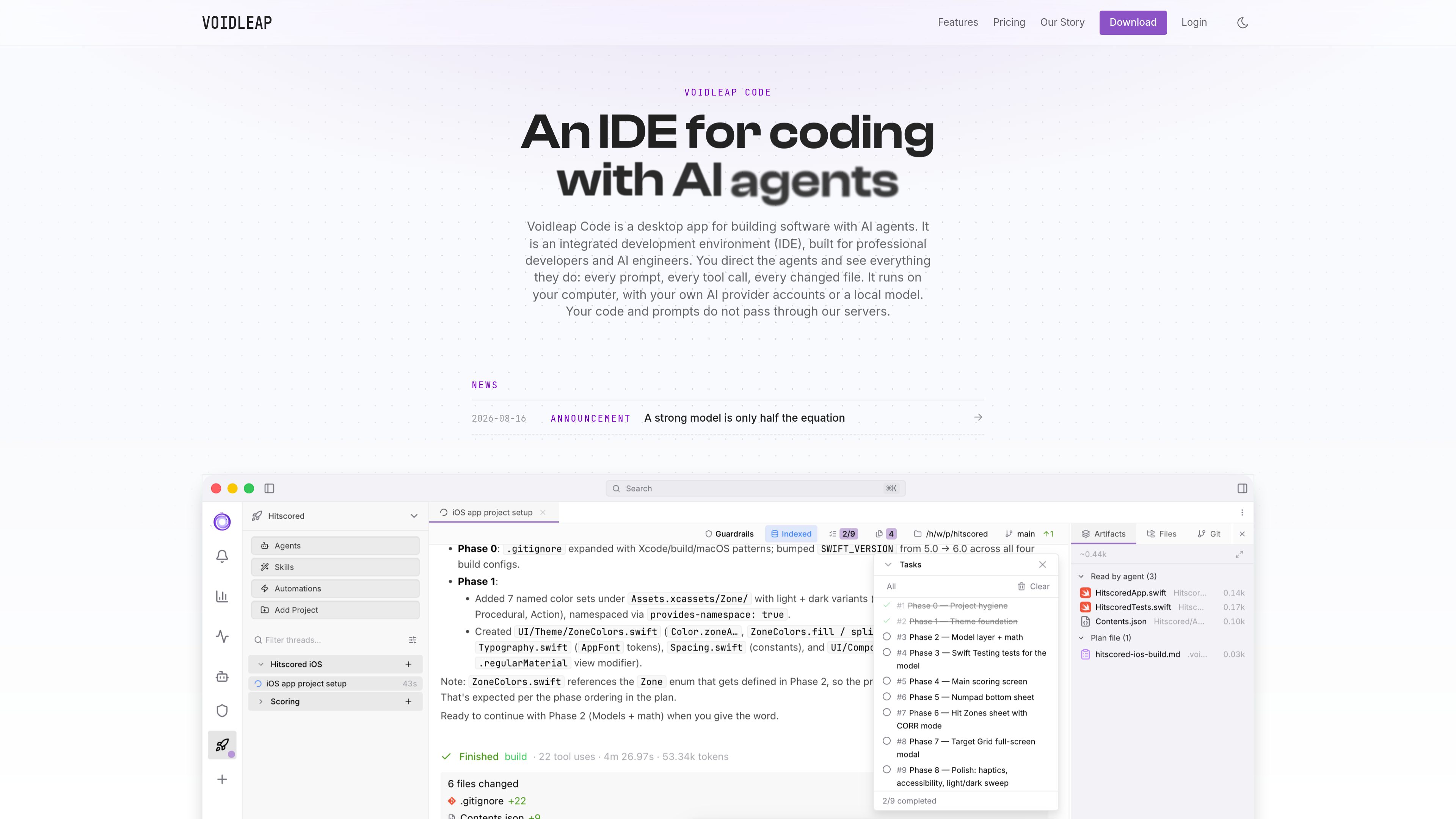
Voidleap Code è un IDE desktop per sviluppatori professionisti e ingegneri AI che creano software con agenti AI. Funziona in locale su Mac e Windows, supporta account di provider cloud o modelli locali e consente di esaminare e controllare prompt, chiamate agli strumenti, contesto e modifiche ai file.

Cos'è Voidleap Code?

Voidleap Code is a desktop integrated development environment for building software with AI coding agents. It combines a code editor with an agent harness that lets developers assign tasks, inspect prompts and tool calls, review file changes, stop or correct an agent, and fork threads for alternative approaches.

The application runs locally on the developer’s computer and supports user-supplied cloud provider accounts or local models. Its stated architecture keeps application data on disk; when cloud inference is used, code and prompts pass directly between the local app and the selected provider rather than through Voidleap’s servers.

Cosa può fare Voidleap Code?

Local runtime and provider choice

The desktop app runs locally and can use supported cloud providers, Ollama, or an OpenAI-compatible local server. Agents, skills, and workflows can be used across providers, with provider changes possible during a thread.

Inspectable agent threads

Prompts, model calls, tool calls, messages, and file changes are visible. Users can edit context, remove items, stop an agent, fork a thread, and run multiple agents in parallel panels.

Command controls and sandboxing

Four execution modes range from read-only to fully automatic operation. Bash and PowerShell commands are parsed before execution, output streams live, sensitive paths are blocked by default, and an optional OS sandbox supports network allow and deny lists.

Configurable agents and extensions

Agents, skills, hooks, MCP servers, slash commands, keybindings, security rules, and automations can be edited visually or as files. Global, workspace, and project scopes support shared configuration with local overrides.

Context and usage management

The dashboard reports cost, tokens, latency, and cache hits, with a live model-call feed. Users can trim or hand off context and control which tools and skills enter the system prompt.

Browser, indexing, and plugin workflows

A built-in browser supports annotations for agents, and a local code index supports navigation. The marketplace and bundle editor provide plugin creation, review, publishing, and per-scope installation workflows.

Casi d'uso

“Reviewing and steering agent work”

Assign an implementation or maintenance task, monitor commands and file edits, intervene when needed, and fork the thread to compare another approach.

“Using multiple model providers”

Connect provider accounts, change models during a thread, or combine providers when different parts of a task call for different model capabilities.

“Private or offline development”

Configure Ollama or another OpenAI-compatible local server for work that should remain on local hardware and avoid provider transmission.

“Building reusable automation”

Package recurring instructions into agents, skills, hooks, slash commands, MCP connections, or automations, then share them through global, workspace, or project scopes.

“Preparing controlled team environments”

The planned Team and Enterprise tiers target shared servers, scoped access, collaboration, SSO, central policy, and on-premises deployment; these capabilities are not described as fully available today.

Domande frequenti

Where does Voidleap Code run?

The desktop app runs on the developer’s computer. The site identifies Mac and Windows as supported today, with a Unix desktop app in internal testing. Application data is stored locally, including under ~/.voidleap/ according to the documentation.

Does Voidleap Code provide model inference?

No. Users connect their own provider subscription or API key, or configure a local model through Ollama or an OpenAI-compatible server. Provider charges and terms apply separately.

Does code pass through Voidleap’s servers?

The product states that code and prompts do not pass through Voidleap’s servers. They move between the local application and the provider selected by the user; Voidleap’s servers are used for license checks and a periodic model-pricing configuration fetch.

Can agents run commands automatically?

Yes, depending on the selected execution mode. The product offers four modes, command parsing, live output, blocked sensitive paths, and an optional OS sandbox. Users can require approval or allow more automatic execution.

Is team collaboration available now?

The Free version is available now. Pro and Team are described as in development; planned Team capabilities include shared servers, scoped invitations, real-time collaboration, handover, and managed seats. Enterprise is planned to add on-premises deployment, central policy, SSO, and key pooling.

Informazioni rapide

Category
Developer Tool
Product type
Desktop IDE for AI-assisted software development
Primary users
Professional developers and AI engineers
Platforms
Mac and Windows; Unix desktop app in internal testing
Model access
User-provided cloud provider accounts or local models
Availability
Free version available; Pro and Team in development

Analisi del traffico di Voidleap Code

I dati sul traffico sono solo a scopo di riferimento.

Domain Rating
4

Alternative a Voidleap Code

Diffsmith logo

Diffsmith

apps.mergeable.io

Diffsmith è un’app nativa per macOS che consente di rivedere le modifiche git locali apportate da agenti di programmazione AI come Claude Code, Cursor, Codex e Copilot. Aggiungi commenti inline e inviali all’agente come prompt o tramite un server MCP locale.

Kilo Code logo

Kilo Code

kilo.ai

Kilo Code è un plugin di programmazione AI multi-agente per JetBrains IDE. Aiuta gli sviluppatori a eseguire e gestire agenti di programmazione AI, esaminare le modifiche in worktree isolati e scegliere da un ampio catalogo di modelli senza uscire dall’IDE.

Caveman logo

Caveman

caveman.so

Caveman è uno stack per l’efficienza dei token destinato agli agenti AI e ai flussi di lavoro in produzione. Aiuta i team a ridurre il contesto idoneo, instradare il traffico e misurare i risparmi verificati tramite strumenti locali, un SDK TypeScript e un livello cloud gestito.

Vaaya logo

Vaaya

vaaya.ai

Vaaya consente agli sviluppatori di collegare GitHub a un saldo di crediti utilizzabile dagli agenti AI e di pagare a chiamata modelli, dati, ricerca, scraping, risorse di calcolo, archiviazione e altri servizi tramite un unico account. È compatibile con gli agenti che supportano MCP e offre anche accesso via chat e API.

Craft Agents logo

Craft Agents

agents.craft.do

Craft Agents è un’app desktop open source per lavorare con agenti AI, collegando modelli, API, server MCP, file locali e un browser integrato.

Superset logo

Superset

superset.sh

Superset è uno strumento desktop per eseguire in parallelo più agenti di coding AI sul proprio computer. Permette agli sviluppatori di separare il lavoro in Git worktree isolati, rivedere le modifiche e far avanzare le attività senza aspettare un agente alla volta.