
Real-time live translation
Cuckoo is built for live translation during conversations, with the site showing it translating spoken language in real time while preserving context.

Cuckoo is a real-time AI translator for global teams, sales, marketing, and support. It enables live multilingual meetings and events with keyword and file briefings.
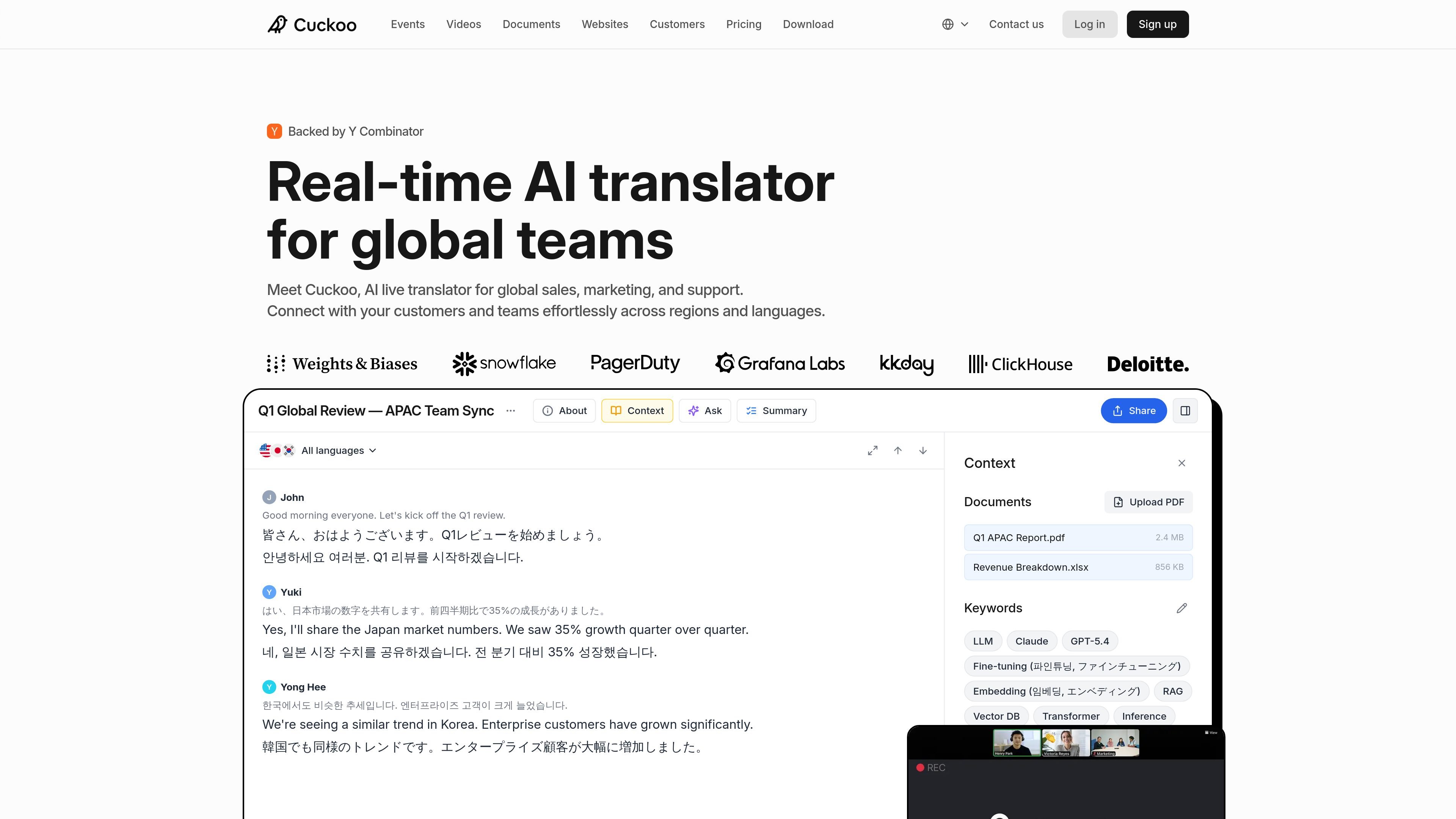
Cuckoo is a real-time AI translator for global teams. It is positioned for sales, marketing, support, and other cross-border conversations where people need to speak and understand each other live across languages.
The site shows Cuckoo joining meetings and events, detecting spoken languages, and translating conversations on the fly while keeping context intact. It can be briefed with keywords and files, and customer examples show it being used for multilingual meetings, developer meetups, customer calls, launches, and regional events.
Cuckoo is built for live translation during conversations, with the site showing it translating spoken language in real time while preserving context.
The product can detect and interpret multiple languages in the same meeting, then translate into selected languages as people speak.
The site shows a simple flow: choose languages, invite Cuckoo, brief it, and start speaking. It is positioned as something teams can use without rehearsal.
Cuckoo accepts keywords and files so it can learn the technical details of a meeting before or during a session.
The product surfaces live transcripts and translations to participants, including through a QR-code flow shown in a customer case.
Cuckoo is shown working in Zoom, Google Meet, Slack, Microsoft Teams, and on mobile or desktop.
Use Cuckoo for sales calls where prospects and internal teams need to communicate live across languages without slowing the conversation.
Use the product in internal team syncs and 1:1s when regional offices need to stay aligned across APAC, the U.S., or other distributed teams.
Use Cuckoo at launches, webinars, town halls, and community events when you want attendees to follow along in their own language during the session.
Use the product for technical developer meetups or product demos where specialized terms, slides, and acronyms matter to understanding.
Use Cuckoo in support or troubleshooting conversations when teams need real-time translation to resolve issues faster with customers or partners.
Cuckoo is designed to run during live meetings and events. The source shows it working inside Zoom, Google Meet, Slack, Microsoft Teams, and on mobile or desktop.
The setup flow shown on the site is simple: select languages, invite Cuckoo, brief it with keywords or files, and then speak normally while it translates in real time.
The pricing page shows plans for Professional, Teams, and Enterprise. Professional and Teams are listed at $100 per month, while Enterprise uses custom pricing and adds items like SSO, IP allowlisting, audit logs, and RBAC.
Customer pages show Cuckoo used for sales calls, multilingual developer meetups, customer support, team syncs, press interviews, webinars, town halls, and regional events.
The site presents Cuckoo as a live translation layer that can learn meeting terminology from keywords, internal documents, and team glossaries. The source does not describe offline translation workflows beyond meetings and events.