
Live retro shaders
Run more than 30 live CRT, VHS, LCD, and classic-computer shaders in real time on top of your screen. The effect is applied instantly without restarting macOS.
RetroMac is a macOS menu bar app that adds live CRT, VHS, LCD and classic OS themes to your screen. Free download, optional Pro upgrade.
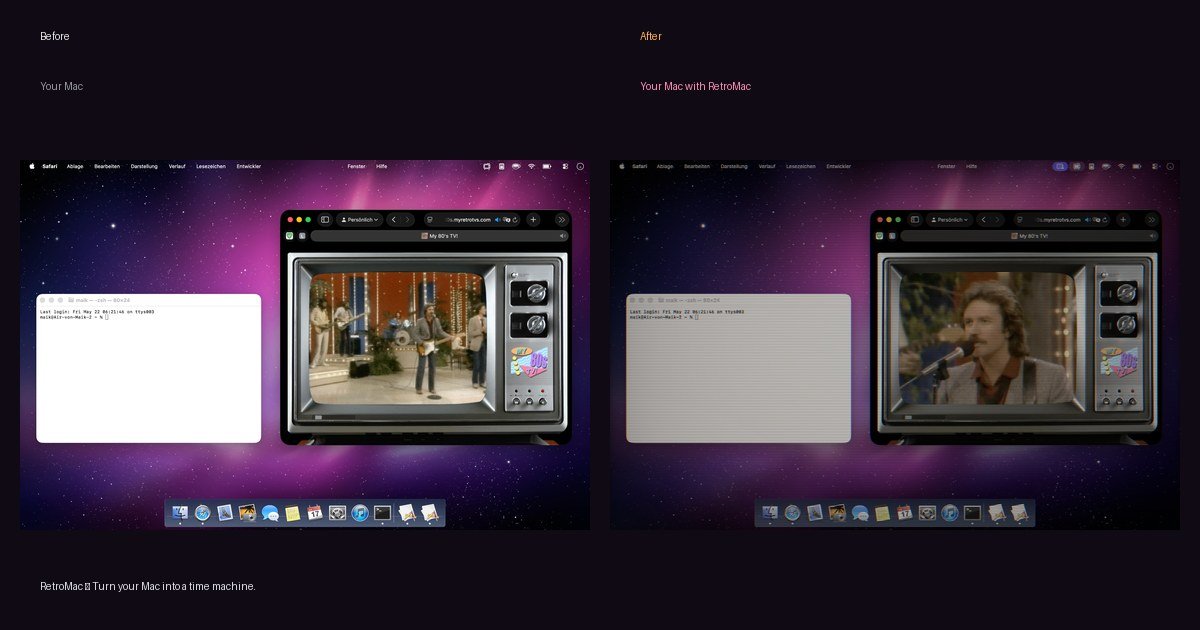
RetroMac is a macOS menu bar app that overlays live CRT, VHS, LCD, and classic operating-system themes on top of your screen. It is designed to give the entire interface a retro look without changing your apps, files, or system settings.
The app supports whole-screen effects, single-window targeting, and per-display control, so you can decide how broadly the shader applies. It also includes classic desktop recreations such as Windows 98, Windows XP, Mac OS 9, Mac OS X, BeOS, and Snow Leopard, along with docks, boot splashes, and some built-in retro-style widgets and games.
RetroMac is free to download and use, runs on macOS 14 and newer, and is described as a universal binary for Apple Silicon and Intel Macs. An optional one-time Pro upgrade unlocks extra shader presets, custom presets, and the webcam shader.
Run more than 30 live CRT, VHS, LCD, and classic-computer shaders in real time on top of your screen. The effect is applied instantly without restarting macOS.
Switch the whole interface to period-style themes such as Windows 98, Windows XP, Mac OS 9, Mac OS X, BeOS, and Snow Leopard, including docks, desktops, and boot splashes.
Target the effect to a full screen, a single display, or just one window. Per-app rules let one app stay sharp while another gets the retro treatment.
Use built-in eco modes that reduce shader load on battery power. The app is positioned to stay responsive on modern Macs and on Apple Silicon hardware.
Use the virtual camera output in Zoom, Google Meet, Teams, or OBS. The download page says it supports iPhone Continuity Camera and USB webcams, plus lower-third overlays.
Customize intensity, colors, icons, dock style, and per-app or per-display rules. The source also says you can import your own Metal shaders and build custom presets.
Apply CRT or VHS shaders to an entire desktop when you want the whole Mac to look like an older display or tape playback setup.
Style only a single app or window so an editor, emulator, or browser can get the effect while the rest of macOS stays normal.
Give a multi-monitor setup different looks on each display, which is useful when you want one screen clean and another screen heavily themed.
Run retro games or pixel-art emulators through scanlines, phosphor masks, and NTSC-style effects to change the presentation without altering the game itself.
Send a CRT-styled feed into Zoom, Meet, Teams, or OBS using the virtual camera for calls, recordings, or streaming.
RetroMac is a macOS menu bar app that overlays live retro shaders and classic operating-system themes on top of your screen. It can switch between CRT, VHS, LCD, and period-style desktop looks without changing your apps or files.
No. The source says RetroMac paints a shader over what is already on screen and does not change your apps, files, or system settings. Quitting the app returns macOS to its normal appearance.
Yes. You can apply a look to the whole screen, a single display, or just one window. The source also says per-app rules are supported.
RetroMac supports macOS 14 or newer and is described as a universal binary for Apple Silicon and Intel Macs. The site also says it is signed and notarized by Apple.
RetroMac is free to download and use. An optional Pro upgrade is a one-time €8.88 purchase that adds extra shader presets, custom presets, and the webcam shader.