
Omnichannel team inbox
Bring WhatsApp, TikTok, Instagram, Facebook Messenger, email, voice, SMS, and web chat into one shared inbox so teams can handle customer conversations without switching tools.

Respond.io is a customer conversation management platform for sales, marketing, and support teams. Manage chats, calls, email, and CRM workflows in one shared inbox.
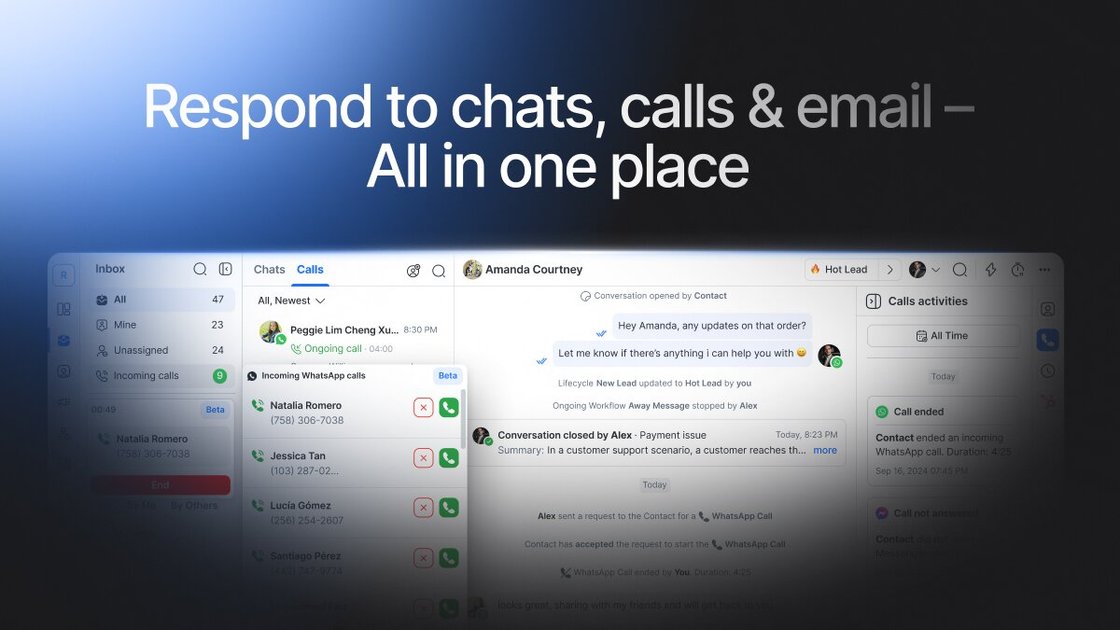
Respond.io is a customer conversation management platform built for sales, marketing, and support teams that need to manage high volumes of chats, calls, and emails from one place. It centers on a shared team inbox, AI Agents, automation, and CRM-connected workflows so customer conversations stay organized even when people switch channels.
The product is designed around the customer lifecycle rather than a single inbox view. The site describes use across lead capture, qualification, sales follow-up, bookings, broadcasts, renewals, and support, with channel coverage that includes WhatsApp, Instagram, Facebook Messenger, TikTok Business Messaging, voice, SMS, email, and web chat. Pricing is published in tiers, and the pricing page shows a free 7-day trial.
Bring WhatsApp, TikTok, Instagram, Facebook Messenger, email, voice, SMS, and web chat into one shared inbox so teams can handle customer conversations without switching tools.
Use AI Agents to answer FAQs, qualify leads, route chats, recommend products, update CRM data, and help book appointments across channels.
Collaborate with teammates using shared customer history, internal coordination, canned responses, and AI-generated reply drafts to keep responses consistent.
Automate follow-up work with workflows, broadcasts, and routing so teams can move leads through sales, reminders, and retention campaigns at scale.
Connect to CRMs and external tools such as HubSpot, Salesforce, Google Sheets, Zapier, Make, n8n, and custom APIs or webhooks to keep customer data and workflows in sync.
Track response times, campaign performance, and conversions with built-in reports and analytics to understand which channels and actions drive results.
Centralize incoming messages from ads, social channels, and other touchpoints so leads land in one inbox with shared context for fast follow-up.
Use AI Agents and routing rules to handle FAQs, qualify prospects, and send high-intent conversations to the right teammate.
Manage sales and support conversations across chat, calls, and email with shared history, canned replies, and collaboration tools.
Schedule appointments and reduce back-and-forth by combining messaging with booking links and AI-assisted conversation handling.
Send targeted broadcasts for promotions, renewals, upgrades, or CSAT-style follow-up when teams need to stay in touch after the first sale.
Respond.io is set up to bring customer messages, calls, and email into one shared inbox, so teams can work from a single conversation history across channels. The source shows options for team collaboration, AI-assisted replies, automation, and integrations, but it does not provide setup steps in detail.
The pricing page shows four plans: Starter, Growth, Advanced, and Enterprise. Starter includes shared inbox features and basic tools, while Growth adds broadcasts, workflow automation, AI Agents, advanced reports, Zapier and Make integrations, and a developer API.
The sources indicate support for WhatsApp Business Platform and WhatsApp Business Calling API, Facebook Messenger and Messenger Calls, TikTok Business Messaging, Instagram, VoIP calls, SMS, email, web chat, and custom channels through API or webhooks. The exact channel set depends on the integration you connect.
The product pages describe AI Agents as tools that can answer FAQs, qualify leads, route enquiries, update customer data and lifecycle stages, recommend products, and book appointments. The sources do not list hard limits or detailed configuration requirements.
respond.io appears best suited to B2C teams that manage high volumes of inbound conversations across chat, calls, and email, especially when they need shared inbox collaboration, automation, and CRM-connected workflows. The sources do not position it as a tool for cold messaging or group messaging.