
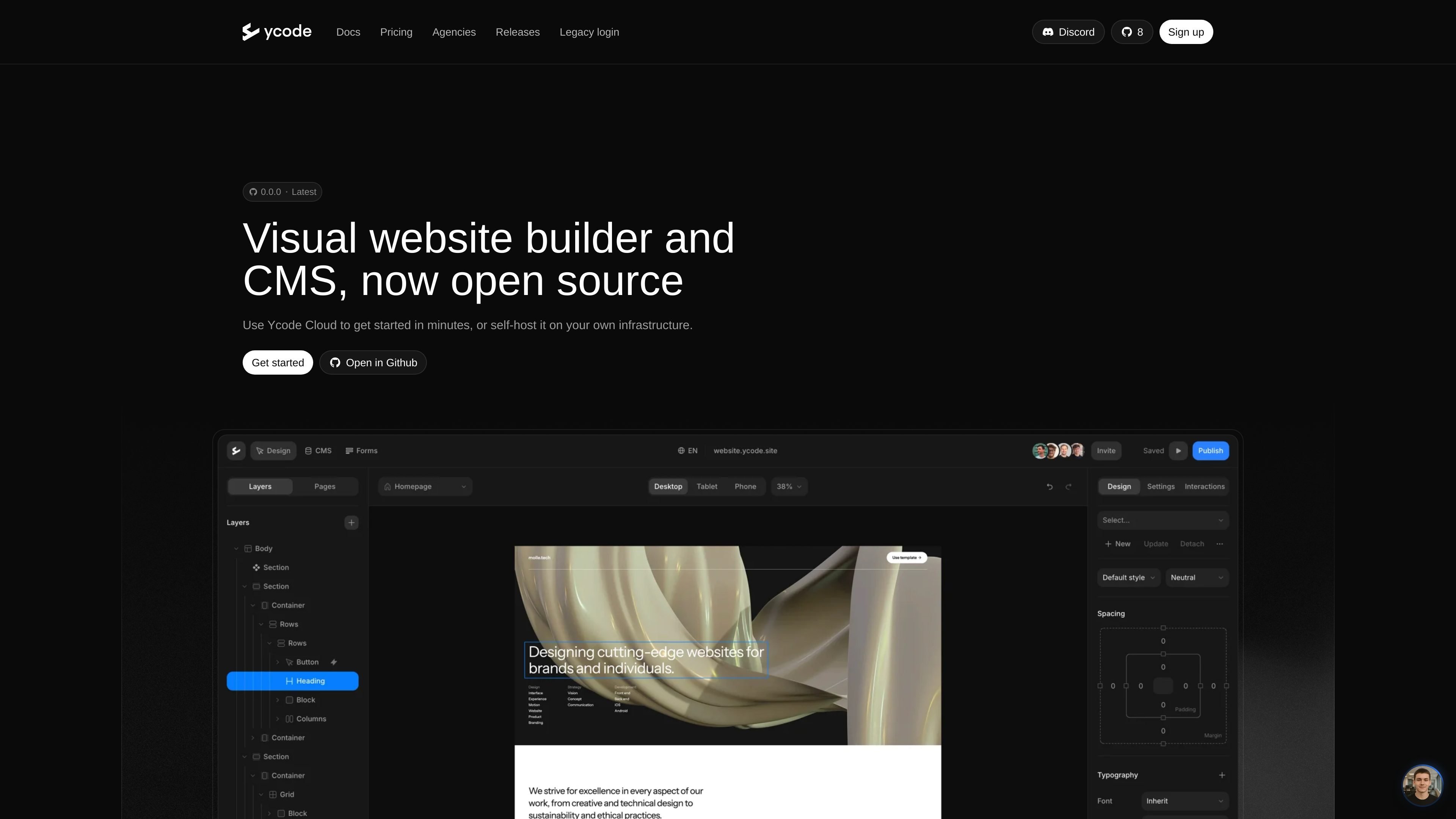
Visual builder with CMS
Design websites in a visual interface while managing structured content with the built-in CMS.

Ycode es un creador de sitios web y CMS de código abierto para diseñar, alojar y actualizar sitios personalizados, con self-hosting, Ycode Cloud y flujos para agencias.
Ycode is an open source website builder and CMS for designing, hosting, and updating custom websites. The site presents it as a visual builder that can run on Ycode Cloud or on your own infrastructure, giving teams a choice between a managed setup and self-hosting.
The product is aimed at people who want a website platform with more control over code and deployment. The homepage emphasizes self-hosting, while the agency page adds a white-label workspace for client sites and the comparison pages position Ycode as an alternative for teams moving from Framer or Webflow.
Design websites in a visual interface while managing structured content with the built-in CMS.
Choose between Ycode Cloud or self-hosting, depending on whether you want a managed setup or control over your own infrastructure.
Start from a GitHub repository, deploy to Vercel, and connect Supabase when running Ycode yourself.
Import Figma designs, migrate from Webflow, or build directly from AI tools through Ycode MCP.
Use a white-label dashboard and builder on the Agency plan to present the platform under your own brand.
Manage unlimited client websites and collaborators under a single agency subscription.
Teams that want to build a website visually while keeping the code and hosting outside a closed ecosystem can use Ycode’s open source setup.
Agencies managing several client sites can use the white-label workspace, unlimited users, and fixed monthly pricing to keep delivery and billing predictable.
Designers and product teams can move from Figma into a site build without rebuilding everything from scratch, based on the Figma import workflow mentioned on the agency page.
Existing Webflow users who want an open source path can treat Ycode as a migration target, with pages describing movement of CMS content, pages, and designs.
Teams adopting AI-assisted workflows can use Ycode MCP to build pages and manage content from tools such as Claude or OpenAI, according to the agency page.
Ycode can be run as an open source website builder and CMS, with the option to self-host it on your own infrastructure or use Ycode Cloud for a managed setup.
Yes. The agency page says Ycode supports unlimited projects and users under one fixed monthly price, with a white-label dashboard and builder for client work.
The source describes Ycode as a visual website builder with a built-in CMS. The comparison pages also mention moving from Figma and Webflow, and building websites directly from AI tools through Ycode MCP.
The pricing content shows three options: self-hosting on a free open source tier, Ycode Cloud, and an Agency plan. The pricing page itself returns a not found page, so plan details should be taken from the homepage and related pages rather than a dedicated pricing page.
The source supports use as an alternative to Framer and Webflow for teams that want more control over code and infrastructure, but it does not provide a full feature-by-feature comparison.
Los datos de tráfico son solo como referencia.

webiny.com
CMS headless de código abierto y autohospedado para que los equipos gestionen contenido estructurado, sitios web y archivos bajo su propio control, con despliegues en AWS, multiinquilinato, flujos de trabajo y extensibilidad para desarrolladores.

hexomatic.com
Plataforma sin código para extraer datos de sitios web y automatizar flujos de trabajo repetibles de investigación, generación de leads y contacto.

www.dograh.com
Dograh es una plataforma de código abierto y autoalojable para crear y desplegar agentes de voz en producción. Conecta telefonía, voz, modelos de lenguaje, texto a voz, flujos de trabajo y observabilidad en tu infraestructura o en su nube gestionada.

typeform.com
Crea formularios inteligentes y automatiza flujos de trabajo para recopilar respuestas, gestionar seguimientos y realizar investigaciones moderadas por IA sin código.

jetbrains.com
JetBrains crea herramientas para desarrolladores, equipos y empresas, como IntelliJ IDEA, PyCharm, DataGrip, WebStorm, Rider y CLion. Sus IDE combinan navegación y sugerencias basadas en el código con flujos integrados para ejecutar, depurar y probar, además de herramientas para CI/CD, gestión de proyectos, calidad del código y documentación.

baserow.io
Baserow es una plataforma de bases de datos sin código y de código abierto para crear bases de datos, aplicaciones, paneles y automatizaciones, en la nube o mediante alojamiento propio.