
Multiple video input methods
The tool page shows that videos can be generated from text, images, or multiple image references, covering different starting materials.

海螺视频 is a web-based AI video generator for turning text, images, or multiple image references into videos, with entry points for images, voice, and music.
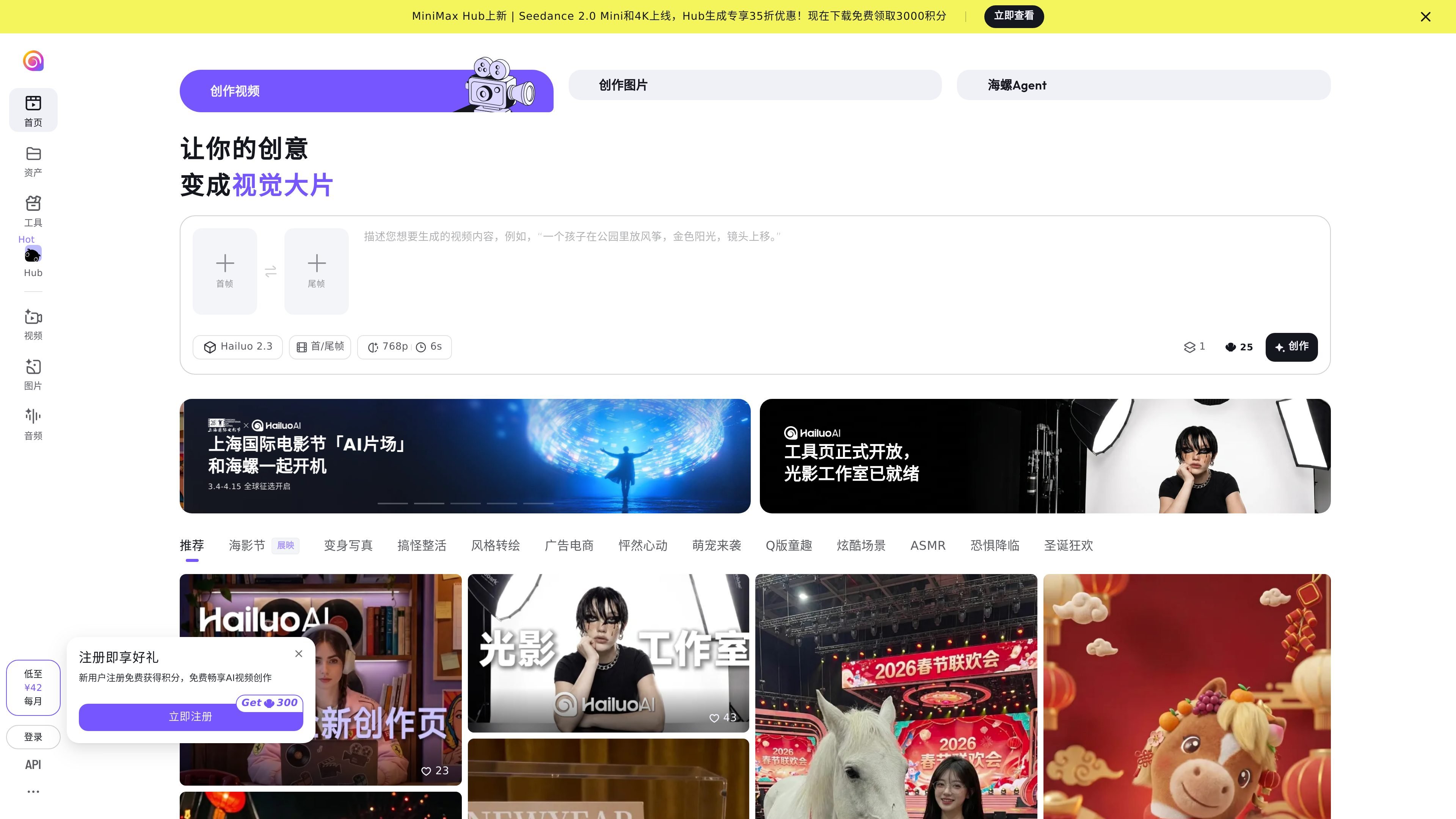
Hailuo Video is an online tool for AI visual creation. Both the homepage and the tool pages position it as a creative space where “every idea is a blockbuster.” The public pages display entry points for video, image, voice, and music, showing that it supports not only video generation but also a broader AI content production workflow.
Based on the disclosed features, Hailuo Video’s core use is turning text, images, or multiple image references into videos, while also supporting first-frame/last-frame creation, camera movement descriptions, storyboard layouts, viewpoint handling, and lighting adjustments. It is more like an integrated creative workstation, suitable for users who want to move from concept and reference images to a finished video.
The tool page shows that videos can be generated from text, images, or multiple image references, covering different starting materials.
The video page emphasizes first-frame and last-frame creation and provides descriptions for controlling camera movement, making it suitable for more explicit shot guidance.
The tool page provides entry points such as multi-panel storyboards, full-view workshop, lighting studio, and Hailuo Agent, covering different stages such as storyboarding, viewpoint, and lighting adjustments.
The page also provides entry points for creating images, voice, and music, showing that it is not limited to video generation.
The image generation page shows multiple image models, including Seedream 5.0, indicating that the image creation side supports different model choices.
The homepage and tool page both show “Free trial” or “Try now,” indicating that some features can be tried before continuing creation.
Suitable for writing a short prompt first, then using video generation to quickly obtain a visual draft and validate the shot composition, mood, and pacing.
Suitable for uploading reference images or using first-frame/last-frame methods to maintain visual continuity and create more controllable short videos.
Suitable for creators who need to break down shots and organize multiple visuals, using multi-panel storyboards and the full-view workshop to structure the story.
Suitable for continuing to process image, voice, or music assets on the same site, forming a continuous creation flow from visuals to sound.
Suitable for scenarios that require adjusting image lighting or trying different style transformations, such as the use cases hinted at by the page examples for advertising, e-commerce, cute pets, or chibi-style content.
Hailuo Video provides entry points for generating videos from text, images, and image references, including multiple images. The page also shows tools for creating videos, images, voice, and music, making it suitable for turning different materials into editable AI-generated content.
The page content shows that video creation uses inputs such as descriptive text, first frames, and last frames; the video page also mentions describing the desired video content and focusing on camera movement control. Overall, the workflow is geared toward entering source material or prompts first, then generating results.
The website presents an online creation tool interface with entry points for video, image, voice, and music features, but the visible content does not clearly state whether it offers a standalone API, desktop app, or mobile app.
The public pages show paid entry points and pricing hints, such as “from ¥42 per month” and membership-related information, but the visible text does not fully list each plan, quota, or limitation.