
Add Zotero context
Attach Zotero items, PDFs, notes, snapshots, tags, collections, selected text, current pages, images, and screenshots so the agent can work from the exact material you are reading.

BibGenie is an AI research agent inside Zotero for searching, reading, organizing, and saving research material with traceable citations and OpenAlex discovery.
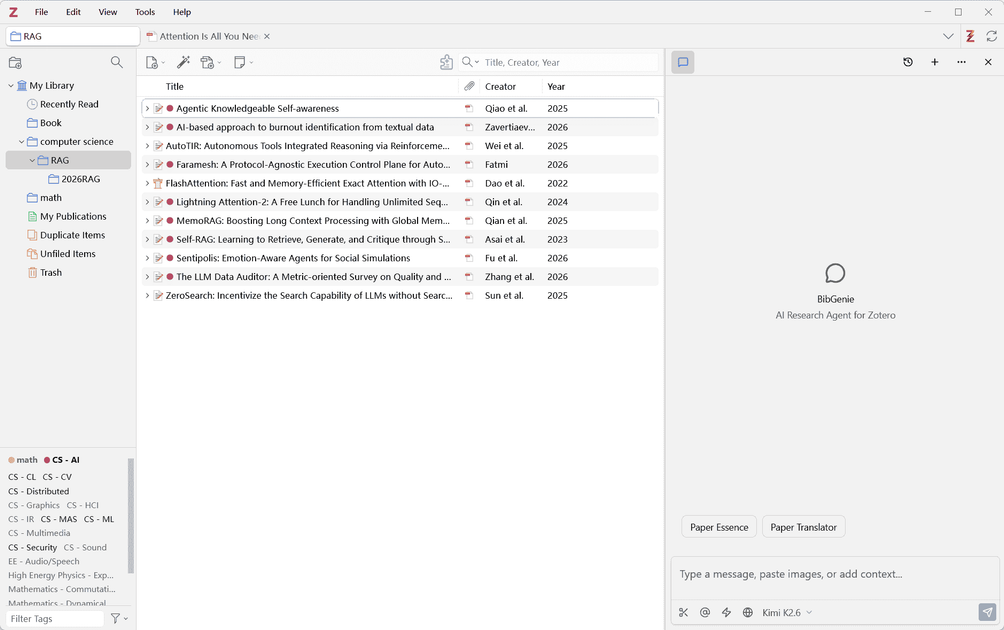
BibGenie is an AI research agent built directly into Zotero. It works inside your Zotero workspace rather than as a separate chatbot, using the library, PDFs, snapshots, notes, selected text, page context, images, and screenshots you already have open.
Its main job is to help researchers read, search, compare, organize, and preserve material without moving the work into a different app. BibGenie can search a Zotero library, use OpenAlex for external scholarly discovery, add traceable citations, and save useful output back as Zotero notes.
Attach Zotero items, PDFs, notes, snapshots, tags, collections, selected text, current pages, images, and screenshots so the agent can work from the exact material you are reading.
Search your library by title, author, year, DOI, tag, collection, journal, conference, keyword, or semantic meaning, then ask for paper summaries, methods, findings, limitations, formulas, and figure explanations.
Use OpenAlex to discover papers, authors, venues, citation neighbors, and research trends beyond your saved library, with traceable results.
Automatic citations can reference PDFs, notes, snapshots, web pages, and OpenAlex results, and BibGenie can save responses back into Zotero notes with headings, lists, formulas, code blocks, tables, links, and citations.
Ask BibGenie to inspect, classify, and organize items with tag, collection, metadata, and item-movement workflows that emphasize preview-first changes for batch edits.
Use recommended official models or connect your own providers and local runtimes, including BYOK setups, Ollama, LM Studio, and compatible endpoints.
Ask for methods, findings, assumptions, limitations, or a plain-language explanation of a paper while keeping the relevant PDF, note, or selected passage in context.
Search a Zotero library by metadata or semantic meaning when you need to locate a paper, compare related items, or narrow a collection by topic or project.
Use OpenAlex and web access to gather public scholarly records or supporting web pages when your Zotero library does not contain enough material.
Turn AI responses into Zotero notes, complete with headings, lists, tables, formulas, links, and citations, so useful output stays attached to the research record.
Review tags, collections, and metadata before applying changes when a library needs cleanup or reorganization at batch scale.
BibGenie runs as an AI research agent inside Zotero. The source pages show it working with Zotero items, PDF attachments, snapshots, notes, selected text, page context, images, and screenshots, then saving useful responses back as Zotero notes.
The pricing page shows Free, Pro, Max, and Pro Lifetime options. Free includes core chat, Add Context, library search, and note saving; Pro and Max add OpenAlex academic search and web access, with more credits for heavier use.
Yes. The docs say BibGenie can search your Zotero library with keyword or semantic search, and the homepage and docs also describe OpenAlex for discovery beyond your saved library.
BibGenie uses traceable citations that can point back to PDFs, notes, snapshots, web pages, and OpenAlex results, and the changelog notes citation reliability improvements across these sources.
The source pages indicate that you can use custom or local models, including BYOK setups and providers such as Ollama and LM Studio. Chat history and many settings are stored locally, and custom model requests go directly to the provider you configure.