

Selection-based pattern generation
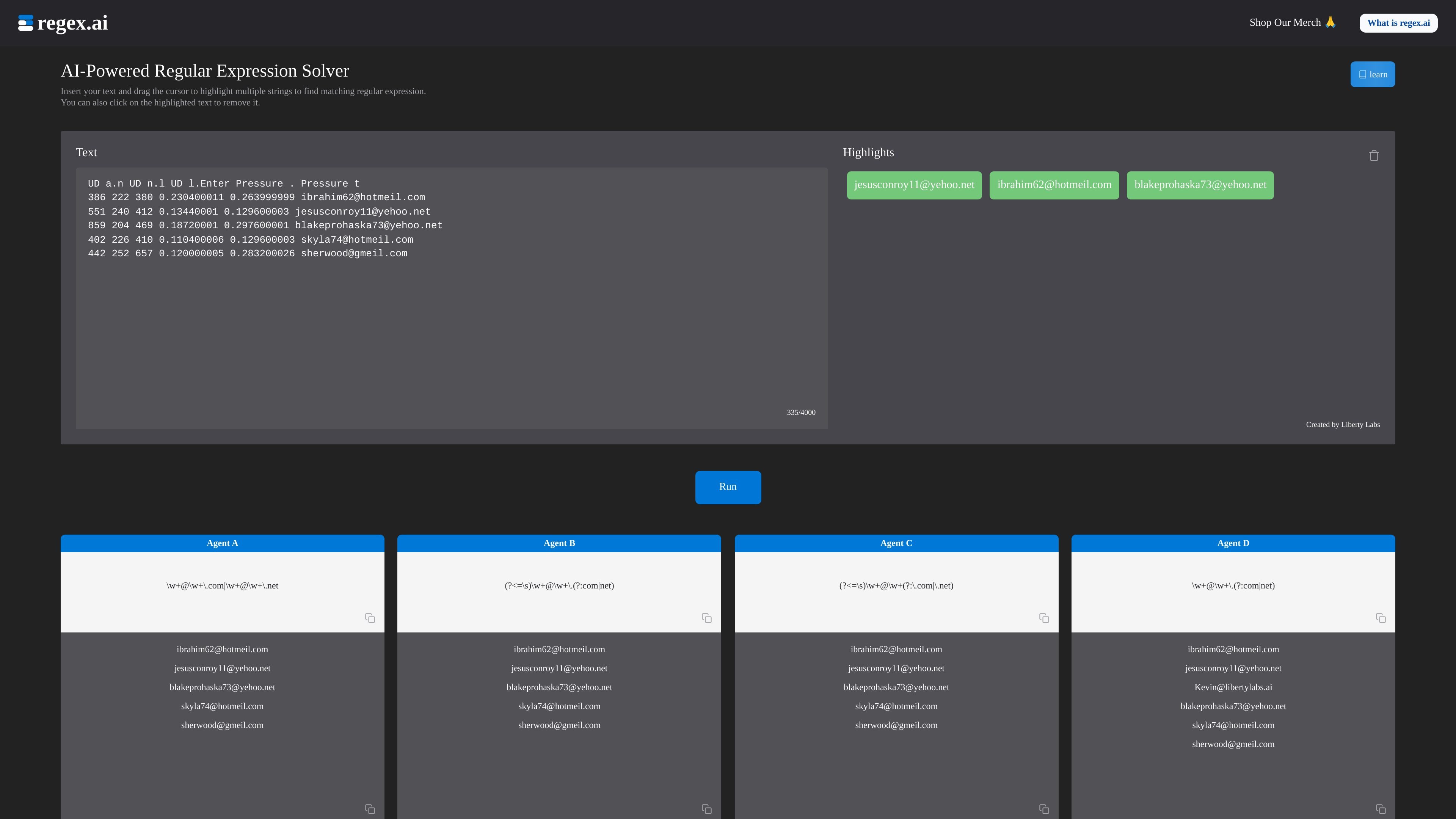
Drag the cursor over multiple strings in a text block to define examples of the desired matches. The solver analyzes both the text and highlighted sections to generate regex patterns.
Regex.ai is a web service that uses AI to generate regular expressions from sample text and selected matches. Users insert a text block, highlight the strings they want to match, and run the solver to get candidate patterns.
Created by Liberty Labs, the tool helps translate concrete examples into reusable text search patterns. Its four agents approach the same input differently, giving users alternative expressions to inspect alongside their matching results.
Compare each pattern’s matches with your intended examples, then test the expression in your target regex engine with representative matching and non-matching cases. A pattern inferred from selected samples is a starting point; it does not establish complete input validation or accuracy on unseen data.
Drag the cursor over multiple strings in a text block to define examples of the desired matches. The solver analyzes both the text and highlighted sections to generate regex patterns.
Click highlighted text to remove it from the selection. This lets users adjust the examples before running the solver.
Agent A generalizes selected examples. Agent B looks for a pattern in the highlights and the surrounding text. Agent C examines adjacent single characters, while Agent D focuses on character counts and types. Compare their results rather than assuming one always fits best.
Each agent displays a generated expression and the strings it matches. A “view all” control lets users inspect additional results when assessing a candidate pattern.
The documentation introduces metacharacters and special sequences, with examples covering character sets, anchors, repetition, grouping, alternatives, digits, whitespace, and word characters.
Highlight examples of a recurring value, such as email addresses, to generate a pattern for locating other matches in the same text block.
Review the expressions and matches returned by different agents when a set of examples could support several patterns. Inspect which strings each candidate includes before choosing an expression.
Generate a pattern from familiar text, then use the syntax reference to understand its character classes, repetition rules, grouping, or anchors.
Insert your sample text, drag the cursor to highlight multiple strings you want to match, and select Run. Click a highlighted string to remove it if you need to revise your examples.
The agents use different approaches to the same examples: generalizing highlights, finding patterns across the text, examining adjacent characters, or focusing on character counts and types. Their expressions can therefore produce different matching results.
Yes. The results show matching strings beneath each agent’s expression, with a “view all” option for additional matches.
No. Selected examples can lead to broad or narrow patterns. Inspect the matching results, add representative examples, and test matching and non-matching cases in the regex engine where you will use the expression. An email-shaped example is not proof of complete email validation.
流量數據僅供參考。