
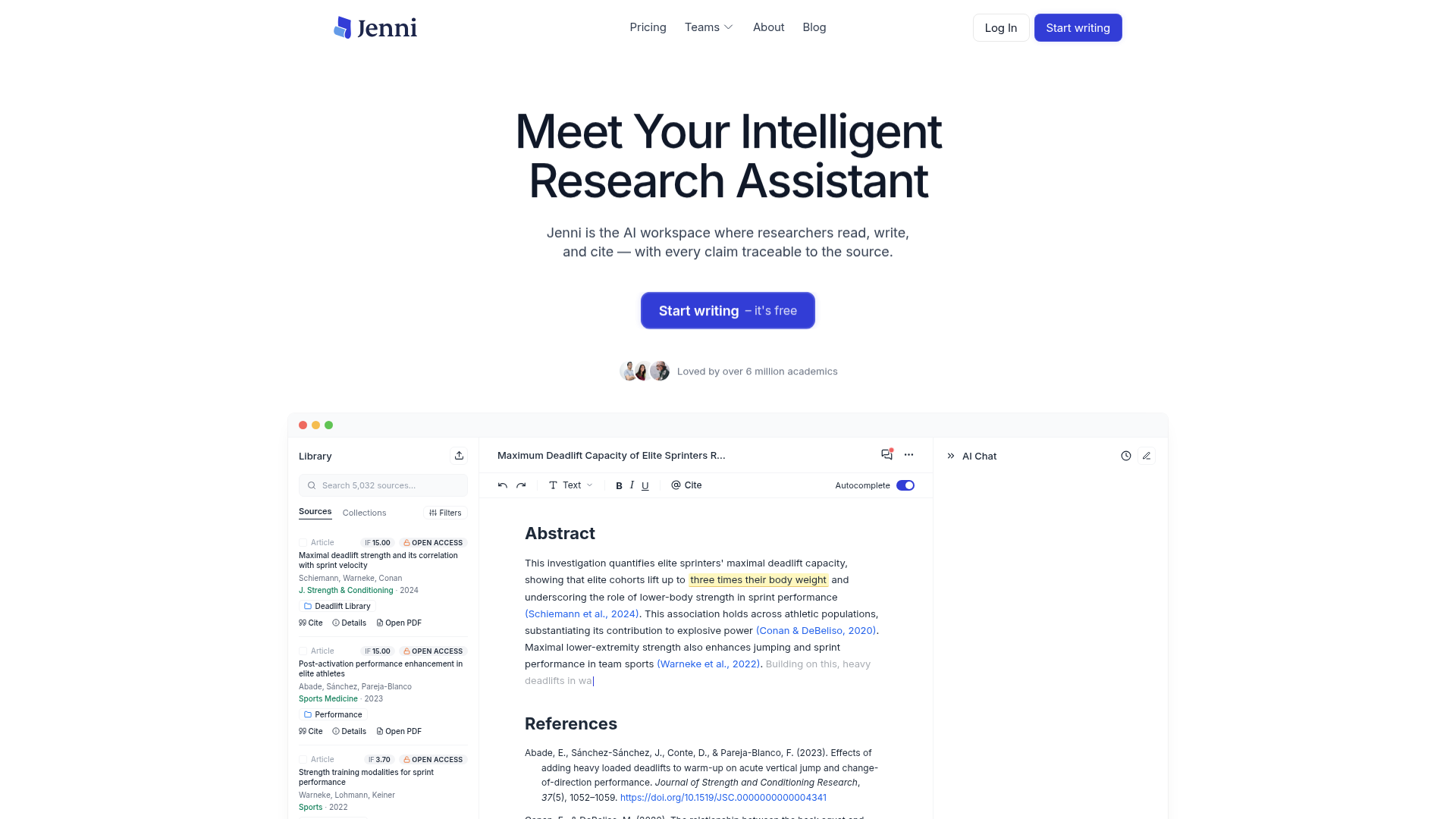
AI autocomplete and editing
Use source-grounded autocomplete while drafting and AI edits while revising. Choose which sources inform a section instead of treating every generated suggestion as verified evidence.

Read sources, draft with AI, check citations, and export academic documents in one research workspace.
Jenni is an AI writing and research workspace for students and researchers. Build a library from PDFs, reference-manager collections, or academic search, then draft with autocomplete informed by selected sources. Citation links let you inspect the supporting PDF page or paragraph while developing your argument.
Library chat helps compare findings or understand a methods section. Reviews cross-reference claims against sources and flag citation-support or proofreading issues. You can revise the draft and export it for work outside the editor. AI suggestions and checks are aids to research; the author remains responsible for source accuracy and the final argument.
Use source-grounded autocomplete while drafting and AI edits while revising. Choose which sources inform a section instead of treating every generated suggestion as verified evidence.
Upload PDFs, import collections from Zotero or Mendeley, and search academic sources from the workspace. Upload size, page count, and library capacity depend on the plan.
Add inline references in styles such as APA, Chicago, Harvard, IEEE, and Vancouver. Follow citation links to the source PDF to check support for a claim.
Ask questions across your library, compare findings, or investigate a methods section. Responses include citations so you can inspect the underlying sources.
Reviews compare claims with your sources and flag issues such as contradictions, unsupported statements, weak support, or overstatement, alongside academic proofreading feedback.
Export editor body content on Free; paid plans support full document export. The workspace supports manuscript handoff in formats including .docx, LaTeX, and HTML.
Develop an outline or section using your selected research sources, revise the AI suggestions, and add citations in the required referencing style.
Build a PDF library and use cited chat to compare methods or findings across papers, then inspect the source documents for context.
Run claim-support and proofreading checks, resolve issues against the source PDFs, and export the revised document for further editing or submission.
Yes. Free includes 10 AI autocompletes per day, 10 PDF uploads, unlimited citations, and export of editor body content. No card is required to start. Other Free AI tools have smaller allowances; paid plans add capacity and full document export.
Plus includes 5,000 autocompletes, 500 AI edits, and 500 chat messages per month, with unlimited library uploads and full document export. Pro lists unlimited autocomplete, edits, chat, reviews, and workflows. Upload size and page limits still apply; choose the billing cycle and plan in the app.
Free allows PDFs up to 25 MB and 150 pages. Plus allows up to 100 MB and 500 pages. Pro allows up to 100 MB and 1,000 pages. Plus and Pro both include unlimited library uploads.
Plus includes live chat support. Pro includes priority support. The pricing page also states that subscriptions can be canceled anytime.
No. Inspect the linked source, check whether it supports the wording and context, and review AI-generated suggestions before including them. Reviews flag potential weaknesses; they do not guarantee a correct argument, plagiarism-free submission, or acceptance by a journal or institution.
流量数据仅供参考。

skriptr.ai
面向学生的 AI 研究与写作工作区:整理课程资料,基于上传来源回答问题并提供页码级引文,支持起草、修改及从笔记和阅读材料生成测验与闪卡。

blainy.com
Blainy 为学生和研究人员提供 AI 辅助学术写作工作区,可搜索论文、添加文内引用、在 PDF 中提问,并借助自动补全和改写完善论文草稿。

ai-writer.com
面向学术界和行业的科研型 AI 写作工具,提供来源引用与结构化综述撰写

ibiling.cn
Biling AI Writing 为职场人士、学生及创作者提供 AI 写作辅助,支持文章、学术文档和职场材料的起草与修改,也可生成演示文稿内容及配套演讲稿。

paperred.com
面向学生和科研人员的学术写作与研究工具集,提供草稿撰写、文本相似度检查、AI 生成内容检测、编辑及文档工具。

66paper.cn
66论文是一款用于论文选题与写作的在线 AI 工具,支持免费大纲、资料投喂、多级章节编辑和多语言初稿生成。