

Natural-language spreadsheet automation
Shortcut automates spreadsheet work from natural-language instructions, with the site positioning it as an AI agent for Excel rather than a general chat assistant.
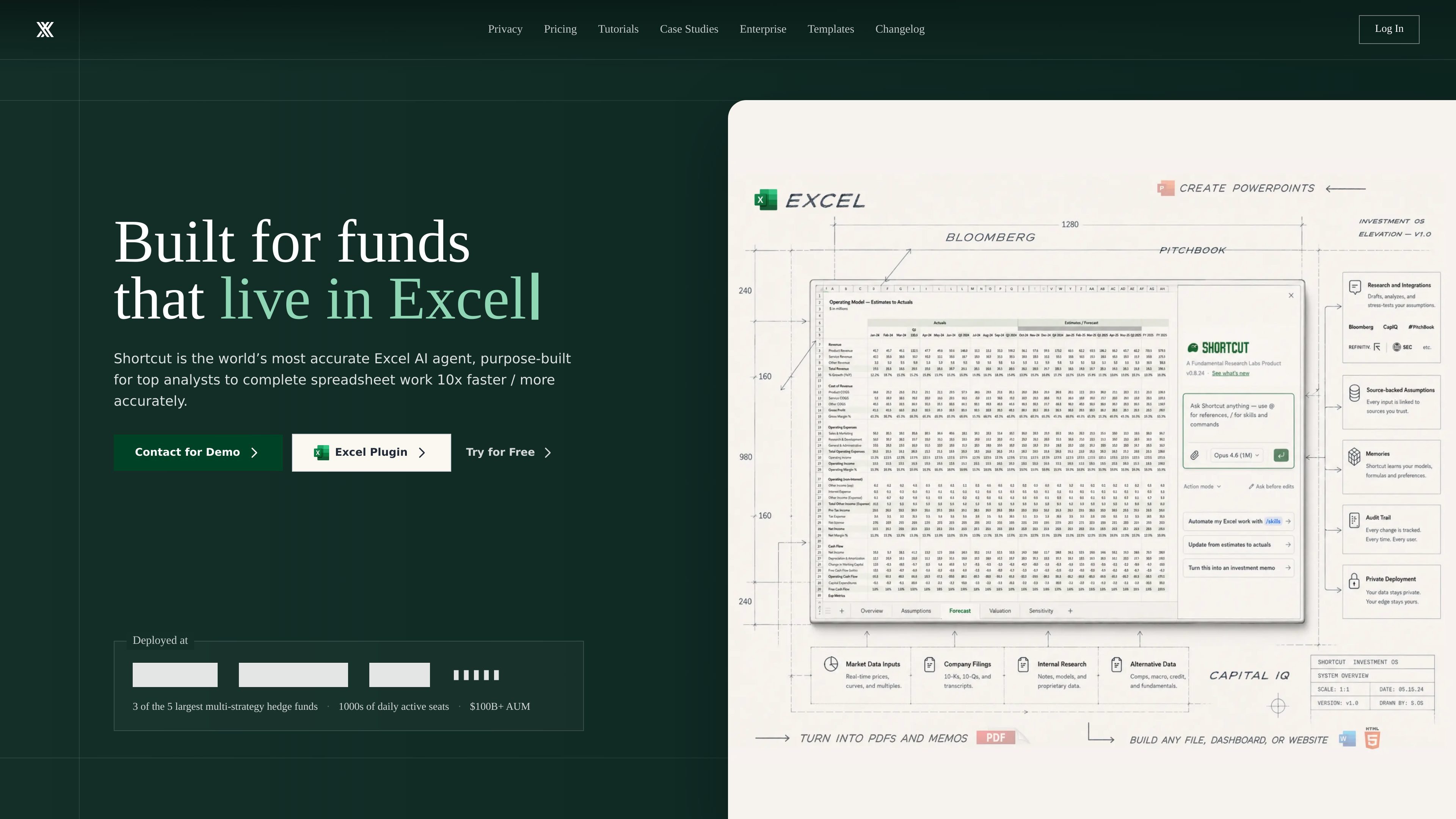
Shortcut is an AI spreadsheet automation product focused on Excel work. The site positions it as a superhuman AI Excel agent that helps users complete spreadsheet tasks faster by turning natural-language instructions into spreadsheet edits and model work.
It is aimed at people who build or maintain financial models and other complex spreadsheets, including LBOs, DCFs, and 3-statement models. Shortcut runs on the web, desktop app, Excel plugin, and Google Sheets plugin, and the company also offers Teams and Enterprise plans for organizations that need shared access, security controls, and administrative management.
The product emphasizes Excel compatibility, formula-driven outputs, and auditable changes. The site also highlights enterprise security features, support for team collaboration, and custom options for larger organizations.
Shortcut automates spreadsheet work from natural-language instructions, with the site positioning it as an AI agent for Excel rather than a general chat assistant.
The product is presented as a tool for building financial models such as LBOs, DCFs, and 3-statement models in minutes.
Shortcut works as an Excel plug-in and also as a standalone web or desktop app, so users can choose the interface that fits their workflow.
The product emphasizes formula-driven outputs, so changes update dynamically when inputs change instead of relying on static hard-coded values.
Shortcut shows changed cells and lets users revert, restore, or undo changes in the action sequence, which helps with review and auditability.
The pricing and enterprise pages describe pooled credits, shared resources, usage statistics, and group-based access control for teams.
Use Shortcut to draft or update LBO, DCF, and 3-statement models from instructions instead of editing formulas and cells manually.
Use the Excel plugin when you want AI assistance inside a familiar workbook environment without leaving Excel.
Use the web or desktop app when you need another way to access the same spreadsheet automation workflow outside the plugin.
Use Teams features to share prompts, templates, AI rules, and pooled credits across a group that works on spreadsheets together.
Use Enterprise options when your organization needs SSO, MFA, access controls, custom integrations, and dedicated support.
Shortcut offers a Free plan and paid plans for individual users, teams, and enterprises. The pricing page also says Teams can sign up self-service, while Enterprise uses custom pricing and a demo flow.
The pricing page says you can use Shortcut on the web, desktop app, Excel plugin, and Google Sheets plugin. The home page also presents Shortcut as an Excel native plugin and standalone app.
The site describes Shortcut as an AI spreadsheet agent for Excel work such as financial models, including LBOs, DCFs, and 3-statement models.
Teams under 15 seats can start self-service, invite teammates, and collaborate with shared credits, prompts, templates, and AI rules. Enterprise is positioned for larger organizations that need custom integrations, SLAs, and dedicated support.
The support page says users can contact the team through a form, and can also join the Discord community for quick help, tips, and feature requests.
流量数据仅供参考。

www.microsoft.com
Microsoft Excel is a spreadsheet application for organizing data, building plans and budgets, and turning information into readable insights. Microsoft 365 subscribers can use Copilot in Excel to analyze data, update tables, and uncover patterns.

workspace.google.com
Google Sheets is a cloud-based spreadsheet application for creating, analyzing, and sharing data collaboratively. It supports real-time co-editing, Excel file compatibility, connected data workflows, and Gemini-assisted spreadsheet tasks.

gptforwork.com
GPT for Work adds an AI agent and bulk-processing tools to Excel and Google Sheets. It helps spreadsheet users clean, analyze, translate, enrich, and reorganize data, as well as create and check formulas.

rows.com
Rows 是一款基于电子表格的 AI 数据分析工具,可导入、分析并分享数据,无需编写代码、SQL 或公式。

formulashq.com
面向 Excel 和 Google Sheets 的 AI 表格助手,生成并解释公式、正则表达式及自动化脚本

aiexcelbot.com
AI Excel Bot 可根据自然语言提示生成 Excel 和 Google Sheets 公式,并提供公式解释、VBA 代码生成及 Chrome 扩展访问。