
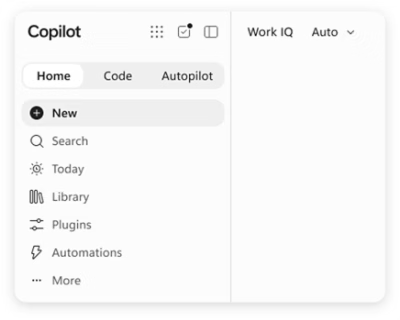
Work-grounded responses
Work IQ uses context from emails, chats, meetings, files, projects, people, and business relationships to make Copilot answers and generated content more relevant to the organization.

Microsoft Copilot is an AI work assistant integrated with Microsoft 365 apps and grounded in organizational work context. It helps individuals, businesses, and enterprises create content, find answers, and delegate multi-step tasks across connected apps and workflows.
Microsoft Copilot is an AI assistant for work that connects to work content and the applications people already use. It combines chat, work-context grounding, and multiple AI models to help users move from questions and ideas to finished work. Microsoft positions it for individuals, businesses, and enterprise organizations.
Copilot is integrated into Word, Excel, PowerPoint, Outlook, and Teams. Its Work IQ intelligence layer uses organizational context such as emails, chats, meetings, files, projects, people, and business relationships to make responses and drafts more relevant. Work IQ can also connect with business systems including Dynamics 365 and Power Platform while preserving existing permission boundaries.
The product includes both conversational and agentic workflows. Chat provides answers grounded in work content, while Cowork handles multi-step tasks across apps, data, and workflows, with checkpoints for review before actions such as sending an email or making a significant update. Users can also create work-grounded agents with Agent Builder and extend them with Copilot Studio.
Work IQ uses context from emails, chats, meetings, files, projects, people, and business relationships to make Copilot answers and generated content more relevant to the organization.
Copilot is integrated into Word, Excel, PowerPoint, Outlook, and Teams, allowing users to work with AI within the applications where their work already takes place.
Copilot brings leading AI models into one experience. Its Auto option weighs factors such as accuracy, speed, and cost to help select the model and effort for a request.
Cowork plans and executes multi-step work across apps, data, and workflows. It can pause for user approval before actions such as sending email or making a significant update.
Agent Builder lets users create personalized, work-grounded agents with natural-language instructions. Copilot Studio can be used to extend and manage agents as needs grow.
Copilot is available across desktop, mobile, and web, with voice, keyboard, or pen input. Microsoft describes enterprise controls for data, identity, privacy, and keeping work and personal accounts separate.
Cowork can bring together account history, recent emails, chats, documents, and open opportunities to create a meeting brief for review.
Users can ask Cowork to sort an inbox, identify threads needing attention, and draft replies while retaining control over what is ultimately sent.
Copilot can help draft a launch plan, align owners, and keep workstreams moving across documents, teams, and timelines.
Work IQ can provide context from business systems so agents can analyze data, prepare reports, and create executive summaries for review.
Teams can turn recurring expertise or work knowledge into personalized agents with Agent Builder, then extend them with Copilot Studio where additional management or scale is needed.
The product page identifies Word, Excel, PowerPoint, Outlook, and Teams as apps where Copilot is integrated. Cowork also works across Microsoft 365, Dynamics 365, and Fabric apps, with plugins extending workflows to partner tools and other systems.
Work IQ connects Copilot and agents to organizational knowledge, context, people, and work. It can reason over Microsoft 365 content such as emails, chats, meetings, and files, as well as connected business-system data, while applying existing permissions and governance boundaries.
Yes. Chat is intended for answers grounded in work, while Cowork can plan and execute multi-step tasks across apps, data, and workflows. Cowork checks in for approval before actions such as sending an email or making a major update.
Yes. Agent Builder supports creating personalized, work-grounded agents with natural-language instructions. Copilot Studio can extend and manage those agents, and Work IQ can provide context for custom agents and applications.
The page lists a plan for individuals at $9.99 per month, a business plan at $23.50 per user per month paid yearly, and an enterprise plan at $30.00 per user per month paid yearly. The page also notes that a product may not be available in every market.

nily.ai
基于浏览器的 AI 助手,提供 20 多种模型及聊天、写作、PDF、邮件、图像和网页分析工具。

workos.com
Atlas is an AI coworker that works in Slack to answer questions, carry out follow-up tasks, and support shared team workflows. It can use Slack context and connected tools to help with research, coordination, and routine work.

www.notion.com
Notion AI is an AI workspace assistant built into Notion pages, tasks, and databases. It helps individuals and teams search connected information, draft and edit content, analyze work, capture meetings, and automate recurring workflows.

gpt.space
适用于 Google Workspace 的 AI 助手,助你起草、总结、翻译和整理内容

perfectassistant.ai
基于 ChatGPT 的 Microsoft Office 效率插件

aiassistant.so
AI Chat 集成多种模型,用于研究、写作、文档处理和内容创作。