
Live generative music
The browser composes and synthesizes new tracks from musical rules, using oscillators, filters, and code-generated noise instead of samples or recordings.

A free browser-based ambient music app pairing animated pixel-art city scenes with lofi music composed in real time. Made for studying, working, relaxing, or winding down—no account or installation required.
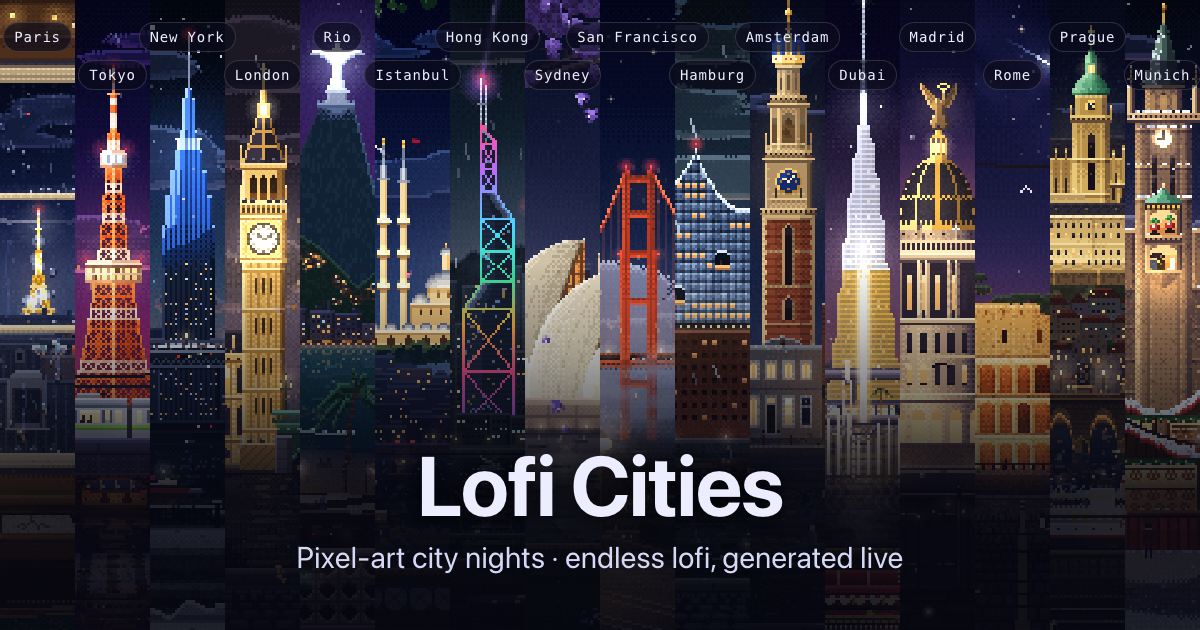
Lofi Cities is a free browser-based ambient music app built around animated pixel-art views of city nights. Users can choose from 16 cities, select weather and musical settings, and let the scene and music run as a background for studying, working, or relaxing. The app works on computers, phones, and tablets, with no account or installation required.
Each scene is a 480×270 animation that loops seamlessly every four minutes and includes city-specific landmarks, weather, and ambient sounds. The music is generated in the browser with the Web Audio API rather than played from a fixed library: each track combines synthesized chords, drums, bass, and often a melody, with tape-style modulation and vinyl crackle.
The browser composes and synthesizes new tracks from musical rules, using oscillators, filters, and code-generated noise instead of samples or recordings.
Choose among 16 pixel-art cities, each with its own landmarks, local time, weather options, and city sound layer. Music and ambience have separate volume controls.
Select nine styles, including Jazzhop, Piano, Ambient, Bossa, Synth, House, Guitar, Sad, and Medieval. Additional controls adjust mood and arrangement, including chill or upbeat, full band, no drums, or chords only.
Up next lets listeners choose an upcoming track, while focus rounds of 25/5 or 50/10 and sleep timers support structured sessions and gradual playback shutdown.
City tour can change scenes automatically or follow the night toward the city closest to 1 a.m. Users can save the current frame as a 1080p PNG, use a computer mini player, or open OBS mode for a clean streaming background.
The site works offline after it has been opened and can install as an app. Touch-sized controls and scene swiping support phones and tablets.
Use the focus timer, low-intensity styles, and separate city-sound volume to create a structured background during reading or coursework.
Keep a city scene running while working, then change the style or arrangement without switching to another music service or managing a playlist.
Choose Ambient or a quieter arrangement, add city ambience, and use the sleep timer to fade the music out after a selected period.
Use OBS mode for a clean stream background or save a 1080p frame for visual use. The site also offers city video loops without audio through Gumroad.
Let City tour rotate scenes every 5 to 30 minutes or follow the night, or browse the city picker to compare local times, landmarks, and weather.
The web app is described as free and requires no sign-up. The site also presents separately available city video loops through Gumroad, but the supplied pages do not state their prices.
No account or installation is required for normal use. The app can also work offline after it has been opened and can be installed as an app where supported.
The Web Audio API synthesizes chords, drums, bass, and melodies in the browser. Tracks are created from generated seeds and musical rules, with effects such as tape wobble, delay, filtering, reverb, limiting, and vinyl crackle; the site says it uses no samples, recordings, or AI model.
You can choose a city, weather, musical style, mood, band arrangement, and city-sound volume. The player also includes track selection, focus and sleep timers, and automatic city touring.
OBS mode provides a clean stream background, and the site offers 1080p60 city video loops without audio through Gumroad. The supplied information does not define broader licensing terms for other uses.
Traffic data is for reference only.

suno.com
Suno is an AI music generator for creating original songs in your browser from prompts, lyrics, or uploaded audio, with free and paid plans.

soundraw.io
Web-based AI music generator for royalty-free beats and tracks

suno.ai
Suno is an AI music generator that turns prompts, lyrics, or musical ideas into original songs with vocals, instrumentation, and production, plus editing, remixing, stem separation, and browser-based tools for paid users.

mubert.com
Mubert is an AI music platform for royalty-free audio across videos, podcasts, apps, games, and listening, with tools for creators, developers, artists, and listeners.

producer.ai
Google Flow Music is a generative AI platform for creating, remixing, and sharing songs, with music video generation, audio remixing, and tool building in a web app with free and paid plans.

beatoven.ai
Beatoven.ai is an AI music generator that creates royalty-free background music and sound effects from text prompts, with MP3/WAV downloads and an API.