HyperMonitor logo

HyperMonitor

Freemium
Visit

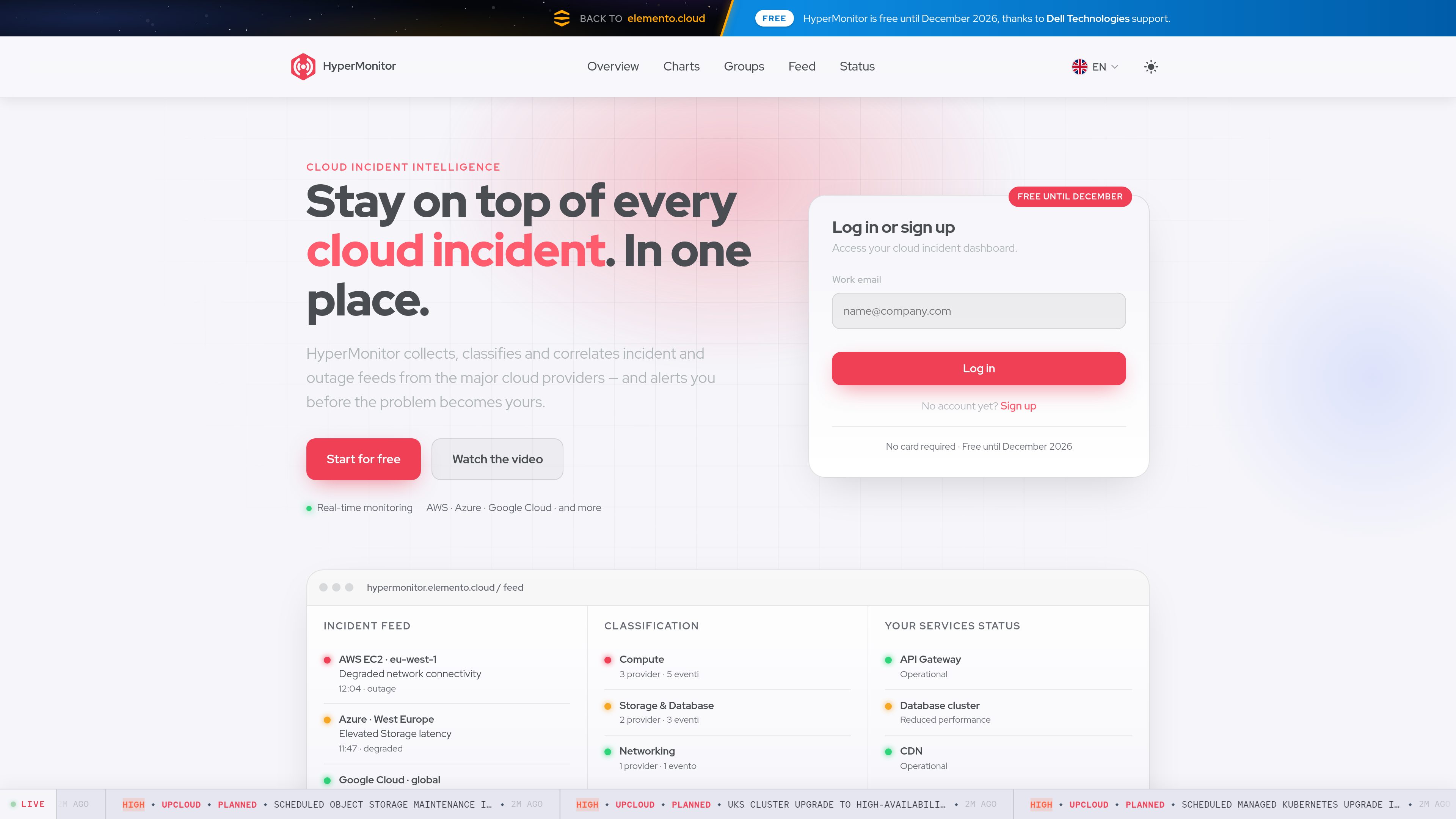
HyperMonitor is a cloud incident intelligence dashboard that collects, classifies, and correlates provider status and outage feeds in one place. It helps teams monitor cloud services, understand incident impact, and receive real-time notifications when a provider reports a problem.

What is HyperMonitor?

HyperMonitor is a cloud incident intelligence dashboard that brings provider status and outage feeds into one view. It collects information from AWS, Azure, Google Cloud, and other providers, classifies incidents by provider, service, and severity, and correlates related events to help users understand which problems may affect their systems.

The service combines a live incident feed with grouped service views, status summaries, and charts for reviewing reliability and outage frequency over time. It is intended for teams that need to monitor dependencies across multiple cloud providers without repeatedly checking separate status pages. The site advertises real-time alerts, but does not specify the available delivery channels in the published material.

What can HyperMonitor do?

Unified provider feed

Collects cloud status and outage information into a single real-time stream. The site names AWS, Azure, and Google Cloud, while the dashboard feed also displays incidents from providers including UpCloud, Scaleway, Cloudflare, and Linode/Akamai Cloud.

Incident classification

Tags incidents by provider, service, and severity, with feed entries also showing states such as planned, investigating, ongoing, monitoring, and completed.

Related-event correlation

Links related events so users can assess a broader incident or likely infrastructure impact instead of treating every provider update as an isolated alert.

Real-time monitoring and alerts

Provides a live view of provider problems and advertises notifications when a provider reports an issue, reducing the need to refresh individual status pages.

Charts and trends

Visualizes reliability and outage frequency over time and supports comparisons between providers using historical status data.

Groups and service status

Lets users group services they care about and view their status together, creating a focused service view similar to a private status page.

Use Cases

“Multi-cloud dependency monitoring”

Use one feed to follow incidents across services that depend on AWS, Azure, Google Cloud, or other listed providers instead of manually switching among provider status pages.

“Incident triage”

During a provider disruption, filter the signal by provider, service, and severity, then use correlated events and status states to build a faster view of what is happening.

“Planned maintenance awareness”

Review planned and ongoing maintenance entries, including region-specific provider events, so scheduled changes can be considered during operational checks.

“Reliability review”

Use charts and outage-frequency views to examine provider reliability over time and compare historical patterns when reviewing infrastructure choices or service dependencies.

“Focused service watchlists”

Create groups for the services that matter to a particular environment and check their combined state from a single status view.

Frequently Asked Questions

Which cloud providers does HyperMonitor cover?

The site explicitly names AWS, Azure, and Google Cloud, and describes support for other providers. The dashboard feed shown in the source also includes UpCloud, Scaleway, Cloudflare, and Linode/Akamai Cloud. The complete provider list is not published in the supplied material.

What information is shown for an incident?

Incidents can be classified by provider, service, and severity. Feed entries also show operational states such as investigating, identified, ongoing, monitoring, completed, and planned, along with details such as affected regions when the provider supplies them.

Does HyperMonitor provide alerts?

Yes. The product describes real-time alerts that notify users when a provider they use has a problem. The available notification channels are not specified in the published source.

Can users monitor selected services instead of the entire feed?

Yes. The Groups & Status feature allows users to group services they care about and monitor their state together in a focused view.

How much does HyperMonitor cost?

The site states that HyperMonitor is free until December 2026, with no credit card required. It does not provide additional plan limits or longer-term pricing in the supplied material.

Quick Facts

Category
Cloud incident monitoring
Primary function
Collects, classifies, and correlates provider status and outage feeds
Named providers
AWS, Azure, and Google Cloud; other providers are also supported
Dashboard views
Overview, charts, groups, feed, and status
Access
Account required; log in or register with an email address
Current offer
Free until December 2026; no credit card required

HyperMonitor Traffic Analysis

Traffic data is for reference only.

Domain Rating
32

HyperMonitor Alternatives

OutageDeck logo

OutageDeck

outagedeck.com

OutageDeck monitors official status feeds for cloud and software providers, then shows current incidents and sends change-based alerts. It helps individuals and teams determine whether a service problem is external before troubleshooting their own systems.

FATHER logo

FATHER

coastcreative.studio

FATHER is a macOS mission-control dashboard for teams managing sites and deployments on Vercel. It brings deployment status, uptime, and speed metrics into one live view, with menu-bar indicators and notifications for issues.

AgentQuartz logo

AgentQuartz

agentquartz.vercel.app

AgentQuartz is a macOS menu bar companion for monitoring Claude and Cursor usage. It keeps usage status on your machine and offers a free tier plus a one-time Pro license for tray customization.

New Relic logo

New Relic

newrelic.com

New Relic is an AI-powered observability platform that connects telemetry across applications, infrastructure, logs, digital experiences, and AI systems to help teams find root causes, understand business impact, and get started with a free tier or usage-based plans.

Waydev logo

Waydev

waydev.co

Engineering intelligence to measure AI adoption, impact, and ROI

Port Radar logo

Port Radar

portradar.devmesh.xyz

Port Radar is a macOS utility that scans local listening ports and helps you identify what is running on your Mac with Apple Intelligence. It also lets you share a local port through a Cloudflare Tunnel when you need a public preview link.