
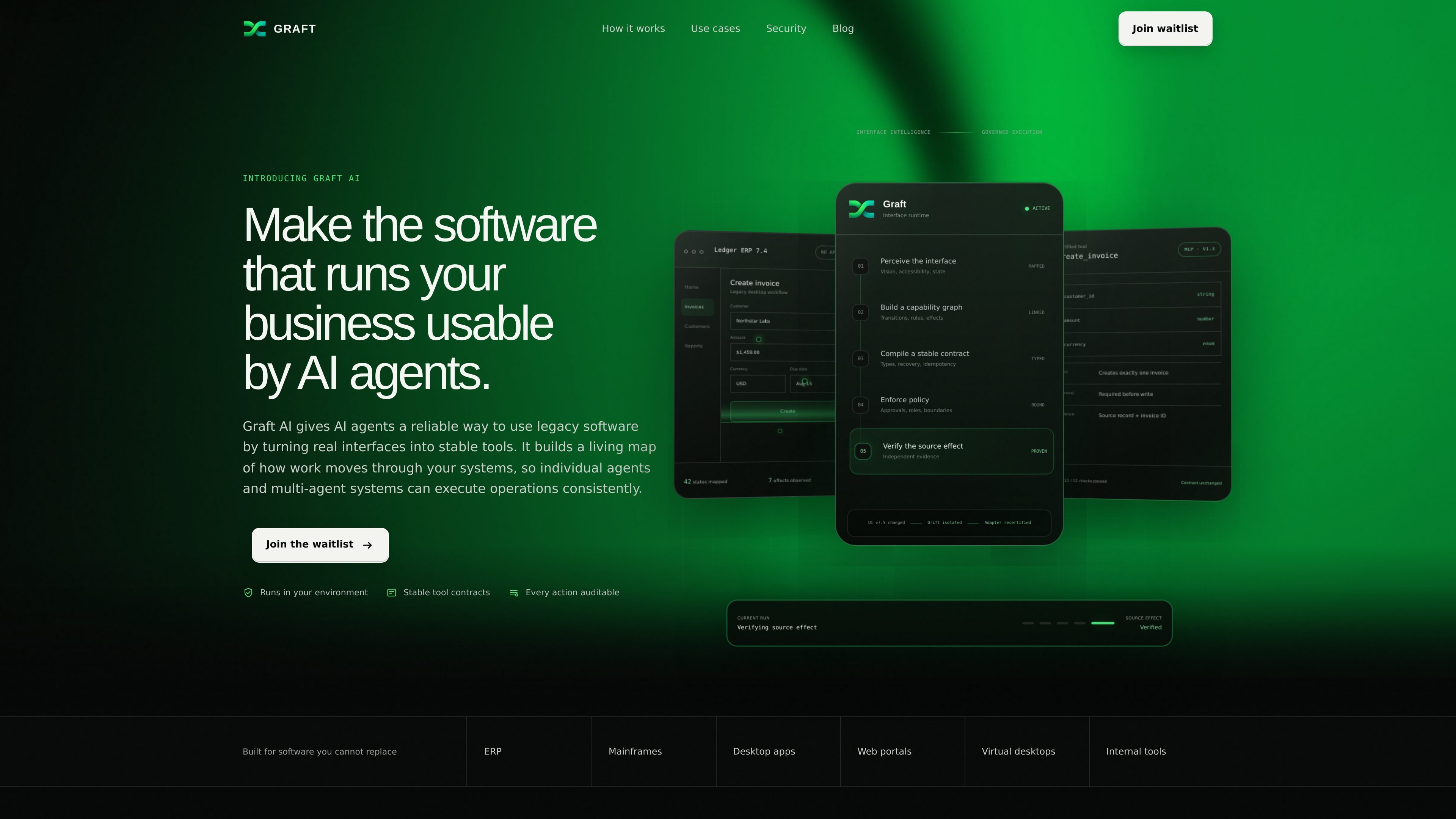
Workflow observation
Graft watches a real workflow and maps screens, inputs, transitions, and side effects so it can understand how work actually moves through a system.

Connect AI agents to existing business software through stable, governed tools built from real interfaces—so teams can operate legacy and internal systems without replacing the source application.
Graft AI is a tool layer for connecting AI agents to business software that is already in use. It turns real application interfaces into stable, governed tools so agents can operate across legacy systems without replacing them.
The product is built around a four-step flow: observe a workflow, compile a tool contract, verify the result against the live system, and connect agents through a single MCP tool. The site positions this approach for systems that are difficult to replace, including ERP, mainframes, desktop applications, web portals, virtual desktops, internal tools, and file-based workflows.
Graft emphasizes running in the customer environment, keeping data under customer control, and logging actions for auditability. It also presents the product as compatible with common agent frameworks such as LangChain, LlamaIndex, CrewAI, Microsoft AutoGen, and the OpenAI Agents SDK.
Graft watches a real workflow and maps screens, inputs, transitions, and side effects so it can understand how work actually moves through a system.
It generates a typed schema, adapter, policy boundaries, and conformance tests from the observed workflow, turning the interaction into a stable tool contract.
An independent witness checks the live application state, and the adapter cannot certify itself, which helps verify the real effect before exposure to agents.
Agents call one stable MCP tool instead of rediscovering the interface every time, which is meant to reduce drift from changing screens or states.
The product supports approval rules, roles, boundaries, and least-privilege access, so actions can be governed before they reach the source system.
Each action is logged with context, and the site says generated tools ship with a conformance bundle that proves effects across supported application versions.
Use Graft to let agents create invoices, update records, reconcile data, or generate reports inside finance and operations systems that already exist.
Use it to update systems, create tickets, or resolve requests in IT and support tools where the interface is stable enough to be mapped and governed.
Use it for inventory, purchase orders, shipments, and vendor records when work spans legacy systems and file-based processes.
Use it to resolve issues and update records across systems of record for customer operations teams that need traceable actions.
Use it to expose any internal tool, desktop application, web portal, or mainframe workflow to agents without replacing the underlying system.
It is designed to connect AI agents to existing business software through stable tools generated from real interfaces. The site describes a flow where Graft observes a workflow, compiles a tool contract, verifies the source effect, and then exposes that workflow as a single MCP tool for agents to call.
The site shows examples for finance and operations, IT and support, supply chain, and customer operations. It also says Graft can be used for ERP, mainframes, desktop apps, web portals, custom internal systems, and files or exports.
Graft says it runs in your environment and that data stays yours. It also states that actions are auditable, permission aware, and protected by least-privilege access and a complete audit trail.
The homepage presents Graft as designed for private beta and asks visitors to join the waitlist. It also says the team will be in touch when early access opens.
The site says Graft can be used from frameworks and agent runtimes such as LangChain, LlamaIndex, CrewAI, Microsoft AutoGen, and the OpenAI Agents SDK. It positions Graft as a tool layer that agents can call rather than a replacement for the source system.
Traffic data is for reference only.

lunen.ai
Lunen is a governed control plane for building and running AI agents across existing business systems. Teams can approve agent actions, manage permissions, and maintain a shared audit record in production.

arcade.dev
Arcade is an MCP runtime for production AI agents, combining agent authorization, reliable tools, and governance. It helps teams connect agents to real systems with flexible deployment and pricing from free to enterprise.

robomotion.io
Agentic automation platform for AI agents on real business systems

mastra.ai
Mastra Factory is an open-source, agent-powered software delivery environment for taking software work from issue intake through planning, implementation, and pull-request review. It provides persistent coding agents, repository workspaces, and configurable lifecycle stages in a web application you can deploy on the Mastra Platform or your own infrastructure.

agents.craft.do
Craft Agents is an open-source desktop app for working with AI agents, models, APIs, MCP servers, local files, and a built-in browser.

tiptap.dev
AI Toolkit helps developers build document-aware AI agents that edit rich-text content in place while keeping changes reviewable. It supports server-side workflows, real-time collaboration, and backend processing without requiring a Tiptap Editor session.