
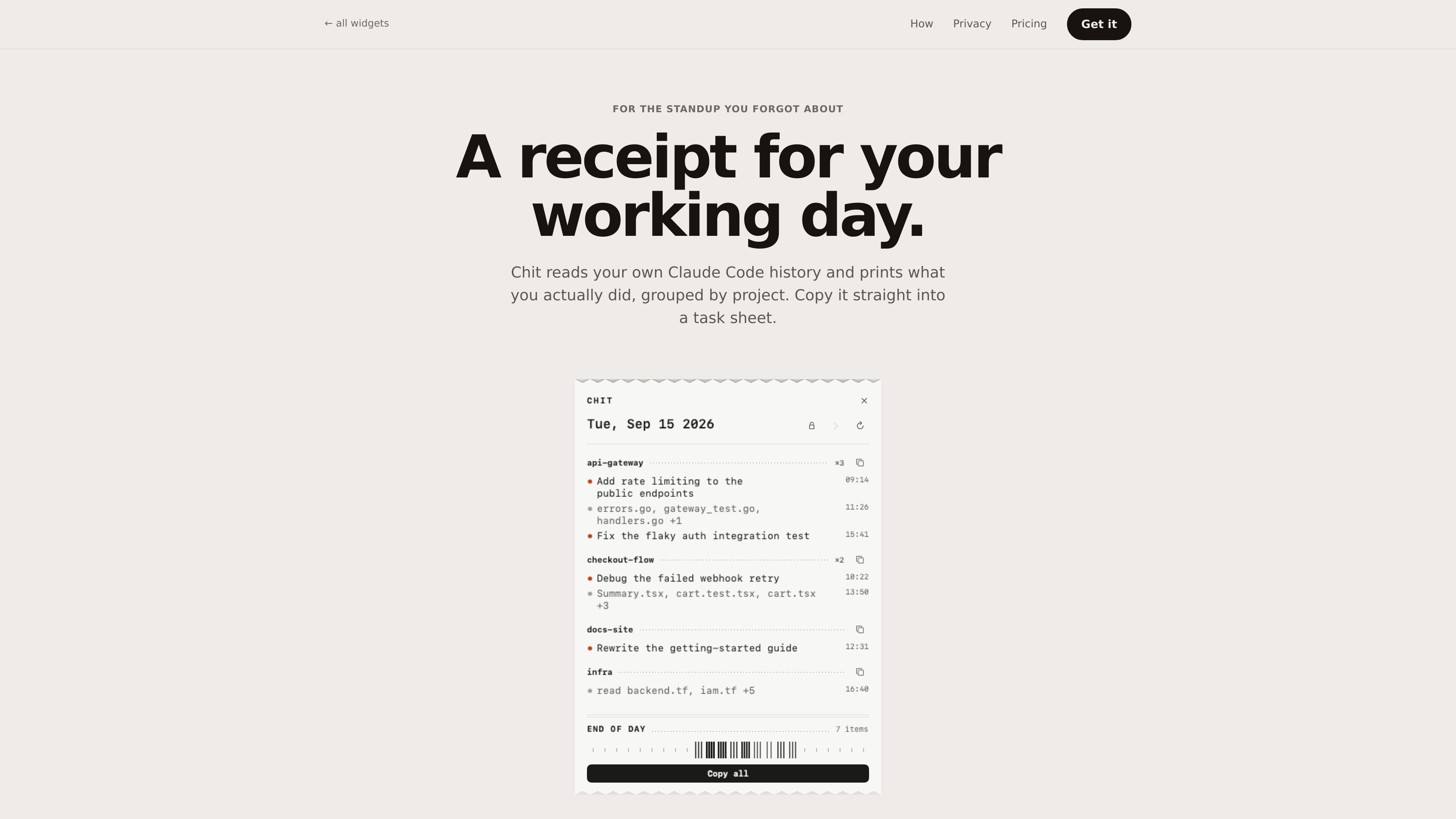
Project-based daily summaries
Groups Claude Code sessions under their repositories, with the busiest projects first, so activity is organized around work areas rather than individual conversations.

Chit is a macOS menu bar app that reads local Claude Code transcript history and turns it into a daily work receipt grouped by project. Reconstruct completed work for standups, task sheets, and timesheets without exposing prompts.
Chit is a macOS menu bar app that reads the Claude Code transcripts already stored on your computer and summarizes the work they represent. It organizes sessions by project, prioritizes the busiest projects, and shows a daily receipt of activity rather than a stream of chat logs.
The result can be copied into a task sheet or standup, or emitted as plain text or Markdown for other workflows. Chit is intended for developers who need a reliable way to reconstruct their working day without displaying the prompts they entered.
Groups Claude Code sessions under their repositories, with the busiest projects first, so activity is organized around work areas rather than individual conversations.
Folds agent worktrees back into their parent project instead of presenting them as separate projects.
Copies the full day or one project in a format suited to task sheets and standups. Plain text and Markdown output are available.
Lets users step back through the week to review a day they need to account for. The Pro tier extends access to every past day.
Reads files under `~/.claude/projects` on the Mac and states that the binary contains no network code. It does not write to the Claude Code directory.
Provides CLI options including `--today`, `--date=`, `--from=`, `--to=`, and `--markdown`, allowing output to be piped into timesheet-oriented workflows.
Copy the day or a single project after coding to create a concise account of completed work without manually reconstructing a session history.
Use the project-grouped receipt as paste-ready source for a task tracker or daily work record, with file names included as supporting context.
Run the CLI with a date or date range and pipe the plain-text or Markdown result into a workflow that accepts command-line output.
Open a previous day when a weekly or monthly account is needed. Pro adds every past day, week and month statements, and a dashboard.
Chit reads the Claude Code transcripts stored locally under `~/.claude/projects`. The site says prompts are not shown or stored; descriptions come from Claude Code session titles or changed-file names.
The product states that nothing leaves the machine and that there is no network code in the binary. The app reads local files and does not write to `~/.claude`.
Users can download the 777 KB ZIP, move `Chit.app` to Applications, and use Open the first time. A shell installer is also provided through `curl`; it installs the app and can add the `chit` command to a writable directory already on the PATH.
The free tier includes the current day’s receipt, copying the day or any project, plain-text and Markdown output, project hiding, and the CLI. The site says it is free indefinitely rather than a trial.
The site lists Chit Pro at $12 as a one-time purchase, not a subscription. Its key is tied to one Mac and works offline; the site says the key can be reissued without charge when changing machines.
Traffic data is for reference only.

store.comu.com
Comu Action Pro is a pocket-sized AI voice recorder and work assistant that turns spoken requests, conversations, and recordings into documents, slides, emails, summaries, and action items. Capture meetings and turn them into useful outputs without rewriting notes by hand.

www.in-parallel.com
In Parallel is an AI context layer for teams that captures shared organizational memory from meetings and makes it available to MCP-capable assistants such as Claude, Copilot, and ChatGPT. It keeps agent responses aligned with current workspace context instead of stale documents or isolated prompts.

jottoo.com
Jottoo is a browser-based meeting notes workspace that records or imports audio, transcribes conversations, creates structured summaries, and turns follow-ups into tasks. It is designed for people who want meeting documentation and action tracking without adding a meeting bot.

tryassistly.com
Assistly is a live meeting assistant for macOS and Windows, offering real-time guidance during calls and writing a recap afterward. It works directly from your computer instead of joining as a bot, and makes call history available to connected apps through an MCP server.

ulpaso.app
Ulpaso is a free, open-source Mac app that transcribes meetings on-device and saves the results as local Markdown files. Keep meeting notes on your Mac without accounts or subscriptions.

quiethint.com
QuietHint is a macOS meeting assistant for Apple silicon Macs that transcribes call audio locally, distinguishes your speech from the other participant’s, and suggests short replies without joining calls or installing anything in the meeting app.