
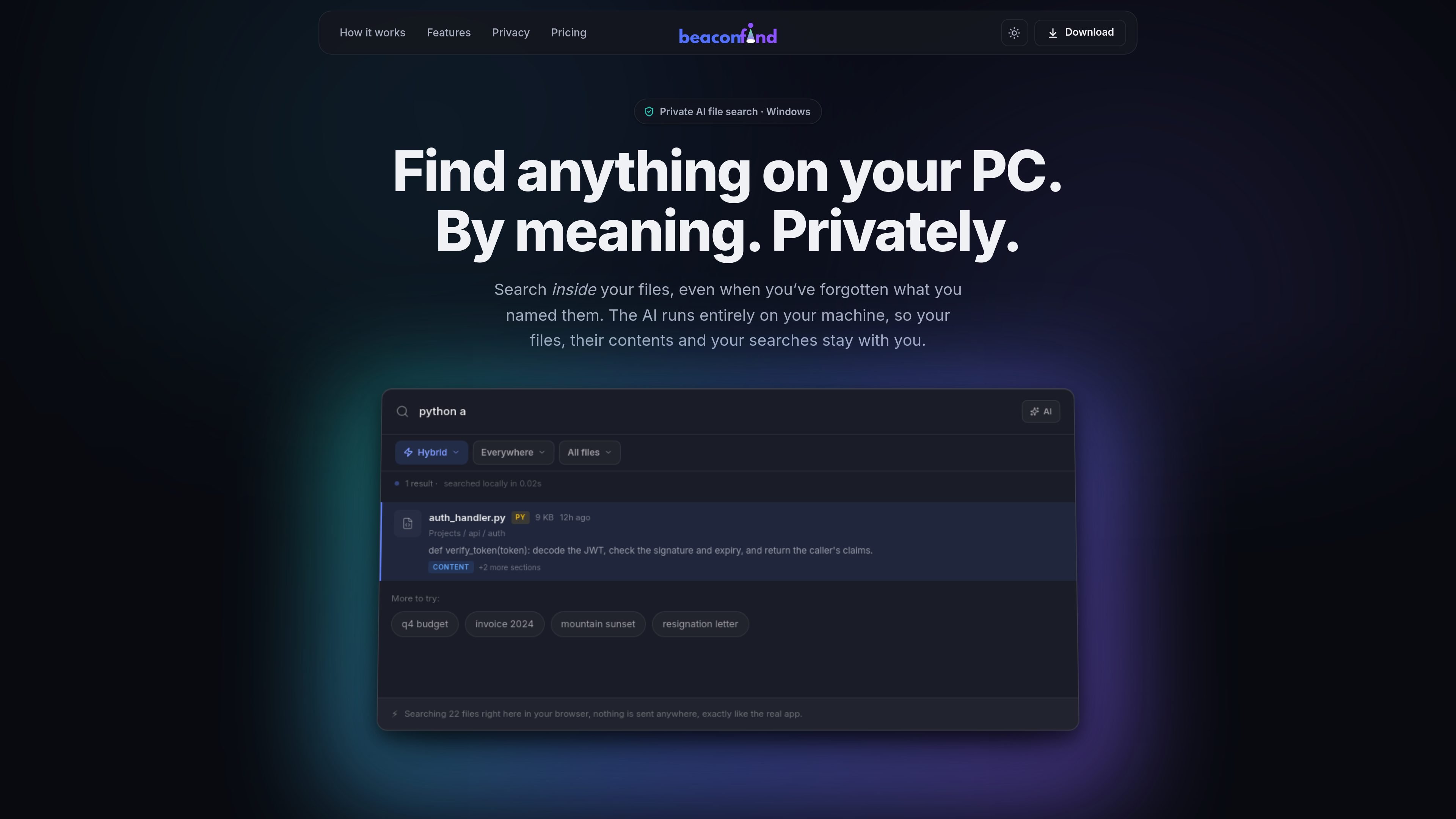
Semantic file search
Search files by describing what you remember in plain language, instead of relying on an exact filename match.

BeaconFind is a private AI file search app for Windows that finds files by meaning, not exact filename. Indexing and search stay on your device, with Ctrl+K, multilingual search, and cited answers from your documents.
BeaconFind is a private AI file search app for Windows. It is designed to help you find files on your PC by meaning, using Ctrl+K to search with plain-language prompts instead of exact filenames.
The product’s core promise is that the AI runs on your machine. The site says your files, their contents, your searches, and the index stay local, with no cloud uploads or API keys required.
Search files by describing what you remember in plain language, instead of relying on an exact filename match.
Search across documents, notes, images, screenshots, and scans, with text extraction and visual understanding where applicable.
Ask questions about your files and get answers with citations that open back to the source passages.
Use filters and saved views to narrow results by type, date, size, and other metadata, then reuse those views later.
Let the app run in the background on a schedule, or pause it with performance and gaming modes when you want resources back.
Keep search local with an on-device stack that supports 50+ languages and does not require cloud APIs or API keys.
Use it when you remember what a document is about but not the filename, such as a quarterly report, a lease clause, or a draft you saved under a vague name.
Search across screenshots, scans, and photos by what they show, which is useful for whiteboard photos, scanned notes, or image-based records.
Ask questions about contracts, agreements, or other documents and jump to cited passages instead of reading whole files manually.
Search in the language you think in and retrieve files written in another language, which fits multilingual personal archives or mixed-language work folders.
Tune indexing and background activity for your machine, including overnight indexing or performance mode when you want to reduce resource usage.
BeaconFind indexes folders on your Windows PC and lets you search them by meaning rather than exact filename. It also supports asking questions about retrieved documents and opening cited passages.
The site states that BeaconFind runs entirely on your machine, with no cloud, no uploads, no API keys, no telemetry, and offline operation supported.
You can point BeaconFind at folders such as Documents, Desktop, and Downloads. The product then reads files on your device and builds a local index you can search with Ctrl+K.
The pricing page states that BeaconFind offers a free 14-day trial, a lifetime purchase option, and a 30-day refund. It does not show subscription tiers in the captured text.
The product page says BeaconFind is for Windows 10 and 11.
Traffic data is for reference only.

www.docusmart.eu
DocuSmart AI is a document search and knowledge base tool for nonprofits and civil society organisations. It indexes files from Google Drive, OneDrive, and Dropbox, letting teams ask questions in plain English and receive citation-backed answers from their own documents.

siriil.com
Ollie is a local-first AI agent for Windows that connects to email, chats, documents, files, calendars, and business tools, then answers questions about that information in plain English—without a terminal or configuration files.

tryreference.com
Reference is a local file search tool for AI agents that returns citations from files on the user’s machine. It is designed to keep data local, with no cloud uploads.
metaso.cn
Search web sources or your documents, then get AI-generated answers.

vengoai.com
Enterprise generative AI search and agent infrastructure with cited answers from business content

veridive.com
veridive searches spoken content on YouTube live and returns cited answers pinned to the exact second, with library analysis and creator tools.