
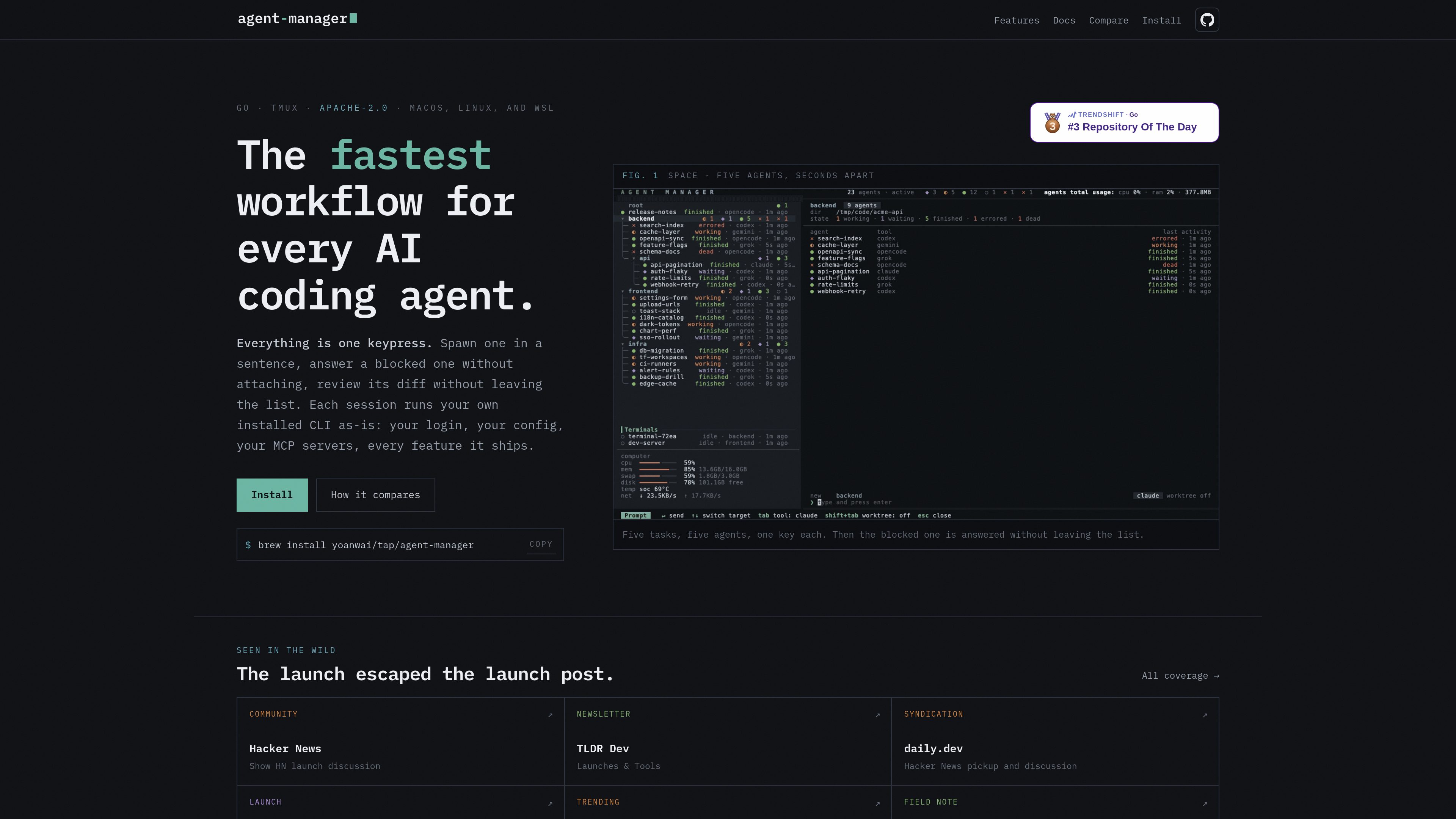
Tmux-backed agent sessions
Every agent is a real tmux session, so quitting the manager does not stop the underlying work. This makes the UI a control surface rather than the runtime itself.

A Go-based TUI for managing AI coding agents through tmux. Spawn, prompt, review, and resume agents without leaving the session list.
agent-manager is a Go TUI that sits on top of tmux and treats every AI coding agent as a real tmux session. It is designed to help developers start agents quickly, respond to blocked agents in place, and review code changes without leaving the session list.
The product’s core workflow is centered on key-driven session management. You can spawn a new agent from a group row, answer an active session without attaching to the terminal, and open a dedicated review view for the selected session’s repository and diff. The documentation also shows that each session runs the user’s installed CLI as-is, preserving the user’s login, config, MCP servers, and other features from the underlying tool.
agent-manager keeps sessions organized in a tree of groups and subgroups, with support for folding, reordering, archiving, and plain terminal tabs. It also includes MCP tools so agents can declare the repo they moved into, the branch they merge into, and their session name, which helps the manager open review in the right place.
Every agent is a real tmux session, so quitting the manager does not stop the underlying work. This makes the UI a control surface rather than the runtime itself.
Press space on a group row to start a new agent with a prompt and directory already set. The prompt is sent as a sentence, so you can create sessions quickly without forms or extra navigation.
On a session row, the same key sends a reply into the agent’s pane as a user message. That lets you answer questions or permission prompts without attaching to the session.
ctrl+r opens a review mode for the selected session’s repo, showing changed files, diff counts, syntax-highlighted content, and review-specific key handling. The review view refreshes as the agent keeps editing.
Groups are paths rather than fixed folders, and sessions can live at any node. You can fold and unfold groups, reorder sessions and groups, and archive finished work while keeping the hierarchy intact.
The manager can kill a tmux session to free RAM while keeping the row and conversation record, then revive the same thread later through the agent’s resume command. It also supports forking a named sibling session from the same conversation.
Useful when you want multiple tasks in flight across different projects or directories. The list view is built to show several agents at once and start them one after another with minimal interruption.
When an agent is blocked on a question or permission prompt, you can respond directly from the session list instead of attaching to the terminal pane.
If an agent is actively editing code, you can open review mode from the same interface, inspect the diff, and send line comments back to the agent.
The group tree and MCP declarations help when one umbrella directory contains multiple repositories or worktrees, making it easier to open review on the correct target.
If you need to reclaim resources, you can end the tmux process while keeping the conversation record, then resume or fork the work later.
agent-manager is a Go TUI for coordinating AI coding agents that run as tmux sessions. It lets you spawn agents, answer them, review diffs, and manage session history from one interface.
No. The docs say the agent sessions are real tmux sessions, so they keep running after the manager exits.
From the session list, you can press space on a group row, type the task, and press enter. The agent starts with its prompt and directory already set.
Yes. ctrl+r opens a review mode that shows the selected session’s repo diff, lets you inspect changes, and allows line comments that are sent back to the agent.
The site lists macOS, Linux, and WSL, and the install example uses Homebrew.
Traffic data is for reference only.

kilo.ai
Kilo Code is a multi-agent AI coding plugin for JetBrains IDEs. It helps developers run and manage AI coding agents, review changes in isolated worktrees, and choose from a large model catalog without leaving the IDE.

vi3ecode.com
Vi3ecode is a maintained development environment for coding agents, combining workspace, terminal, Git, memory, flows, review, and remote access. It helps developers keep their AI coding setup connected without managing each part separately.

superset.sh
Superset is a desktop tool for running multiple AI coding agents in parallel on your own machine. Separate work into isolated Git worktrees, review changes, and keep tasks moving without waiting for one agent at a time.

cosyra.com
Cosyra is a mobile cloud terminal for developers who want to run AI coding agents from iPhone or Android without managing their own VPS. It provides an isolated Ubuntu workspace, persistent storage, and bring-your-own API key billing.

mastra.ai
Mastra Factory is an open-source, agent-powered software delivery environment for taking software work from issue intake through planning, implementation, and pull-request review. It provides persistent coding agents, repository workspaces, and configurable lifecycle stages in a web application you can deploy on the Mastra Platform or your own infrastructure.

apps.mergeable.io
Diffsmith is a native macOS app for reviewing local git changes made by AI coding agents such as Claude Code, Cursor, Codex, and Copilot. Add inline comments and send them back to the agent as a prompt or via a local MCP server.