
Multi-agent browser canvas
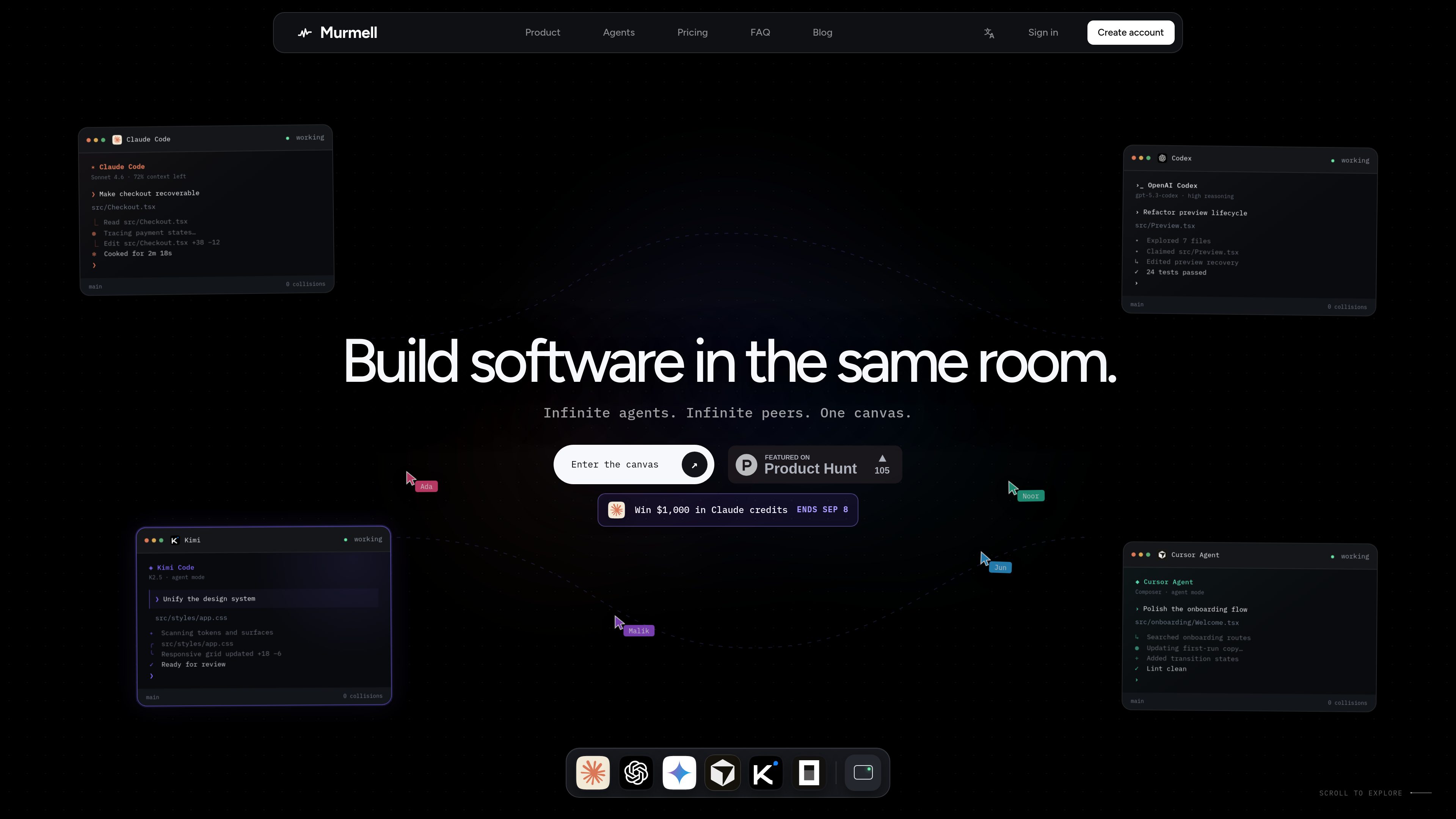
Open multiple coding agents in the same project and manage them from one shared canvas rather than separate local sessions.

Murmell — это браузерная рабочая область для запуска ИИ-агентов программирования в общих облачных песочницах. Она помогает разработчикам координировать Claude Code, Codex, Kimi и OpenCode в одном проекте без локальной настройки и конфликтов файлов.
Murmell is a browser-based canvas for running several AI coding agents on one shared project directory in the cloud. It is built around a live workspace where agents can work in parallel and other people on the link can watch the session as it happens.
The product’s core purpose is to make multi-agent coding safer and easier to coordinate. Murmell uses file reservations, shared terminals, and persistent cloud sandboxes so teams can avoid overlapping edits, keep a session in sync, and work without setting up the agents locally.
Open multiple coding agents in the same project and manage them from one shared canvas rather than separate local sessions.
Agents reserve file paths before editing, which helps prevent simultaneous writes to the same file.
Projects run on cloud machines managed by Murmell, so the workspace is not tied to one developer’s laptop.
Everyone with access to the canvas can see the same terminals, cursors, and live previews while work is underway.
The site names Claude Code, OpenAI Codex, Kimi, and OpenCode as supported agents, with more mentioned on the homepage.
Murmell publishes numbered guides for common tasks such as using Claude Code without local installation, splitting work across several agents, and sharing a session live.
Use Murmell when you want different agents to work on separate parts of the same repository at the same time, with reservations reducing the chance of file collisions.
The guides describe opening a real Claude Code terminal from the browser, which is useful when you want to use the agent without installing it locally.
Share a canvas link so another person can observe the same terminals, cursors, and previews without refreshing or replaying the session.
Use the persistent cloud sandbox when you want the workspace to live on Murmell’s machines rather than on a developer laptop.
The examples on the homepage show tasks like checkout recovery, preview refactoring, and design-system updates handled by separate agents in the same room.
The site explicitly names Claude Code, OpenAI Codex, Kimi, and OpenCode, and the homepage also says “and more.”
According to the site, agents run on dedicated cloud machines managed by Murmell, while the local machine is only used for the browser.
Murmell uses a reservation system: an agent claims the file paths it is about to edit before writing, so other agents wait until those paths are released.
Yes. The site says a canvas can be shared as a link and watched live, with no need to replay or refresh the session to stay in sync.
The site indicates Starter is free forever and mentions paid Pro and Builder plans, but the dedicated pricing page fetched for this review returned a 404, so the public pricing information is limited in the collected pages.
Данные о трафике приведены только для справки.

www.tryport22.com
port22 — приложение для iOS и агент macOS для мониторинга и управления сессиями coding-агентов, запущенными в терминале. Он передаёт расшифровки на iPhone, уведомляет о необходимости ввода и поддерживает Claude Code, Codex и OpenCode.
tablo-cat.netlify.app
tablo — это настольный виджет-кот, который следит за сессиями Claude Code и OpenAI Codex в углу экрана. Он показывает использование контекста в реальном времени, запросы разрешений, уведомления и активность каждой сессии.

skillsmp.com
SkillsMP — бесплатный маркетплейс для поиска навыков open-source-агентов в публичных репозиториях GitHub с поиском, просмотром, REST API и доступом через MCP для Claude Code, Codex CLI и ChatGPT.

blackflare.dev
BlackFlare — приложение для строки меню macOS, предназначенное для Claude Code и Codex. Оно не даёт активным сессиям переходить в спящий режим, уведомляет о завершении или необходимости ввода и показывает статистику использования. Оповещения можно пересылать в Telegram или Slack, а настройки по умолчанию менять без ручного редактирования конфигурационных файлов.

evlat.kalaomer.com
Evlat is a quiet macOS status strip for monitoring Claude Code, Codex, and Antigravity sessions, plus long-running commands. It highlights sessions that need your response and shows activity from local or SSH-connected machines.