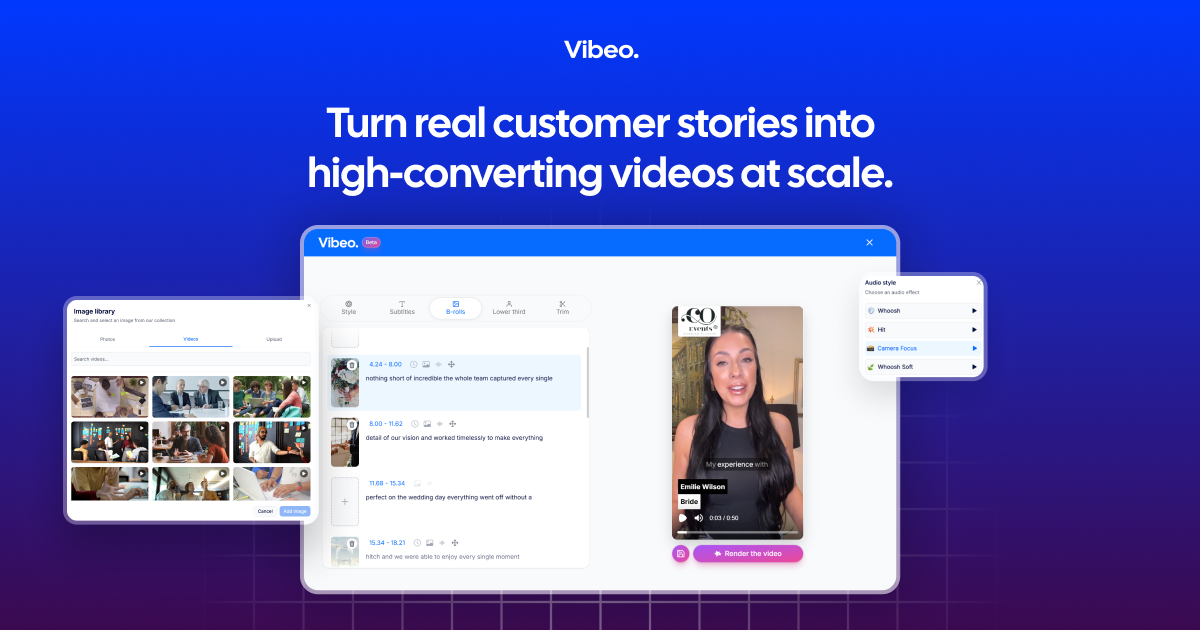
Vibeo is video testimonial software for collecting, editing, and sharing customer stories. Great for small businesses and teams.

Vibeo

Overview

Vibeo is video testimonial software for collecting, editing, and sharing customer stories. It is built for small businesses and teams that want to create testimonial videos without using a video crew or advanced editing tools.

The workflow is straightforward: send a recording link, let participants capture video from any device, edit the result with AI-assisted tools, and publish it on a branded share page. The product emphasizes authentic social proof, with landing pages and analytics designed to help teams use testimonials in marketing, outreach, and sales follow-up.

Features

Guided testimonial collection

Send a shareable link so customers can record a testimonial from any device, without downloads or logins. The pricing page also notes mobile-friendly recording, a built-in teleprompter, front and back camera support, and custom data collection.

AI video editing

Use AI-assisted editing to trim videos, add dynamic subtitles, insert B-rolls, apply transitions, and import your own photos or video clips. The pricing page also lists sound effects, lower-thirds, brand overlays, and HD export.

Branded share pages

Create a unique branded page for each testimonial with a custom title, description, CTA, and brand colors. Vibeo says each page is ready to share by link and optimized for desktop and mobile.

Link analytics

Track views, clicks, and conversions on shareable pages so you can see how each testimonial performs. Analytics are included with the landing pages described on the homepage and pricing page.

Campaign controls and consent

Support multiple campaign settings, custom fields, GDPR consent collection, and testimonial incentives. The homepage also says the product supports over 20 languages.

Template-based video workflows

Use templates for customer testimonials, employee videos, and interviews, with automatic AI-powered B-rolls to add visual interest. The homepage and pricing page both point to flexible template-based workflows.

Use Cases

  • Customer proof collection

    Collect customer testimonials from clients without scheduling a studio session or asking them to install software. A shareable link lets them record from the device they already use.

  • Sales follow-up and outbound

    Create a short branded testimonial page for a sales conversation, follow-up email, or outbound sequence. The page format supports a CTA and analytics, which makes the asset easier to measure and reuse.

  • Website and campaign sharing

    Publish testimonial videos on a website or social channel to support landing pages, campaigns, and social proof. The share pages are designed to be dropped into email, LinkedIn, social media, or other public surfaces.

  • Internal and recruiting-style video stories

    Use templates and campaign settings to gather employee videos or interview-style content alongside customer testimonials. The homepage explicitly mentions customer testimonials, employee videos, and interviews as supported use cases.

  • Multi-language testimonial campaigns

    Localize testimonial collection for international audiences by using one of the supported languages and customizing the campaign setup. This is useful when you gather stories from customers across regions.

Pros and Cons

Pros

  • Simple collection flow that works through a shareable link, with no login or download required for participants.
  • AI-assisted editing covers common testimonial cleanup tasks such as trimming, subtitles, B-rolls, and branding.
  • Each video gets its own branded share page with a CTA and analytics.
  • Pricing is easy to understand from the source: videos can be collected for free, with a paid subscription available for downloads.
  • Supports campaign customization, GDPR consent collection, and over 20 languages.

Cons

  • The site does not provide a public integration list or detailed platform compatibility information.
  • Some plan details are limited to the pricing page, and a few limits are not fully explained in the source.

FAQ

What is Vibeo used for?

Vibeo is designed for collecting video testimonials, editing them with AI, and sharing them through branded pages. It is positioned for small businesses and teams that want to turn customer stories into marketing assets without a video team.

Is Vibeo free?

The source shows a free-to-collect model: Vibeo is free as long as you collect videos, and a subscription is available if you want to download. The pricing page also lists a Pro plan.

How do people record testimonials?

Customers can record through a shareable link from any device, without downloads or logins. The pricing page also mentions a mobile-friendly recording interface and built-in teleprompter.

How are testimonials shared?

Vibeo’s share pages include custom title, description, CTA, and analytics. The site says you can share videos on a website, with prospects, on social networks, or through email and other outreach channels.

Does Vibeo integrate with other tools?

The source does not list a public integration catalog. One blog post mentions using testimonial links in HubSpot, Outreach, or Salesloft campaigns, but that does not establish native integrations.

Quick Facts

Category
Video testimonial software
Primary users
Small businesses and teams
Core workflow
Collect, edit, and share customer video testimonials
Site domain
vibeo.ai
Pricing model
Free to collect; subscription required to download
Languages supported
20+