
Natural-voice narration
Listen to a document from start to finish using one of four available narrators: Theo or Elaine in American English, Quentin in British English, or Tamsin in New Zealand English.

Read PDF Out Loud é um leitor de PDF no navegador que narra documentos com uma voz natural enquanto destaca cada palavra. Foi criado para artigos de pesquisa, relatórios, livros e PDFs com equações, figuras, tabelas e layouts de duas colunas.
Read PDF Out Loud is a browser-based tool for listening to PDF documents rather than reading them solely on screen. Users can upload a PDF or open a sample paper, then listen as the service narrates the document and highlights the spoken words. It is intended for research papers, reports, articles, manuals, books, and other PDFs with text.
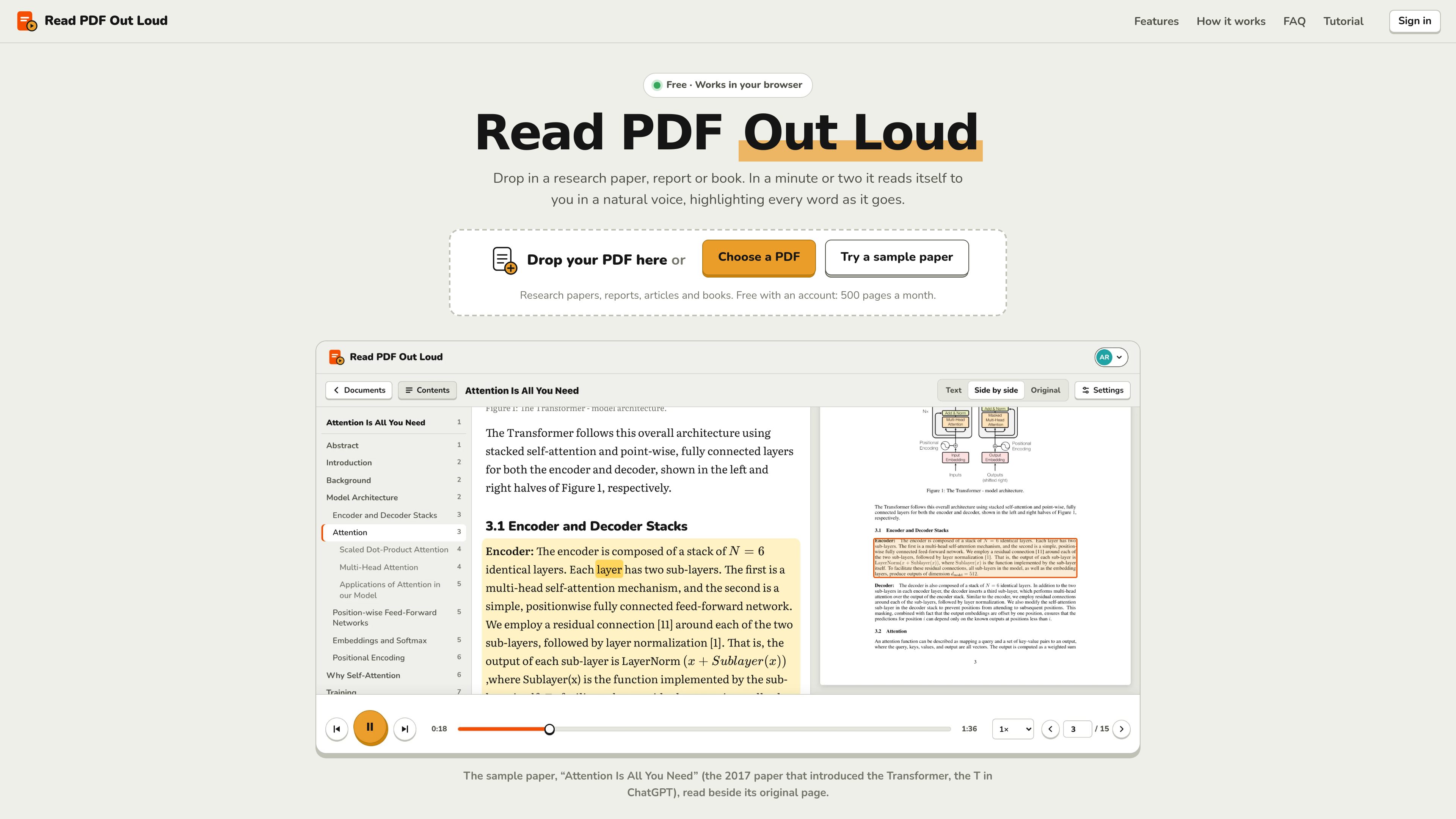
The reader prepares each page for listening by interpreting its layout, text, mathematics, and figures. It can preserve the reading order of two-column papers, skip common page furniture such as running headers and reference lists, and keep the original page available beside the reading view. Documents can be revisited from a personal library, with reading position and settings saved to the account.
Listen to a document from start to finish using one of four available narrators: Theo or Elaine in American English, Quentin in British English, or Tamsin in New Zealand English.
The current sentence is shaded and each word lights up as it is spoken. Users can click any word to begin reading from that point, or use the player to move through the document.
Two-column layouts, headings, captions, equations, tables, code, footnotes, and other document elements are interpreted for reading. Equations are spoken by meaning rather than as an unstructured sequence of symbols.
An optional Summaries setting provides short spoken explanations of figures, charts, tables, code listings, algorithms, and displayed equations. These AI-generated summaries are presented as a guide and should be checked against the page.
Text, Original, and Side by side views let readers choose between a simplified reading view, the printed PDF page, or both. In Side by side mode, the relevant part of the original page is framed as it is discussed.
Playback speed ranges from 0.75× to 2×. Settings include four fonts, adjustable text size, light, sepia, dark, or device-matched themes, optional text-box narration, automatic page turning, and automatic playback on new pages. The document text can also be downloaded as a plain-text file.
Listen to papers with two-column layouts, equations, citations, figures, and tables while following the original page when visual context is needed.
Use a browser on a computer, tablet, or phone to continue listening to lecture notes, textbooks, and papers, with saved progress available when returning to a document.
Follow the spoken text through word highlighting, larger text, a calm theme, and the Atkinson Hyperlegible font. The tool is presented for readers with dyslexia, ADHD, or low vision, although individual suitability may vary.
Listen to reports, contracts, manuals, white papers, and similar documents while away from the screen or doing another task.
Use narration to give your eyes a break after extended screen reading while retaining access to the page and text views.
Open Read PDF Out Loud in a browser, drag a PDF onto the page, or choose one from your device. Sign in with Google or with an email sign-in link to read personal PDFs. Most papers are prepared in a minute or two; then press Play or click a word to begin at that point.
Each PDF can be up to 200 pages and 20 MB. A free account can add up to 500 pages per month, with the monthly count resetting on the first day of each month. Listening is unlimited.
It can read scanned pages, although clean digital PDFs work best. The reader is designed to handle two-column layouts and reads equations by meaning. It can also provide optional summaries for figures, tables, code, algorithms, and displayed equations.
Yes. The site works in a browser on a computer, tablet, or phone. On a phone, users can select a PDF, play it, tap a word to start from that point, and access the reader controls from the browser interface.
The site states that documents are visible only to the user. They remain in the user's library until deleted, and deleting the account deletes its documents. The document list is shown only in the browser where the PDFs were added, while saved reading position and settings can follow the account across devices.
Os dados de tráfego são apenas para referência.

bug-shot.com
BugShot é uma ferramenta de registro de bugs baseada no Chrome que permite inspecionar, editar, capturar e relatar problemas diretamente do navegador. Ajuda as equipes de QA, design e engenharia a incluir contexto e enviar relatórios para Jira, GitHub, Linear e Notion.

kiwidesk.kiwicanopy.com
Um gerenciador de janelas em mosaico para Mac que organiza automaticamente as janelas abertas e oferece layouts, atalhos de aplicativos, perfis e movimentação de janelas com o mouse. Mantém a área de trabalho organizada sem redimensionar e posicionar cada janela manualmente.

browser.arunbrahma.com
Nook é um navegador minimalista para macOS que bloqueia anúncios e rastreadores, oferece modos de leitura e concentração e mantém os dados de navegação armazenados localmente por padrão. Foi criado para uma leitura mais tranquila, sem extensões, contas ou sincronização.

spline.design
Plataforma no navegador para criar experiências 2D/3D interativas e colaborar em tempo real

isheji.com
爱设计 é uma plataforma de design de templates no navegador para cartazes, gráficos para redes sociais, visuais de e-commerce e mais, com edição online, salvamento na nuvem e associações separadas para downloads e uso comercial.

toki.com
Toki é um assistente de calendário e organização de agenda com IA que transforma textos, notas de voz, capturas de tela e e-mails em eventos, lembretes e planos de tarefas, além de ajudar a coordenar reuniões. Ideal para pessoas, equipes e famílias com vários compromissos.