
Browser-based image upload
Upload or paste an image and start editing from the browser. The homepage accepts JPG, PNG, and WEBP files.

Editor de fotos com IA gratuito e baseado na web para alterar traços faciais em selfies e fotos de grupo, com uploads pelo navegador, formatos comuns e resultados com marca-d’água no plano grátis.
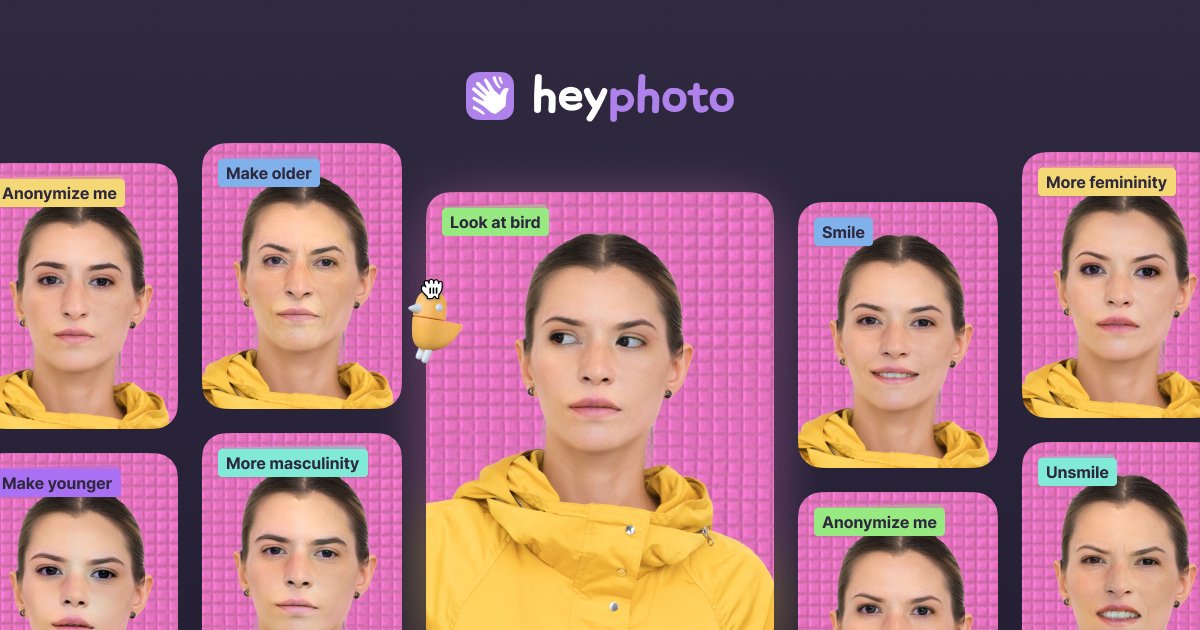
HeyPhoto is an online AI photo editor focused on changing facial features in uploaded photos. It is built around quick, browser-based edits such as changing gaze direction, smile level, emotions, age, gender appearance, skin tone, and hairstyle.
The homepage frames the product as a simple way to tune selfies and group photos without manual editing skills. It also notes support for common image formats and presents the service as free to use, with output watermarked on the free tier.
Upload or paste an image and start editing from the browser. The homepage accepts JPG, PNG, and WEBP files.
Adjust gaze direction, smile, emotions, skin tone, gender appearance, and age using AI-powered facial edits.
Change hairstyle, add makeup, and reshape parts of the face where the site says those tools are available or coming soon.
Use the anonymize option to make a face invisible to face recognition systems, according to the homepage copy.
Work with selfies and group photos, with the site describing the product as suited to both.
Make a selfie look more polished by adjusting smile intensity, emotions, age, skin tone, or gaze direction in a few steps.
Edit group photos to tweak expressions or facial appearance without using a desktop photo editor.
Create profile or dating photos with a more specific expression or look, including the product's “Great for Tinder” positioning.
Use the anonymize function when you want a face to be less recognizable to face recognition systems.
HeyPhoto detects faces in uploaded images and applies the selected adjustment automatically. The site says it uses artificial intelligence and is designed to be intuitive, so no special skills are required.
The site says uploaded images are securely stored so you can access them later, and you can delete them at any time.
HeyPhoto recommends quality photos with people facing the camera. Slight rotation is also acceptable.
Yes. The site says HeyPhoto is free to use, but resulting photos include a watermark.
The site says you can upload photos up to 5 MB, with faces up to 1024×1024 px. It also returns images at the same size and quality as the source image.
Os dados de tráfego são apenas para referência.

z-image-ai.run
Gerador e editor de imagens com IA baseado na web para criar imagens a partir de textos e reestilizar fotos, com vários modelos, créditos grátis e uso comercial sem marca-d’água.

photoeditorai.io
Editor de fotos com IA no navegador para editar e gerar imagens por prompts, com planos gratuito, de créditos e empresarial.

www.dreampixelai.com
DreamPixel AI é um gerador de imagens com IA baseado na web para criar imagens a partir de texto ou de outras imagens. Também oferece ferramentas de edição e aprimoramento de fotos, um plano gratuito e planos pagos com saída em maior resolução.

pixlr.com
Editor de fotos e gerador de imagens com IA no navegador, para fotos, vídeos e remoção de fundos.

photoeditor.ai
Editor de fotos e gerador de imagens com IA no navegador, com mais de 30 ferramentas para edição, restauração, upscaling e texto para imagem.

pokecut.com
Editor de fotos com IA no navegador para fundos, objetos, melhorias e fotos tipo documento