
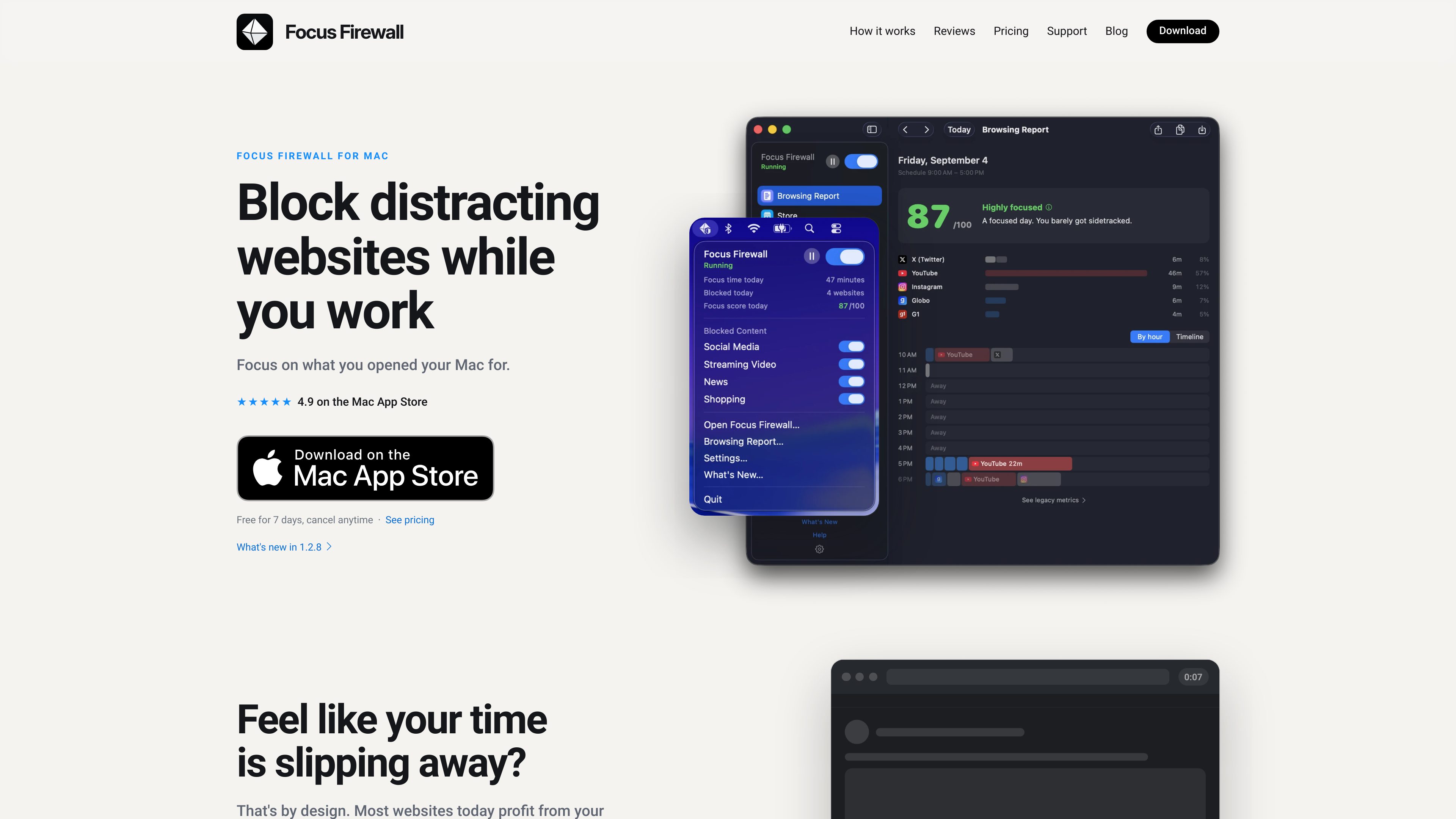
System-level website and app blocking
Blocks selected websites and apps from accessing the internet, so blocking is not tied to a particular browser or browser extension.

Focus Firewall is a macOS app that blocks distracting websites and apps across browsers without browser extensions. It helps people automate focus periods, take controlled breaks, and review local browsing-time reports.
Focus Firewall is a system-level distraction blocker for Mac. It prevents selected websites and apps from accessing the internet, including services such as X, Instagram, YouTube, Reddit, TikTok, and messaging apps. Because blocking happens at the system level, it works across supported browsers without requiring browser extensions.
The app is designed around scheduled focus periods. Users can set working hours so selected sites and apps are blocked automatically during the workday, rather than having to remember to start blocking manually. The blocklist includes more than 155 websites and nine messaging apps out of the box, and users can add websites or apps and hide categories they do not need.
Focus Firewall also supports controlled interruptions. Users can pause blocking briefly, temporarily turn off a category, or unblock one website when necessary. A daily blocking reset and optional Touch ID or device-password authentication for stopping or pausing add structure without making the app completely inflexible.
The Browsing Report shows time spent on blocklisted sites by hour, along with a focus score and timeline. The report is opt-in and stored locally on the Mac. Focus Firewall does not require an account and says it does not collect personal information, browsing habits, or visited websites.
Blocks selected websites and apps from accessing the internet, so blocking is not tied to a particular browser or browser extension.
Set working hours once and let the app block selected distractions automatically during scheduled periods.
Start with more than 155 websites and nine messaging apps, then add other websites or apps and hide categories that are not relevant.
Pause blocking for a short period, temporarily disable a category, or unblock a single website when a specific exception is needed.
Review time spent on blocklisted sites by hour with a focus score and timeline. The report is opt-in and kept on the Mac.
Require Touch ID or the device password to stop or pause the firewall, adding an extra confirmation step when enabled.
Set regular working hours so social networks, streaming sites, and other selected distractions are blocked automatically while work is in progress.
Use predefined categories or custom entries to reduce access to distracting websites and messaging apps during study sessions.
Pause the firewall for a limited break, then let blocking resume instead of turning off the whole routine for the rest of the day.
Use the opt-in Browsing Report to inspect time spent on blocklisted sites by hour and compare that activity with focus periods.
Focus Firewall is currently available for macOS through the Mac App Store. It is not currently available for iPhone or iPad.
The site lists Safari, Chrome, Firefox, Arc, Brave, Opera, Vivaldi, Edge, Orion, Zen, Dia, and additional browsers including Floorp, Waterfox, Comet, Helium, and ChatGPT Atlas. The developer asks users to request support for other browsers.
No. It works at the system level without browser extensions, and the product says no account is required.
A blocked website appears as if the internet is unavailable for that site. Blocked apps can open but cannot access the internet.
Yes. Users can pause blocking for a few minutes, temporarily turn off a category, or unblock one website. The app is designed to add some friction without making exceptions impossible.

notchpop.com
NotchPop is a macOS productivity island that places media controls, file handling, clipboard history, timers, calendar information, live activity and other utilities in the Mac notch or a floating island. It supports Macs with or without a physical notch and is aimed at people who want quick access to these tasks without switching away from their current app.

gsdtaskmanager.com
GSD Task Manager is a private Eisenhower Matrix for organizing tasks by urgency and importance across the web, iPhone, iPad, and Mac. It works without an account, keeps data local by default, and supports optional sync when needed.

parall.app
Parall is a native macOS launcher for creating separate instances of supported apps, websites, files, folders, and command-line tools. It helps users maintain distinct app identities, data paths, profiles, and launch settings where macOS and the target app support them.

usericly.com
Ricly is a macOS utility that adds file conversion, cleanup, organization, sharing, and other tools to the Finder right-click menu. It helps Mac users handle common file tasks without opening a separate application or browser.