
Connected messaging
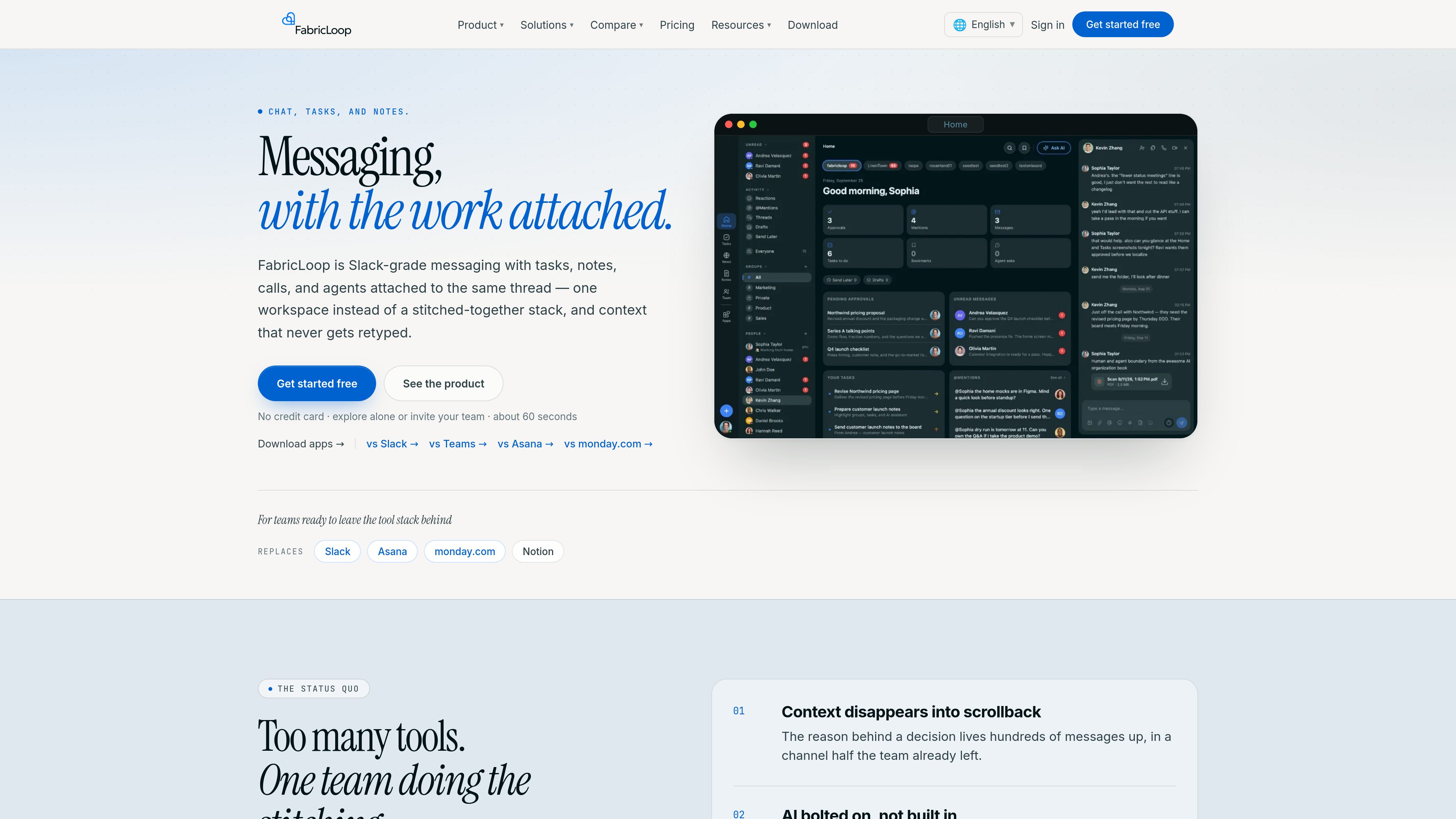
Use DMs, group channels, threads, mute controls, and @here/@channel mentions. Messages can be converted into tasks, notes, or news with AI, keeping the originating conversation available as context.

FabricLoop is a team workspace that combines messaging with tasks, notes, news and events, calls, people, search, and AI agents. It helps teams keep the discussion and the work created from it connected in one workspace.
FabricLoop is a team collaboration workspace centered on Groups for teams, projects, and topics. It combines Slack-style messaging with task tracking, co-editing notes, news and events, audio and video calls, people profiles, search, and AI agents. Messages, tasks, notes, and updates can remain connected rather than being copied between separate tools.
The workspace supports direct messages, group channels, threads, mute controls, and @here/@channel mentions. Tasks can include owners, due dates, files, and comments and can be viewed in list or Kanban formats; the pricing page also lists calendar and dashboard views. Notes support real-time co-editing, and highlighted note text can be turned into a task with its context attached.
FabricLoop also includes Loop Agent and MCP capabilities. Users can message an agent in a channel without slash commands, while the workspace's MCP server can connect Cursor, Claude, or ChatGPT to messages, tasks, notes, and news. Agent model usage is billed separately on paid plans, with test-only credits on Free and production usage on Standard and Enterprise.
Installable apps are available for iOS, iPad, Mac, Windows, and Android, alongside the web version. The Free plan supports up to 10 Groups and unlimited users with 90-day message history; Standard and Enterprise add unlimited Groups, unlimited history, and production agent usage. Enterprise adds SSO/SAML, audit logs, an admin console, and custom data retention.
Use DMs, group channels, threads, mute controls, and @here/@channel mentions. Messages can be converted into tasks, notes, or news with AI, keeping the originating conversation available as context.
Create and assign tasks with due dates, files, comments, and list or Kanban views. The pricing page also lists calendar and dashboard views, while task relationships keep related notes and conversations accessible.
Write and edit notes in real time, use approvals, and highlight text to create an owned task. Notes can be associated with Groups and chat.
Publish announcements and comments in the News & Events area, maintain an event schedule with RSVPs, and start audio or video calls from a channel or direct message. Calls can produce an AI summary after they end.
Use Loop Agent in the workspace or connect Cursor, Claude, or ChatGPT through a scoped MCP server to read and write supported workspace content. Agents can summarize threads, create tasks, draft updates, and notify selected people.
Search messages, tasks, notes, people, and files with filters and AI summaries. Use the same product through the web, iOS, iPad, Mac, Windows, and Android apps.
A team can discuss an issue in a channel, create a task from the message, assign an owner and due date, and retain the decision and surrounding conversation with the task.
Project or design teams can co-edit a note, highlight a sentence that needs follow-through, and create a linked task without retyping the brief's context.
A launch Group can bring together messaging, tasks, notes, announcements, and events so participating teams can track decisions and share updates from the same workspace.
After a discussion or call, Loop Agent can summarize the thread, draft an update, create tasks, or notify relevant groups. Users can review the resulting update before it is shared when the workflow requires approval.
Teams using Cursor, Claude, or ChatGPT can connect through MCP to read and write supported messages, tasks, notes, and news from a scoped workspace connection.
FabricLoop is available on the web and has installable apps for iOS, iPad, Mac, Windows, and Android. The product site describes the apps as the same product as the web version.
Messages can become tasks, notes, or news, and tasks retain links to the conversations, notes, and updates behind them. Highlighted text in a note can also create a task with the note attached as context.
Loop Agent can summarize threads, create tasks, draft updates, and notify people. It can be messaged in a channel without slash commands. AI summaries are also available for calls after they end.
FabricLoop provides a scoped MCP server that can connect Cursor, Claude, or ChatGPT to supported workspace content, including messages, tasks, notes, and news. The product site also describes MCP as both a client and server capability.
Free includes up to 10 Groups, unlimited users, 90-day message history, five voice-AI requests per hour, and test-only agent credits. Standard and Enterprise provide unlimited Groups, unlimited history, and production agent usage. Agent model costs are separate from the seat price and are billed directly at provider rates; usage is visible in Settings and spending limits can be set.
velofiler.vercel.app
VeloFiler is a keyboard-first, dual-pane file manager for macOS that handles local files and SSH/SFTP locations in the same workflow. It combines previews, grid browsing, editing, notes, transfers, and cloud-folder access for file-intensive development and content work.
foglioapp.com
Foglio is a private document editor for work documents, personal notes, and lightweight collaborative writing. It combines a distraction-free editor with templates, folders, link sharing, exports, and AI-assisted document creation.

hackrbio.com
HackrBio is a customizable one-page portfolio for people who build and sell things. It combines projects, repositories, writing, products, links, and contact options into a single publishable page.