
Multi-surface product stack
BLACKBOX combines a terminal CLI, an AI-native IDE, and a unified inference API so teams can use the same platform across coding, editing, and model access workflows.

Plataforma de programação assistida por IA para terminais, editores e APIs
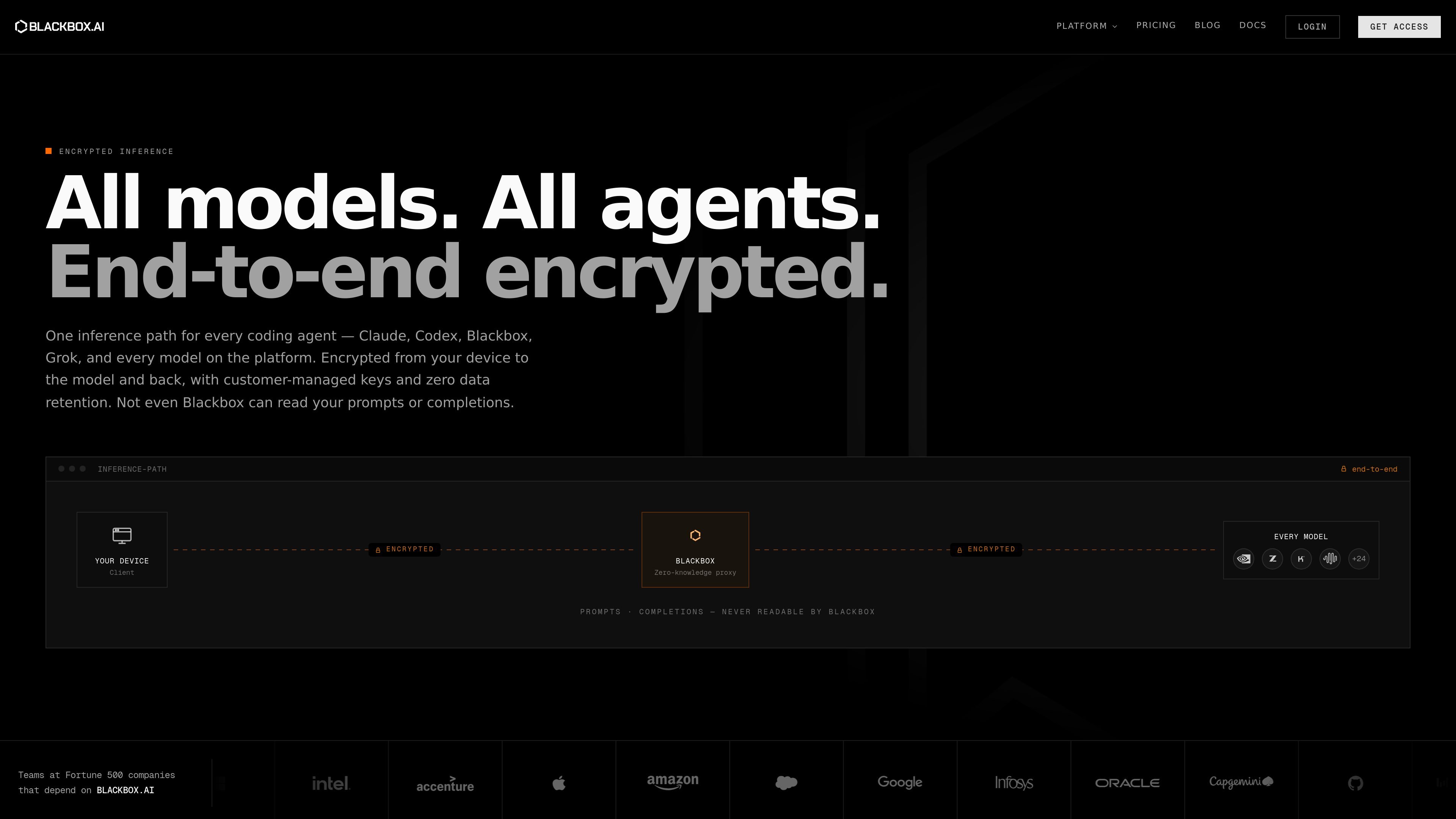
BLACKBOX AI is a developer platform centered on AI-assisted coding across the terminal, editor, and API layers. Its public site presents four main entry points: a multi-agent CLI, an AI-native IDE, a unified Agent API, and an encrypted inference layer that routes requests for models such as Claude, Codex, Blackbox, and Grok.
The product is aimed at teams and individual developers who want to plan changes, generate code, collaborate in an editor, and call frontier or open-source models from one platform. The site also emphasizes enterprise controls such as on-premise deployment, data sovereignty, SSO, audit logging, and support for private infrastructure.
BLACKBOX combines a terminal CLI, an AI-native IDE, and a unified inference API so teams can use the same platform across coding, editing, and model access workflows.
The CLI supports parallel multi-agent workflows, with agents such as Blackbox, Claude Code, Codex, Gemini, Goose, OpenCode, and Qwen working on separate branches before a Chairman LLM evaluates the results.
The IDE provides inline AI chat, multi-file context, real-time code generation, workspace sharing, and collaboration features for editor-based development.
The Agent API exposes major models through a single OpenAI-compatible endpoint and supports chat completions, embeddings, image generation, streaming, function calling, JSON mode, and vision inputs.
Enterprise plans add on-premise deployment options, end-to-end encryption, zero-knowledge architecture, SSO, audit logging, and custom integration support.
The platform advertises integration with 35+ IDEs plus tools such as Slack and Figma, and the CLI supports existing CI/CD tooling and cloud environments.
Use the CLI to plan work, split tasks across multiple agents, and run coding jobs headlessly in scripts or CI pipelines when the work needs automation rather than an interactive editor session.
Use the IDE when developers want inline chat, multi-file refactors, and shared workspace collaboration while staying inside a code editor with repo context.
Use the Agent API when an application or internal tool needs access to frontier or open-source models through a single OpenAI-compatible endpoint.
Use enterprise deployment when an organization needs on-premise operation, private infrastructure, or tighter control over data handling and identity management.
Use the platform across mixed environments when teams want to combine editor workflows, terminal automation, and API calls without switching vendors for each layer.
BLACKBOX CLI is installed with `npm install -g @blackbox/cli` on macOS, Linux, or Windows. On Unix systems, BLACKBOX also provides a shell installer, and Windows users can use the PowerShell installer.
Yes. The CLI supports major languages and frameworks including React, Vue, Angular, Node.js, Python, Java, and Go, and it detects project conventions automatically.
Yes. The CLI supports non-interactive mode for automated workflows such as code generation, test generation, security scanning, and deployment automation, and it can be used in CI/CD pipelines.
Yes. BLACKBOX AI offers enterprise on-premise deployment options, and the pricing page says enterprise plans support full data sovereignty. The CLI FAQ also notes air-gapped environments and encryption at rest for enterprise deployments.
Yes. The Agent API is OpenAI-compatible and supports `/v1/chat/completions`, `/v1/embeddings`, and `/v1/images/generations`, along with streaming, function calling, JSON mode, and vision inputs.
Os dados de tráfego são apenas para referência.

penligent.ai
Penligent é uma plataforma de testes de intrusão assistida por AI para equipes de segurança, pentesters e red teams. Automatiza descoberta, validação, reprodução de exploits e relatórios baseados em evidências em aplicações web, APIs, lógica de negócio e agentes de AI.

github.com
GitHub Copilot é um assistente de programação e uma plataforma de agentes de IA para desenvolvedores.

mistral.ai
Plataforma de IA empresarial para criar assistentes, agentes de programação, modelos personalizados e fluxos de implantação

minimaxi.com
MiniMax é uma plataforma de inteligência artificial de uso geral que oferece grandes modelos multimodais, uma plataforma aberta para desenvolvedores e produtos por assinatura para indivíduos e equipes. É indicada para quem precisa de programação, tarefas com agentes, processamento multimodal e integração de aplicações nativas de AI.

openhands.dev
OpenHands é uma plataforma de código aberto e agnóstica em relação a modelos para agentes de programação na nuvem, que automatiza fluxos de engenharia por meio de interfaces web, CLI, terminal UI e SDK, com implantações locais, na nuvem e empresariais.
qoder.com
Qoder é um assistente de programação com IA e uma plataforma agêntica para desenvolvedores e equipes.