
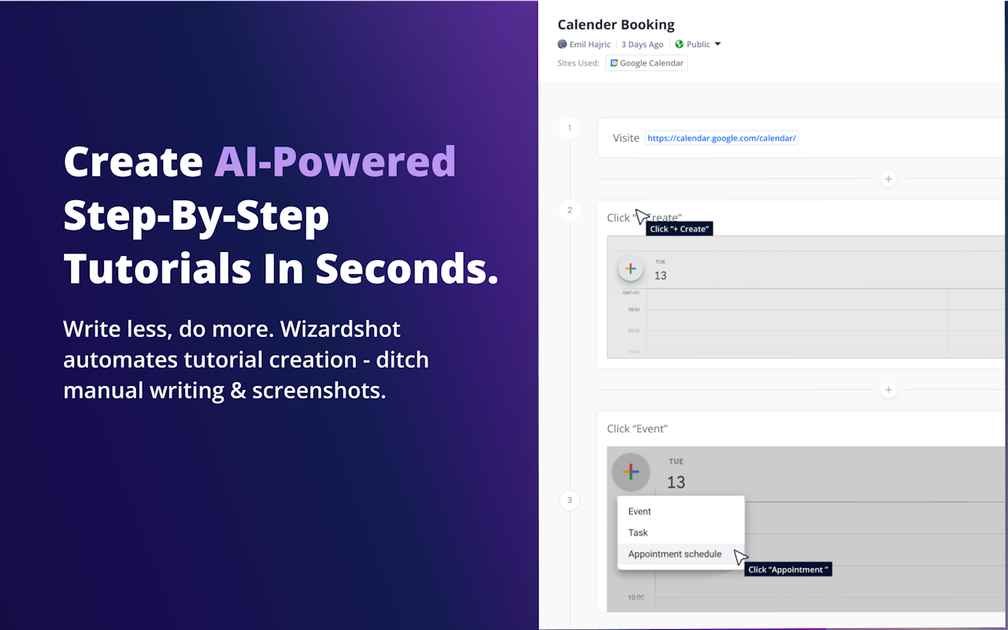
Capture-to-article workflow
Install the Chrome extension, start a capture, and record the steps you take. Wizardshot then converts those actions into a draft tutorial article.

Wizardshot turns screen actions into step-by-step tutorials for teams.
Wizardshot is a web app and Chrome extension for turning recorded screen actions into step-by-step tutorials. The core flow is simple: install the extension, click Capture, perform the task, and let the product generate a draft article from what you did.
It is aimed at teams that need to document repeatable processes, build help content, or capture knowledge for a knowledge base without writing each tutorial manually. The product also includes editing, privacy, sharing, and collaboration features so teams can refine and distribute the resulting guides.
Install the Chrome extension, start a capture, and record the steps you take. Wizardshot then converts those actions into a draft tutorial article.
Use the built-in editor to refine the generated tutorial, embed videos, transform steps into GIFs, and adjust the content before sharing.
Apply smart blur to hide sensitive information and protect specific screen elements before publishing or sharing a tutorial.
Share tutorials by downloading them, exporting them, or sending them to others. The site also mentions PDF and DOC export and social sharing.
Browse tutorials, search within a knowledge base, and organize access for different people on the team.
Invite teammates, manage access more granularly, and review analytics to understand tutorial usage and coverage gaps.
Record routine internal processes and turn them into repeatable how-to guides without starting from a blank page.
Create help articles for customers or staff by capturing the steps you already know how to do and then editing the draft into a finished guide.
Share workflows with teammates while controlling who can view sensitive details through blur and access restrictions.
Build a library of tutorials that can be searched and browsed by people working in the same knowledge base.
Export finished tutorials to PDF or DOC, or share them in other channels when the content needs to leave the product.
Wizardshot is a web app and Chrome extension that creates step-by-step tutorials by capturing your screen actions and turning them into an article.
The source says Wizardshot is free to use and explains that it is offered free because it is inexpensive to run and much of the technology runs inside the Chrome extension.
After installation, the basic workflow is to click Capture, perform the actions you want documented, and let the AI generate the tutorial article.
The product supports team collaboration features such as inviting team members, restricting access, and tracking tutorials, but the source does not describe detailed plan limits.
The source mentions privacy controls such as smart blur and a blur feature for hiding sensitive information, but it does not describe every output format or limitation in detail.
Traffic data is for reference only.

layerpath.com
Layerpath turns real workflows into reusable demos, videos, SOPs, and training paths.

usesuperflow.ai
Superflow turns website QA checklists into AI agents that review site changes, leave findings as comments, and route approvals between teams and clients. Built for agencies and web teams that need review workflows without requiring client logins.

waffer.ai
TakeCareOS is a web platform for home care, disability, and aged care agencies, combining rostering, communication, billing, compliance, and AI-assisted administration.

creao.ai
CREAO is an AI agent platform that turns recurring business work into reusable workflows with tool integrations, schedules, and approval gates.

rayyan.ai
AI-powered platform for systematic and literature reviews

lexworkplace.com
Cloud-based document and email management for law firms