
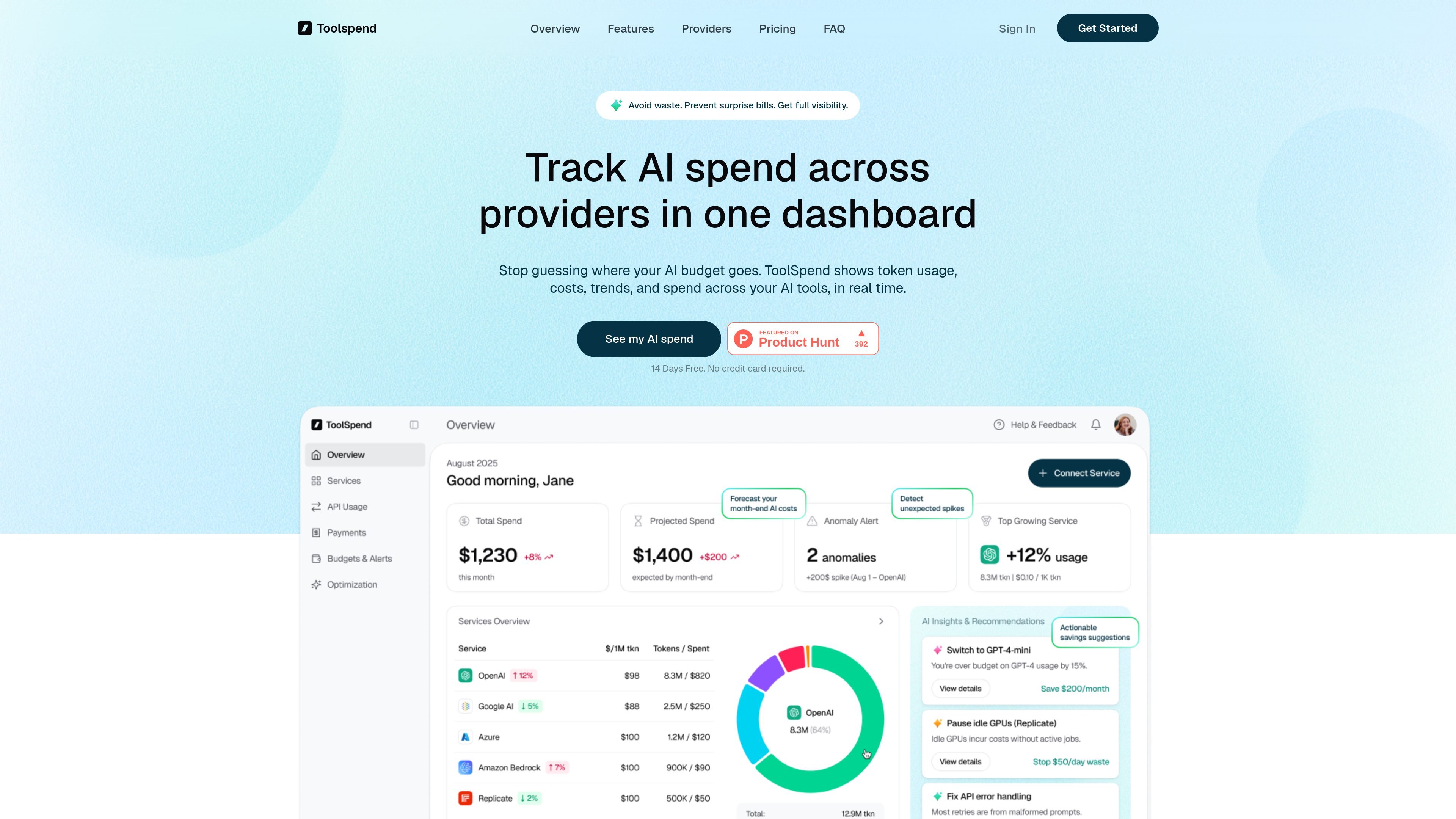
Unified spend dashboard
See token usage, costs, trends, and spend across connected AI services in one dashboard, instead of checking each provider separately.

ToolSpend tracks AI spend across providers in one dashboard with real-time usage, forecasts, anomaly alerts, and usage-based recommendations.
ToolSpend is an AI spend tracking product for teams that use multiple providers. It collects usage, token consumption, and billing data from connected AI services and presents it in a single dashboard for monitoring cost, trends, forecasts, and anomalies.
The product is positioned for founders, developers, and finance teams that need to understand where AI spend is going without maintaining spreadsheets. Its workflow is built around read-only connections, real-time updates, and alerts that help users spot waste before it grows.
See token usage, costs, trends, and spend across connected AI services in one dashboard, instead of checking each provider separately.
Track spend and token usage across providers such as OpenAI, Google AI, Azure, and Bedrock, with a comparison view for where costs are going.
Project month-end spending from current usage so teams can spot budget pressure before the bill arrives.
Detect sudden usage jumps and surface anomalies that may indicate retries, broken prompts, or runaway jobs.
Review suggestions based on usage patterns and billing signals, including model switches, idle GPU pauses, and retry/error fixes.
Export spend data in a reporting view designed for finance workflows and team review.
Use ToolSpend to see which AI provider is driving spending across OpenAI, Google AI, Azure, Bedrock, and other connected services.
Track current usage and projected month-end cost so finance or leadership can plan budgets before the billing cycle closes.
Watch for spikes in usage that may point to retries, broken prompts, or runaway jobs after a release or configuration change.
Review spend distribution, trends, and export-ready reporting when finance needs cleaner reporting than ad hoc spreadsheets can provide.
Check recommendations to identify where a cheaper model, paused GPU, or retry fix could reduce waste in production systems.
ToolSpend says it provides real-time cost tracking with up to 99.9% accuracy by pulling data directly from connected API providers and updating costs continuously.
The site says it supports major AI providers including OpenAI, Google AI, Microsoft Azure, Amazon Bedrock, Anthropic, Replicate, and more, with new providers added regularly.
ToolSpend uses read-only API access and says it never stores API keys. Its privacy policy also states that data is encrypted in transit and at rest.
The homepage says you can sign up, connect the services you already use with read-only access, and see spend, forecasts, and anomalies within minutes.
Traffic data is for reference only.
| Jun | 1020 |
|---|---|
| Jul | 304 |
| Aug | 0 |
Traffic analytics are not available yet.
Traffic analytics are not available yet.

getbasis.ai
Basis is an AI accounting platform that runs end-to-end workflows for firms and in-house teams, then hands completed work to accountants for review.

clarity.ai
AI-native extra-financial intelligence for risk, impact, climate, and compliance

every.io
AI-native finance and HR platform for startups, combining incorporation, banking, payroll, bookkeeping, and tax services.
tradesviz.com
TradesViz is a web-based trading journal and analytics platform for importing executions, reviewing performance, and organizing workflows across asset classes.

docuclipper.com
DocuClipper automates financial document extraction and exports data to accounting and spreadsheet tools.

taxgpt.com
AI tax assistant for research, drafting, document analysis, and client context management