
Cookieless measurement
The tracking script writes nothing to a visitor’s device. Statable says it does not use fingerprinting or cross-site tracking, and identifiers are scoped to one site and change daily.

Statable is a privacy-focused web analytics platform for measuring visitors, traffic sources, website behavior, goals, and funnels without cookies. It supports one-line installation, GA4 history import, Google Search Console, and EU-hosted data processing.
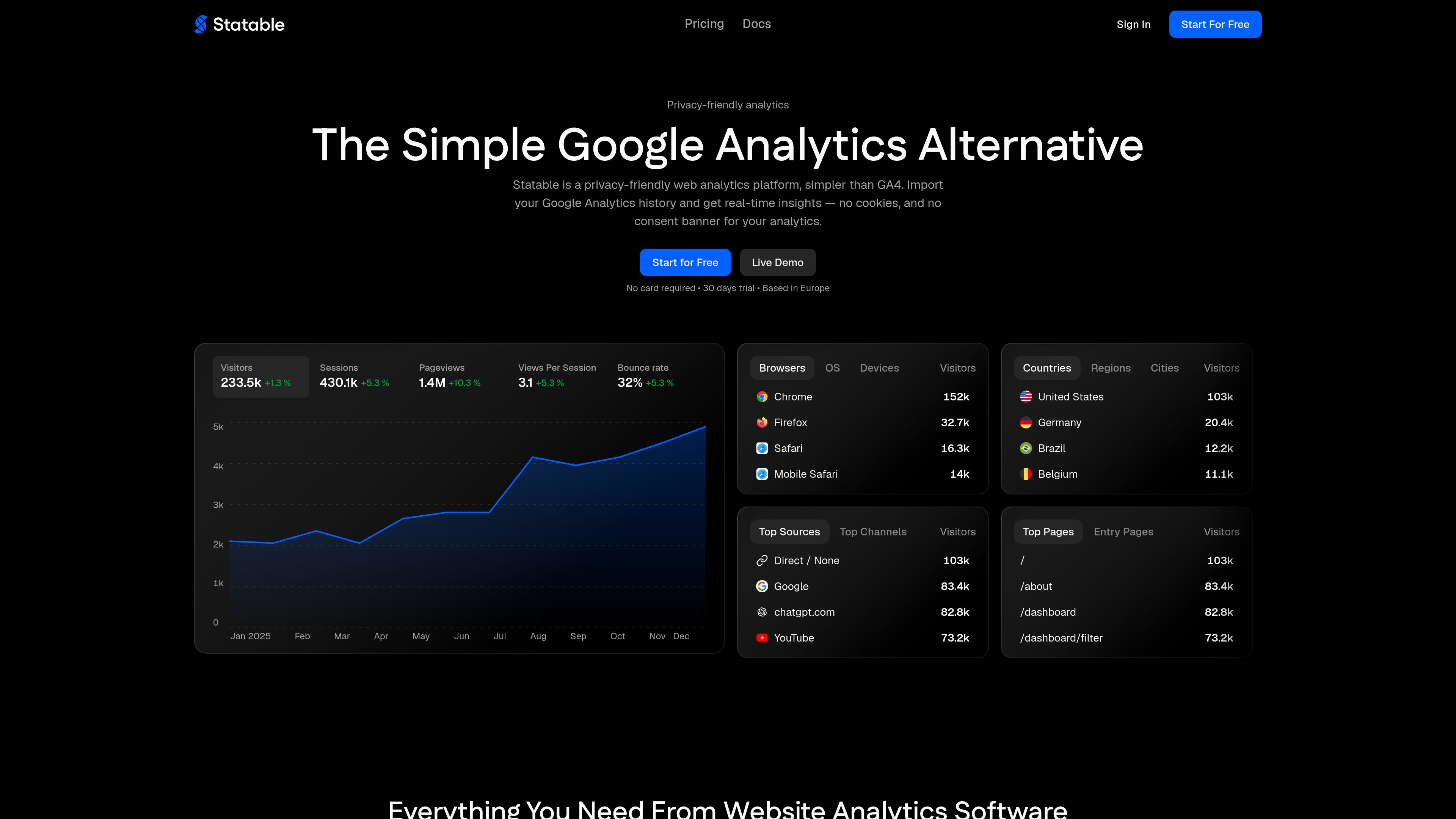
Statable is a cookieless web analytics platform designed as a simpler alternative to Google Analytics. It provides a dashboard for visitors, sessions, pageviews, views per session, bounce rate, session duration, traffic sources, top pages, locations, browsers, operating systems, and devices.
The service can be installed with a small tracking script added before the closing head tag, with additional guidance for frameworks, WordPress, tag managers, and static sites. It can also import available historical data from a GA4 property through a read-only Google OAuth connection, so users can migrate without starting with an empty dashboard.
The tracking script writes nothing to a visitor’s device. Statable says it does not use fingerprinting or cross-site tracking, and identifiers are scoped to one site and change daily.
Review visitors, sessions, pageviews, views per session, bounce rate, session duration, trends, top pages, entry pages, and traffic sources in the dashboard.
Measure conversions such as signups, downloads, and sales with goals and custom events, then use funnels to identify where visitors leave a multi-step process.
Explore visitor geography, including countries, regions, and cities, alongside browsers, operating systems, and device types.
Import available GA4 history through a read-only OAuth connection and connect Google Search Console so search queries can be viewed alongside other traffic data.
Create embeddable widgets for live users, top countries, visitor maps, and a 3D globe. Documentation also lists public dashboard sharing, a Stats API, a CLI, n8n, and MCP connections for AI assistants.
Owners of content sites, company sites, or online services can check traffic trends, top pages, sources, and visitor technology without assembling a large report set.
Teams tracking registrations, downloads, purchases, or other defined actions can configure goals and custom events, then use funnels to locate drop-off points.
Organizations moving away from Google Analytics can connect a GA4 property and bring available historical data into the Statable timeline before changing their reporting workflow.
Sites that want analytics without cookies can use Statable’s cookieless script and its documented handling of IP addresses, Do Not Track, and Global Privacy Control.
Publishers, projects, and site operators can embed live user counts, country rankings, maps, or a globe when they want to show selected audience information publicly.
For a standard site, add Statable’s tracking script before the closing `head` tag. The documentation also covers Next.js, Nuxt, React, Vue, WordPress, Google Tag Manager, and plain HTML or static sites. The WordPress option is an official plugin.
Statable says its cookieless analytics does not write to the visitor’s device and therefore does not add an analytics consent banner. Its script checks for Do Not Track and Global Privacy Control; when either is present, the visit is not measured.
Yes. A user can sign in with Google, grant the read-only analytics scope, select a GA4 property, and import available history. The import does not overwrite data Statable has already collected.
The monthly total combines pageviews and custom events across every site in the account. Outbound link clicks and file downloads recorded by the standard script, events marked with `data-statable-event`, and events sent through the API count; time on page does not.
The pricing page states that plans include unlimited websites. It also lists site members, goals, custom events, funnels, filters, saved segments, and embeddable widgets as included capabilities, although the exact team-role details are documented separately.

clicks.page
clicks.page is cookieless website analytics for founders and indie hackers. Track visitors, traffic sources, conversions, and revenue attribution with setup and querying workflows built for AI agents.

reignat.com
Reignat is a privacy-first web analytics platform combining real-time traffic, revenue attribution, visitor journeys, funnels, and performance tracking for product and marketing teams seeking a simpler Google Analytics alternative with cookieless defaults.

diib.com
diib is an SEO and website growth tool that scans your site, syncs with Google Analytics, and turns performance data into actionable recommendations.

tableau.com
Tableau is a business intelligence and visual analytics platform that helps people explore data, create visualizations, and share insights. It offers hosted, self-managed, and desktop options for teams that need analytics, governance, and collaboration.

datafa.st
DataFast is web analytics for entrepreneurs and small teams, connecting traffic to revenue, payments, goals, and visitor journeys with cookie-based or cookieless tracking.

powerbi.com
Microsoft Power BI is a business intelligence and data visualization platform for interactive reports, dashboards, and analytics, with free, paid, and Desktop options.