
Link-in-bio storefront
Sell digital products, services, courses, and memberships from a page that also supports paid consultations, embedded audio and video, lead capture forms, giveaways, and media kits.

Link-in-bio storefronts, social scheduling, and marketing tools for creators and businesses.
Pushbio is an online platform for creators, service providers, and businesses managing their social presence and sales. It combines a link-in-bio storefront with social post scheduling, email marketing, invoicing, and tools for sharing links.
Users can bring content, products, and services together on a single page, then manage publishing and audience communication from the same dashboard. Plans vary by page count, connected social profiles, storage, analytics retention, and team capacity.
Sell digital products, services, courses, and memberships from a page that also supports paid consultations, embedded audio and video, lead capture forms, giveaways, and media kits.
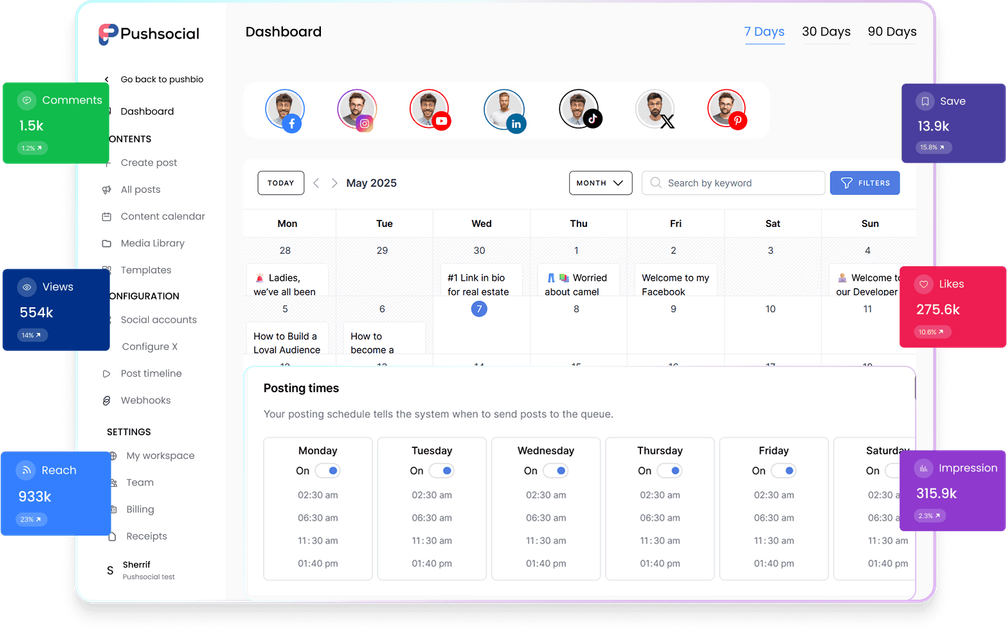
Schedule posts across multiple platforms using a visual calendar with weekly and monthly views. A media library stores reusable assets, while the AI assistant helps write captions and repurpose posts.
Capture email addresses through your page and send newsletters, promotions, and course updates from the dashboard. Lead collection syncs with the page without requiring a separate email marketing integration.
Create branded invoices, accept payments through Stripe and PayPal, and track paid, unpaid, and overdue invoices.
Generate branded QR codes, shorten URLs with tracking, and share virtual business cards to connect printed materials and offline interactions with online destinations.
Track page activity and conversions. Link-in-bio analytics retention ranges from 180 days on Mini to lifetime data on Max; Pro and Max list advanced analytics.
Give followers one destination for content and paid offers, collect subscribers for future launches, and present a media kit when pursuing brand deals.
Organize courses, memberships, and paid consultations alongside educational content, then send course updates to subscribers.
Present services through a public page, invoice clients, and follow outstanding payments from the dashboard.
Coordinate publishing through a shared content calendar and reusable media library. Larger plans provide more connected profiles and team member capacity.
Mini costs $19 per month or $190 per year; Pro costs $45 per month or $450 per year; Max costs $89 per month or $890 per year. The pricing page offers a seven-day free trial.
Yes. Mini includes one link-in-bio page and one custom domain. Pro includes 10 pages and 10 custom domains. Max includes unlimited pages and custom domains.
Mini supports 10 social profiles and 5 GB of media storage, Pro supports 30 profiles and 15 GB, and Max supports 100 profiles and 45 GB.
Pushbio supports collaboration with teams or clients. The social scheduler comparison lists three team members for Pro and 10 for Max.
Traffic data is for reference only.

hypefury.com
Social media scheduling and automation for creators and small businesses

typefully.com
AI-assisted social media writing, scheduling, and collaboration for creators and teams.

tweethunter.io
An X audience growth toolkit for creators and businesses, combining writing, scheduling, engagement, analytics, and CRM workflows.

hookle.net
AI social media assistant for small businesses with content creation, scheduling, and analytics

threadcreator.com
Social media scheduling and management for agencies, brands, and small businesses.

creatosaurus.io
AI content creation and social media management for creators and marketing teams.