
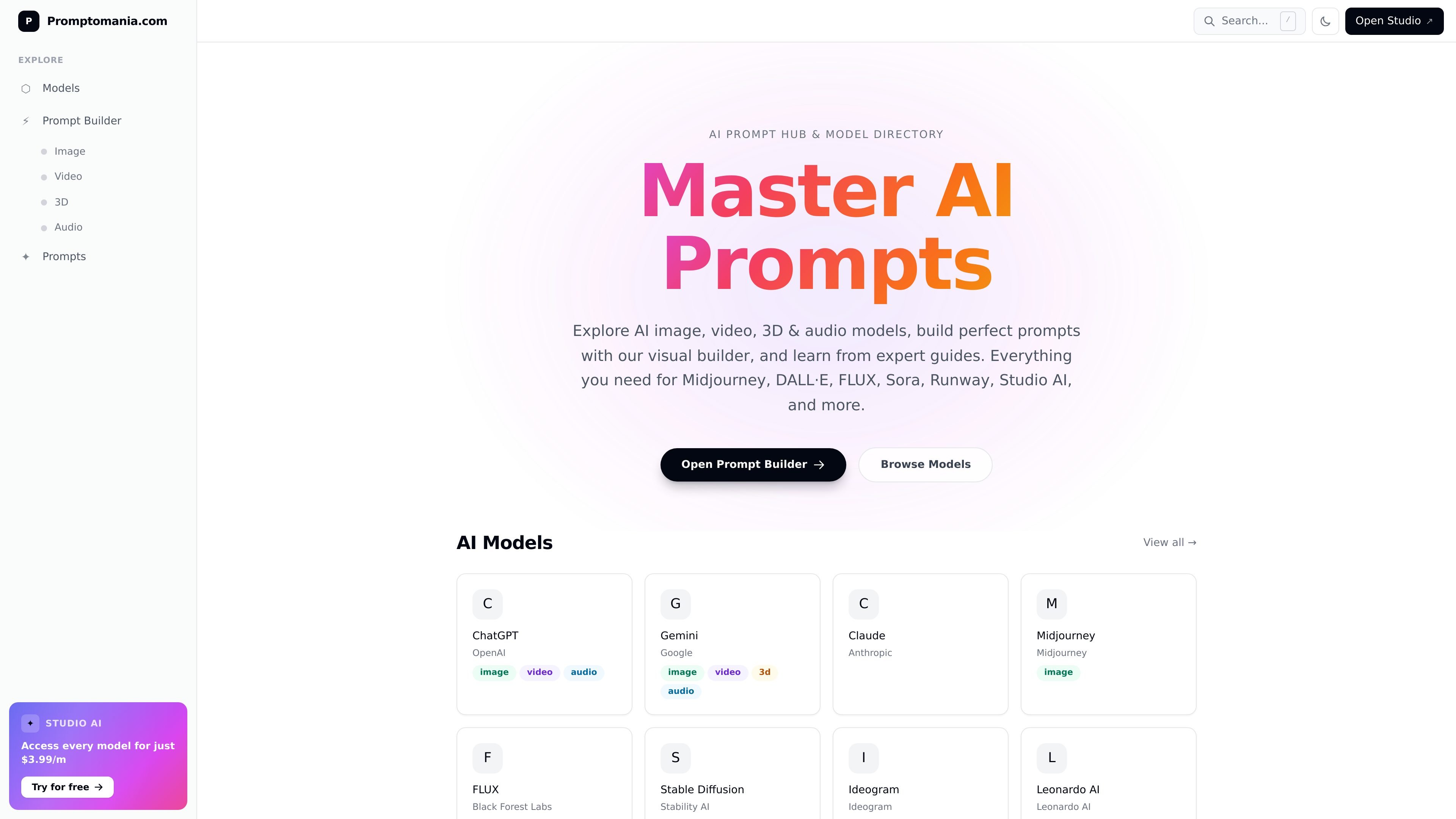
Visual prompt builder
Build prompts with a visual prompt builder instead of starting from a blank text field. The site positions the builder as a way to construct stronger prompts for image generation and compare output across models.
AI prompt hub and model directory for image, video, 3D, and audio tools.
Promptomania is an AI prompt hub focused on prompt writing, model discovery, and prompt-building tools. It brings together a model directory, a visual prompt builder, and a library of prompt guides for image generation and related creative workflows.
The site covers image, video, 3D, and audio models, with pages for providers such as Midjourney, DALL·E, Stable Diffusion, FLUX, Sora, Runway, Ideogram, Leonardo AI, and others. Its FAQ and guide content help users shape prompts more precisely by calling out style, composition, lighting, parameters, and output-specific considerations.
Build prompts with a visual prompt builder instead of starting from a blank text field. The site positions the builder as a way to construct stronger prompts for image generation and compare output across models.
Browse a large AI model directory organized by provider and modality. The directory includes image, video, 3D, and audio models, with model pages that summarize capabilities and best use cases.
Read prompt guides for common creative workflows such as logos, portraits, landscapes, product mockups, typography, anime, fantasy, characters, architecture, food, fashion, and posters. These guides translate broad creative goals into prompt ideas.
Compare major model families and their prompting characteristics. The FAQ and directory pages highlight differences such as artistic style, prompt adherence, text rendering, local control, and commercial suitability.
Use prompt advice for different media types, including image, video, 3D, and audio. The FAQ references text-to-video prompting, 3D-printable STL generation, and AI music and sound effect workflows.
Access a lightweight search and navigation path through models, prompts, and resources from the site’s hub pages. The pricing page also links into the builder, models, prompts, FAQ, and resources sections.
Use the visual builder and prompt guides to turn a creative idea into a more structured prompt for image generation, especially when you want help with style, lighting, composition, or parameters.
Browse the model directory when you want to compare providers before starting a project, such as choosing between Midjourney, FLUX, Stable Diffusion, Ideogram, or Adobe Firefly for a specific output type.
Follow category pages like portrait, landscape, product mockup, typography, anime, or architecture prompts when you need a starting point for a specific visual brief.
Use the FAQ and model pages to understand differences in output behavior, such as artistic style, photorealism, text rendering, local control, or commercial fit.
Explore the non-image sections when your workflow extends to video, 3D, or audio generation and you need prompt guidance for those formats as well.
Promptomania explains that an AI prompt is a text instruction you give a model to generate a specific output such as an image, video, music, or text. Its FAQ also shows how to shape prompts for Midjourney, compare models such as Midjourney, DALL·E, Stable Diffusion, and FLUX, and use the visual prompt builder for image prompts.
The site presents a prompt builder for visual prompt construction, model directory pages for comparing AI systems, and prompt guides for categories such as logos, portraits, landscapes, typography, and more. The FAQ also references a Video Prompt Builder for text-to-video prompts.
Promptomania states that its model directory covers AI image, video, 3D, and audio models, including providers such as Midjourney, FLUX, Stable Diffusion, Sora, Runway, Pika, Kling, and Studio AI. The homepage also highlights model pages for ChatGPT, Gemini, Claude, Midjourney, FLUX, Stable Diffusion, Ideogram, and Leonardo AI.
The pricing page shows a paid offer, 'Access every model for just $3.99/m,' and also includes a 'Try for free' prompt. It does not provide fuller plan details in the captured text.
The FAQ is written around self-serve use cases and public model guidance rather than team administration. Based on the available text, it is best suited to individuals who are learning prompt writing or comparing model behavior, while team-specific workflows are not described.
Traffic data is for reference only.

prompt-genie.com
Prompt management, optimization, and Claude Code memory for efficient AI workflows

thisorthis.ai
Compare AI model outputs, organize chats, and reuse prompts in one workspace.
getdolphin.ai
Pretty Prompt turns rough text into clearer prompts for AI tools.

portkey.ai
Production AI platform with gateway, observability, guardrails, and prompt management for Gen AI teams.

phrasevault.app
PhraseVault is an offline text expander and snippet manager for Windows and macOS. It helps individuals and teams reuse email templates, AI prompts, code, and other text wherever they can paste.

prompttokencounter.com
Check prompt token counts across supported OpenAI models before sending.