
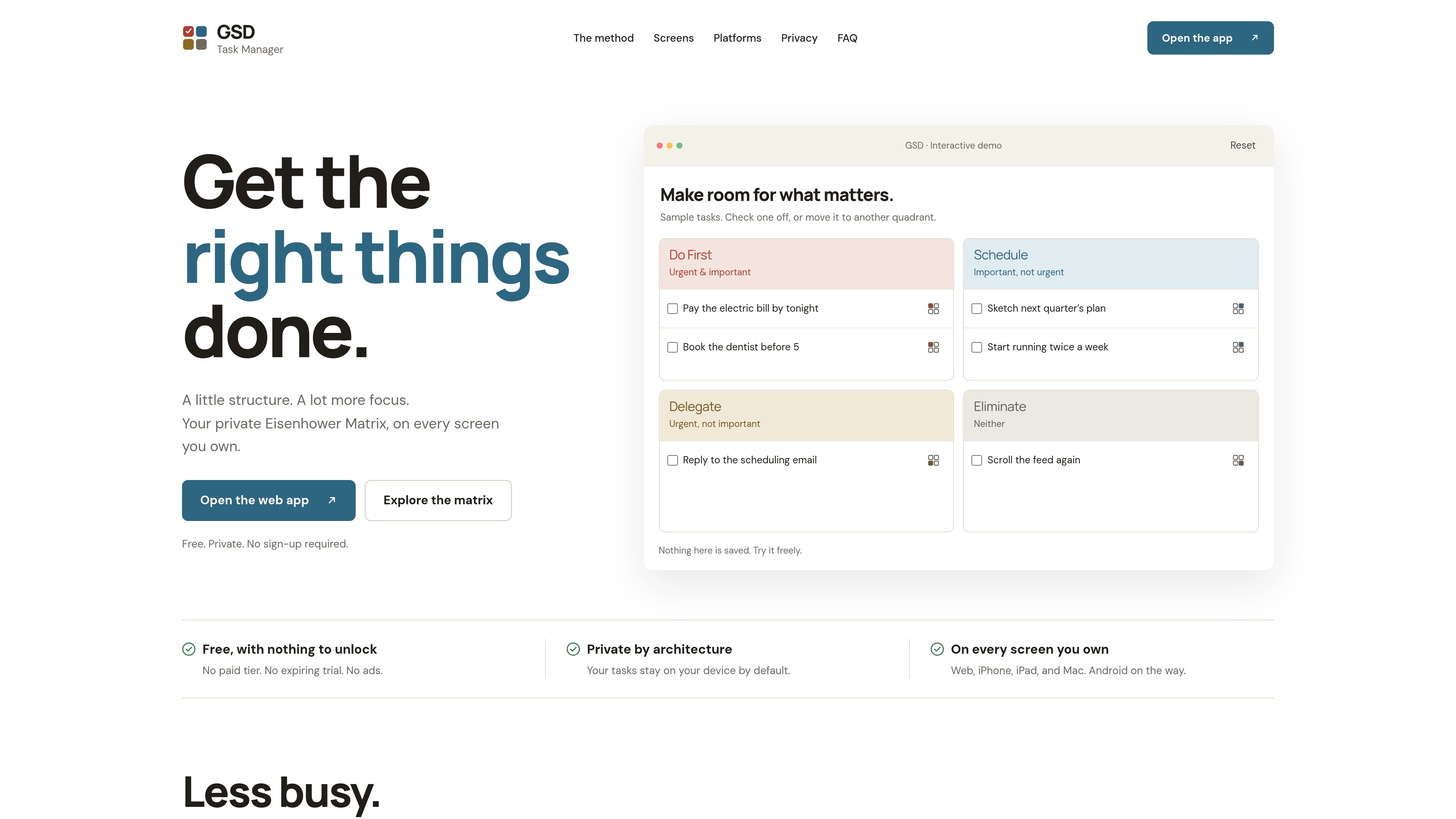
Eisenhower Matrix workflow
Classify tasks by urgency and importance, then use the Do First, Schedule, Delegate, or Eliminate action associated with each quadrant.

GSD Task Manager is a private Eisenhower Matrix for organizing tasks by urgency and importance across the web, iPhone, iPad, and Mac. It works without an account, keeps data local by default, and supports optional sync when needed.
GSD Task Manager is a task-management app based on the Eisenhower Matrix. It organizes tasks around two questions—whether they are urgent and whether they are important—and turns the resulting four quadrants into practical actions: Do First, Schedule, Delegate, and Eliminate.
The app is available on the web, iPhone, iPad, and Mac. It can be used without an account and stores tasks locally by default: in IndexedDB in the browser or in an on-device database in the native apps. The web app is installable as a PWA and works offline, while the native apps are offline-first.
Optional sync lets users keep the same matrix across signed-in devices. Sync requires an account through Google, GitHub, or Apple and stores a copy of tasks in a PocketBase backend. Users can also export and re-import tasks as JSON, and the project provides a self-hosting option for the sync backend.
Classify tasks by urgency and importance, then use the Do First, Schedule, Delegate, or Eliminate action associated with each quadrant.
The web app stores tasks in browser IndexedDB, while the iPhone, iPad, and Mac apps use an on-device database. An account is not required to begin.
The web app can be installed as a progressive web app and used offline. Native apps are offline-first, and offline changes can queue for reconciliation when optional sync is enabled.
Optional sync keeps tasks current across signed-in devices through a PocketBase backend. Sync is off by default, and local tasks remain after signing out.
Export tasks to a JSON file and import them later using either merge or replace behavior, providing a way to move or restore task data.
The optional MCP server allows compatible assistants to list, search, create, and complete tasks, as well as retrieve productivity metrics and upcoming deadlines. It requires sync and supports dry-run writes.
Sort an unstructured list into the four matrix quadrants to identify urgent and important work that needs immediate attention and separate it from lower-value tasks.
Place important but non-urgent tasks in Schedule so they receive dedicated time instead of competing with immediate requests.
Add tasks from the browser, iPhone, iPad, or Mac, using mobile quick capture and share-sheet input or Mac keyboard-first navigation according to the device in use.
Use the installable web app on supported browsers or the native apps while offline, then reconcile changes after reconnecting when sync is enabled.
Connect Claude or another MCP-compatible assistant to search or update the matrix and review proposed changes through dry-run writes before applying them.
Yes. The app opens directly into the matrix, and local task management does not require sign-in. An account is only needed for optional sync.
Web tasks are stored in IndexedDB in the browser. The iPhone, iPad, and Mac apps use a local on-device database. By default, the product does not keep another copy elsewhere.
After signing in with Google, GitHub, or Apple, tasks are synchronized across signed-in devices through a PocketBase backend. The backend holds a copy scoped to the account, and local tasks remain available after signing out.
Yes. The web app is an installable offline PWA, and the native apps are offline-first. With sync enabled, offline changes queue and reconcile after the device reconnects.
There is no native Android app yet. The web app can be used on Android as an installable PWA and works offline.
Traffic data is for reference only.

planye.com
Planye is a digital planner for organizing tasks, habits, mood, money, cycle tracking, and journaling across day, week, month, and year views. It starts on the day you open it and works in a browser and on a phone.

tenorshare.com
Back up and manage iPhone and iPad data on Windows or Mac, with an AI wallpaper generator in the Mac edition.

clay.earth
Mesh is a personal and team relationship manager for iPhone, Mac, Windows, and the web. Organize contacts, surface updates, and follow up with data from email, calendars, calls, messages, and social networks.

www.stashformac.com
Stash is a macOS utility that keeps apps and system controls accessible from the screen edges and corners without leaving them visible. It includes a Hidden Dock, App Launcher, Edge Sliders, Corner Dials, App Profiles, and an iPhone companion called Stash Deck.

notchpop.com
NotchPop is a macOS productivity island that places media controls, file handling, clipboard history, timers, calendar information, live activity and other utilities in the Mac notch or a floating island. It supports Macs with or without a physical notch and is aimed at people who want quick access to these tasks without switching away from their current app.

focusfirewall.com
Focus Firewall is a macOS app that blocks distracting websites and apps across browsers without browser extensions. It helps people automate focus periods, take controlled breaks, and review local browsing-time reports.