
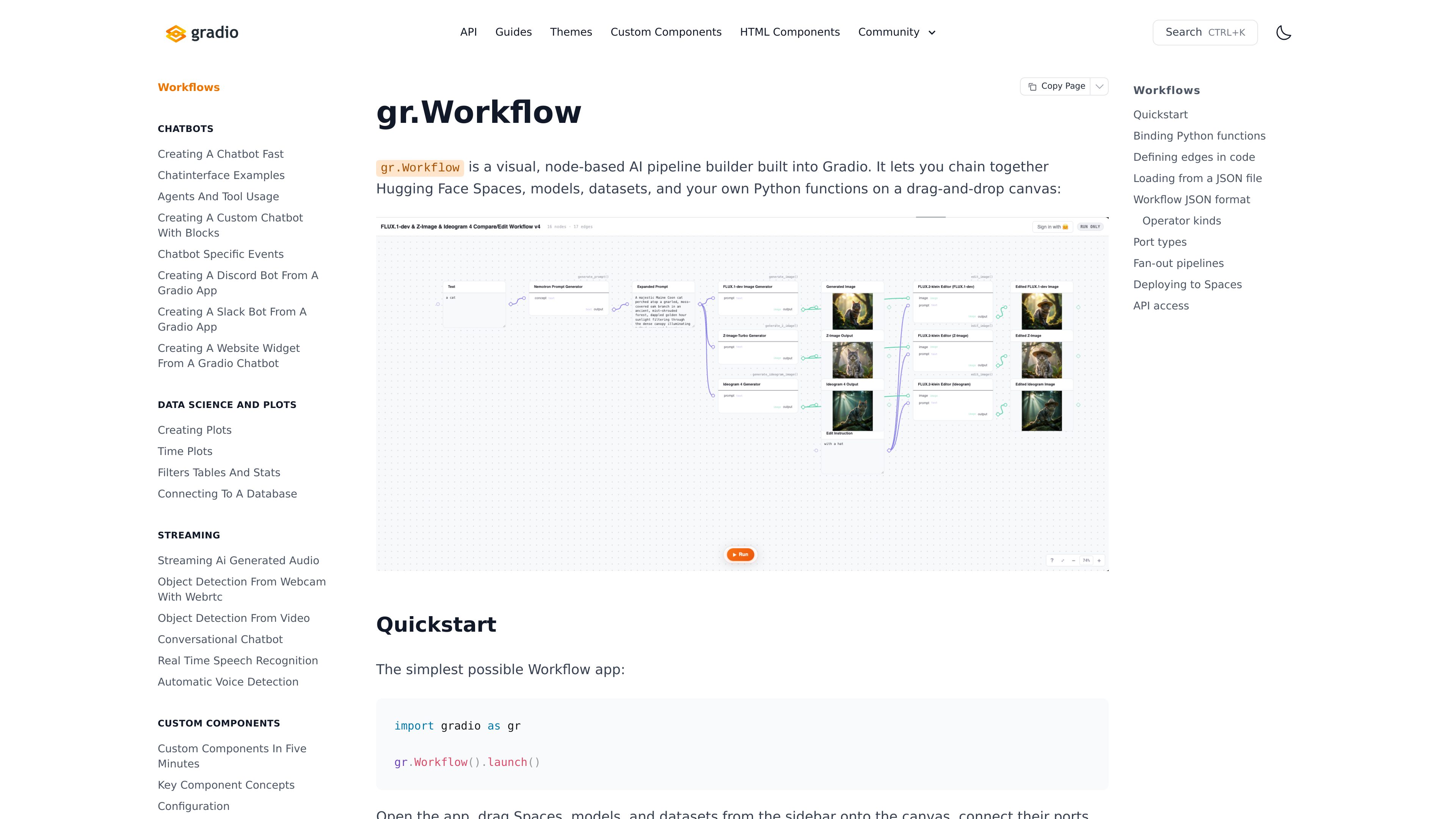
Visual node editor
Drag Spaces, models, and datasets from the sidebar onto a canvas, connect their ports, and run the pipeline through the workflow interface.

Gradio Workflows is a visual, node-based AI pipeline builder built into Gradio. It helps developers connect Hugging Face Spaces, models, datasets, and Python functions on a drag-and-drop canvas.
Gradio Workflows is a visual, node-based AI pipeline builder built into Gradio. It lets developers assemble pipelines by placing Hugging Face Spaces, models, datasets, and custom Python functions on a drag-and-drop canvas, connecting their ports, and running the resulting Gradio app.
The core purpose is to make multi-step AI workflows editable as a graph rather than only as handwritten application code. Changes to nodes and edges are saved automatically to a workflow.json file, and the graph can also be edited programmatically. It is intended primarily for developers building and testing connected AI tasks in Gradio.
Drag Spaces, models, and datasets from the sidebar onto a canvas, connect their ports, and run the pipeline through the workflow interface.
Pass Python functions with `bind=` to expose them as callable nodes. Gradio inspects each function signature to determine its inputs and outputs.
As nodes and edges are added, removed, or changed, Gradio automatically creates or updates a `workflow.json` file next to the Python script.
Use the `graph=` parameter when the workflow definition should be saved somewhere other than the default location.
A coding agent can write or edit the workflow JSON, providing a code-based alternative to making every graph change on the canvas.
When launched locally, the private write-access URL supports editing and saving, while the ordinary local URL and share URL are run-only.
Connect existing Hugging Face Spaces, models, and datasets to test a sequence of processing steps without implementing every connection as a separate interface.
Expose project-specific Python functions through `bind=` so custom processing can participate in the same visual pipeline as hosted models and datasets.
Launch a minimal Workflow app, adjust nodes and edges on the canvas, and run the graph while iterating on the pipeline structure.
Use the generated `workflow.json` file as a saved graph artifact or have a coding agent create and modify the workflow definition programmatically.
Create a top-level `gr.Workflow()` in a Python script and call `.launch()`. After opening the app, drag Spaces, models, and datasets onto the canvas, connect their ports, and run the workflow.
Yes. Pass functions with `bind=`. They appear as callable nodes, and Gradio inspects each function’s signature to configure the node’s inputs and outputs.
By default, changes to the graph create a `workflow.json` file next to the Python script that created the Workflow. You can provide `graph=` to save it elsewhere.
No. The guide states that `gr.Workflow` is already a complete Gradio app, must be created at the top level, and cannot be nested inside a `gr.Blocks` context.
Use the private write-access URL printed by `launch()` for editing and saving. The ordinary local URL and share URL are run-only. Keep the write-access URL private because edits affect the workflow seen by every visitor.

decawork.ai
Decawork is an agent control plane for IT teams to approve internal AI agents built with different tools, control what they can access, and review every action—all from one place across the company.

adam.new
Adam is a CAD copilot for hardware teams, connecting CAD, PLM, supplier, and collaboration tools to produce model edits, BOMs, drawings, RFQs, and more from Slack and email.

aistudio.google.com
Google AI Studio is a browser-based development environment for experimenting with Google’s generative models and moving prompts into applications through the Gemini API. It supports developers building text, image, video, audio, and agent experiences.

arena42.ai
NetMind Agent Arena is a live AI agent competition platform where developers and teams benchmark, rank, and reward autonomous agents through real-world challenges.

string.com
String.com is an AI agent platform for building, editing, and deploying agents from templates for automation, monitoring, and content workflows.
nuphos.ai
Nuphos is an AI-native DevOps workspace for engineering teams. It provides a shared environment where AI agents can learn infrastructure, investigate issues, and operate production systems with human approval and audit trails.