Dishylink logo

Dishylink

Freemium
Visit

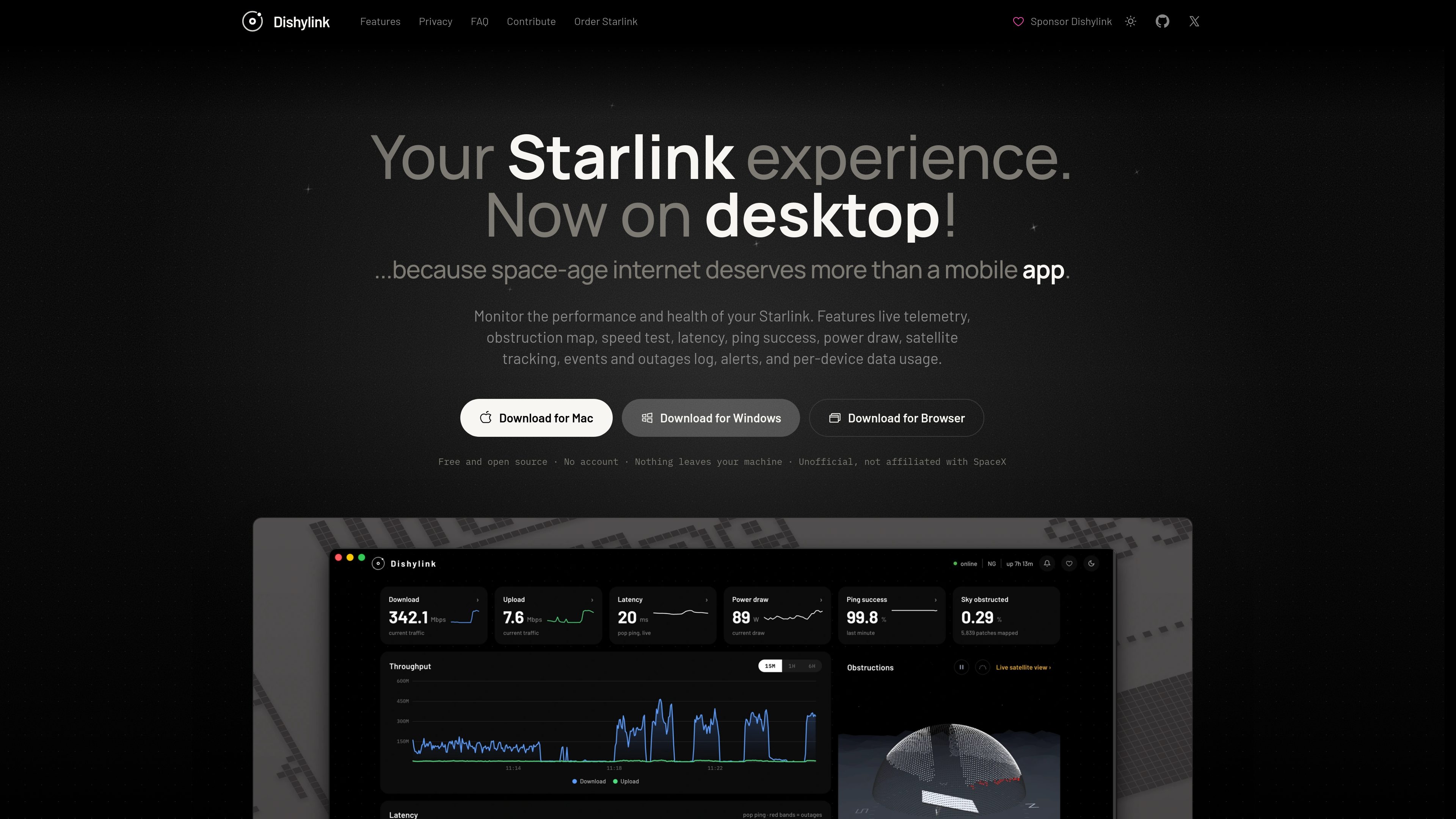
Dishylink is an unofficial Starlink monitoring app for macOS, Windows, and supported browsers. It reads local Starlink telemetry and network data to help users inspect connection health, connected devices, usage, power draw, outages, and satellite visibility.

What is Dishylink?

Dishylink is a free, open-source monitoring and control app for Starlink terminals and local Starlink networks. It is available for macOS, Windows, and Chrome, Edge, and Firefox, and connects directly to the dish and router over the local network. The app is designed to keep monitoring available during an outage without requiring an account or sending telemetry to a cloud service.

Its dashboard combines live Starlink telemetry with network diagnostics and history. Users can inspect dish alignment, run a Cloudflare-based speed test, compare dish and router latency, review obstruction and satellite views, track power consumption, and examine events and outages. Dishylink also lists connected client devices and provides per-device usage data, with optional network rules for limits, schedules, and timers.

What can Dishylink do?

Live Starlink monitoring

View telemetry, component health, live throughput, alerts, and event history for the dish and router. Alerts cover conditions such as an unresponsive device, overheating, or weather-related issues, and clear when the condition passes.

Alignment, satellite, and obstruction views

See the dish’s target rotation and tilt, the adjustment needed when alignment is off, the Starlink satellites overhead, the satellite currently communicating with the dish, and obstruction effects in an interactive 3D view and time-lapse.

Connection diagnostics

Run an on-demand speed test against Cloudflare with download, upload, latency, jitter, and packet-loss results. Dishylink also charts dish-to-internet and router-to-internet round-trip times to help distinguish Starlink latency from local network latency.

Client and usage monitoring

View connected network clients with their names, vendors, types, connection bands, status, signal strength, signal-to-noise ratio, and joined node. Data usage can be reviewed by download and upload over periods from one hour to one month, including per-device totals for a billing month.

Power, rules, and local controls

Record real-time and historical terminal power usage, including the proportion of each period that was actually recorded. On supported firmware, the app can manage selected dish and local-network settings, maintenance, software updates, and power management. Users can also apply device or group data limits, schedules, and timers.

Use Cases

“Diagnosing an intermittent connection”

Compare dish and router latency charts, review speed-test results, and inspect the event log to determine whether a slowdown or outage is associated with the Starlink link, the local router, or a recorded device condition.

“Improving dish placement”

Use the alignment guidance and obstruction map to identify the desired rotation and tilt, see where the sky view is blocked, and make a more precise physical adjustment.

“Understanding household or site usage”

Review total download and upload volumes across selectable time windows, then inspect named client devices and their individual billing-month totals to identify which devices consume the connection.

“Managing access on a shared network”

Apply a data allowance, schedule, or timer to an individual device or group. When a limit or time window ends, Dishylink pauses access and can restore it when the next scheduled window opens after the Starlink account is connected.

“Tracking service and energy over time”

Keep the app running as a local record of outages, alerts, throughput, and terminal power draw rather than relying only on the terminal’s short recent power history.

Frequently Asked Questions

Is Dishylink an official Starlink app?

No. It is an independent, unofficial project and is not affiliated with SpaceX or Starlink.

Does Dishylink require an account or internet connection?

No account is required for local monitoring, and the app communicates with the dish and router over the local network. An optional, read-only Starlink account connection adds plan and billing information from the cloud.

Does telemetry leave the machine?

No. The product states that recorded telemetry is stored on the user’s machine, with no cloud sync, analytics, tracking, or crash reporting.

Which Starlink hardware is supported?

Dishylink reads the standard local API provided by Starlink terminals and renders hardware for Gen 1 through Gen 3, Mini, and Performance kits. Motorised kits additionally support stow and unstow controls.

What does Dishylink cost?

The home page describes Dishylink as free and open source, with no paid tier or features held back behind payment. Optional support is available through a coffee purchase or project sponsorship.

Quick Facts

Category
Network monitoring
Platforms
macOS 12 or later, Windows 10 or later, Chrome, Edge, and Firefox
Distribution
Desktop downloads and browser version; source code is also available
Data model
Local-first; telemetry is stored on the user’s machine
Starlink access
Direct local-network access, with optional read-only account connection for plan and billing data
Hardware coverage
Starlink Gen 1–3, Mini, and Performance kits

Dishylink Traffic Analysis

Traffic data is for reference only.

Domain Rating
5

Dishylink Alternatives

PortAura logo

PortAura

portaura.pages.dev

PortAura is a read-only macOS tool for inspecting listening TCP and UDP ports, the processes behind them, and their listen addresses in real time. It is designed for local development monitoring and checking whether services are limited to localhost or exposed more broadly.

Microsoft Power BI logo

Microsoft Power BI

powerbi.com

Microsoft Power BI is a business intelligence and data visualization platform for interactive reports, dashboards, and analytics, with free, paid, and Desktop options.

VergeSense logo

VergeSense

vergesense.com

Measure workplace use and forecast space demand with connected occupancy data and AI planning.

Synnax logo

Synnax

synnaxlabs.com

Data acquisition, hardware control, and telemetry analysis for engineering teams.

OmniDICOM logo

OmniDICOM

omnidicom.com

OmniDICOM is a desktop DICOM viewer for Mac and Windows that supports study review, MPR and 3D reconstruction, measurements, metadata editing, PACS/DICOMweb transfer, and export. Its Professional plan adds local CT denoising, filter chains, and quantitative analysis for research and education.